Story Chat
A mod that modifies the chat, offering an interesting look and useful features with customizable settings. Perfect for creators of story-driven (and…
⬇ Download on Modrinth


Story Chat
En
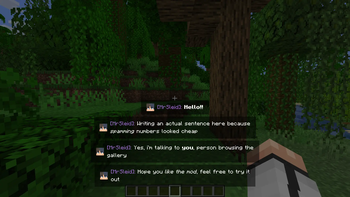
Story Chat is a lightweight and functional interface mod for NeoForge 1.21.1 that completely overhauls the vanilla Minecraft chat. It modernizes the default text display, improves readability, and adds deep visual customization, making it an excellent addition to any custom modpack, roleplay (RP) server, or everyday gameplay.
What the Mod Changes
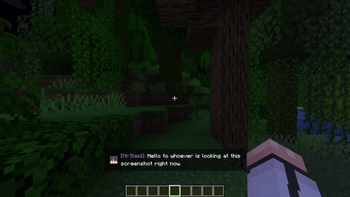
- Smooth Animations: Messages fade in smoothly instead of abruptly snapping into existence.
- HEX Color Integration: Support for direct HEX code input, allowing precise color configuration for UI elements and nicknames without being locked into predefined templates.
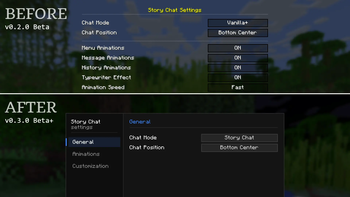
- Config & History Screens: Built-in settings menu and a dedicated, scrollable message history window bound to custom hotkeys.
- Sleek Input Interface: A completely overhauled, modern, and clean text input box that stays out of the way.
Compatibility
- Warning: This mod changes core chat rendering elements. It will likely conflict with other modifications that significantly alter or overhaul the in-game chat.
Permissions
- Modpacks: You are very welcome to include this mod in your modpacks. Linking back to this page is appreciated so users can always find the latest updates and help the project grow!
- Videos/Content: You are free to use this mod in your videos, streams, or screenshots.
- Redistribution: Please do not re-upload this mod to other websites. Always link to this official page.
- Modifications: Do not modify, decompile, or create "forks" of this mod without my permission.
- Disclaimer: I am not responsible for any issues or conflicts that may arise from using this mod in third-party modpacks or custom maps.
RU
Story Chat — это легкий и функциональный интерфейсный мод для NeoForge 1.21.1, который полностью перерабатывает стандартный чат Minecraft. Он модернизирует отображение текста, повышает общую читаемость диалогов и добавляет визуальную настройку, благодаря чему отлично подходит как для повседневной игры в любых сборках, так и для ролевых (RP) серверов.
Что меняет мод
- Плавные анимации: Текст появляется со сглаженным затуханием вместо резкого ванильного вывода.
- Интеграция HEX-кодов: Поддержка прямого ввода HEX-значений для точной настройки цвета элементов интерфейса и никнеймов без привязки к жестким шаблонам.
- Настройки и Экран истории: Внутриигровое меню конфигурации и выделенное окно истории сообщений, открываемое по горячей клавише.
- Современная строка ввода: Полностью переработанное, аккуратное поле ввода текста, которое не загромождает экран.
Совместимость
- Внимание: Мод изменяет базовые элементы рендеринга чата. Он будет конфликтовать с другими модификациями, которые значительно меняют или перерабатывают внутриигровой чат.
Разрешения
- Сборки (Модпаки): Вы можете свободно включать этот мод в любые сборки. Буду благодарен за ссылку на эту страницу, чтобы игроки могли легко найти последние обновления и поддержать проект!
- Контент: Вы можете свободно использовать мод в своих видео, стримах или скриншотах.
- Распространение: Пожалуйста, не перезаливайте мод на сторонние сайты. Всегда используйте только официальную ссылку.
- Модификация: Запрещается изменять, декомпилировать или создавать «форки» этого мода без моего разрешения.
- Отказ от ответственности: Я не несу ответственности за любые проблемы или конфликты, возникающие при использовании мода в сторонних сборках или пользовательских картах.
- Edition: Minecraft Java
- File type: .jar
- Minecraft version listed: 1.21.1
- How to install: Install the matching mod loader (Forge, Fabric or NeoForge) for your Minecraft version. → Download the .jar. → Put it in the .minecraft/mods folder and launch that loader profile.
- Where to get it: Opens on Modrinth — not every file is mirrored on our own servers.
Install steps are the general flow for this file type — How to install Minecraft Java mods & modpacks walks through it step by step.
- Ships as StoryChar_v0.3.0Beta.jar — drop this file into the mods folder
- Download size: 96 KB
- Download link checked 19 Aug 2026 — working
These come from our own check of the pack file, not from the source page.