
Better Peaceful
Java mod listed for Minecraft 1.21–26.x. Downloads from the MC Java Mods app on Android.
I don't know my version or loader
Better Peaceful


Overview
This datapack brings the feeling of Peaceful Mode without removing the possibility of completing the game.
Most hostile mobs are prevented from spawning, creating a calmer survival experience while still allowing players to progress through all major milestones, including defeating the Ender Dragon.
Better Peaceful is perfect for players who enjoy building, exploring, and surviving without constantly fighting hostile creatures.
Features
- Removes most hostile mobs from the game.
- Keeps important progression mobs alive.
- Allows players to access Blaze Rods and Ender Pearls.
- Supports defeating the Ender Dragon.
- Fully configurable mob blacklist.
- Multiplayer-friendly.
- Lightweight and easy to install.
Whitelisted Hostile Mobs
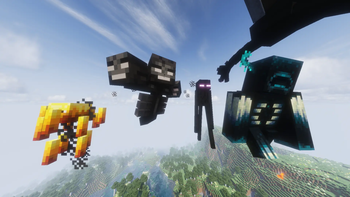
The following hostile mobs are not removed:
minecraft:blaze
minecraft:enderman
minecraft:ender_dragon
minecraft:wither
minecraft:warden
Customizing the Mob Blacklist
To remove or add mobs to the blacklist, open:
Better-Peaceful-1-0-0.zip\data\betterpeaceful\tags\entity_type\banned.json
You can then:
- Add mob IDs to blacklist them.
- Remove mob IDs to allow them to spawn.
⚠️ Important
This datapack is not designed for worlds with the difficulty set to Peaceful.
Instead, it should be used on Easy, Normal, or Hard difficulty. The datapack only removes hostile mobs that are not necessary for completing the game.
Installation
- Download the datapack.
- Move the
.zipfile into your world'sdatapacksfolder. - Run
/reloador restart the world/server. - Enjoy a more relaxed Minecraft experience.
Compatibility
- Singleplayer ✔
- Multiplayer ✔
- Vanilla ✔
- Most datapacks ✔
Have Fun!
Thank you for downloading Better Peaceful. I hope you enjoy a calmer Minecraft adventure while still being able to experience the ender fight.
- Edition: Minecraft Java
- File type: .jar
- Minecraft versions listed: 1.21, 1.21.1, 1.21.2
- How to install: Install the matching mod loader (Forge, Fabric or NeoForge) for your Minecraft version. → Download the .jar. → Put it in the .minecraft/mods folder and launch that loader profile.
- Where to get it: Opens on Modrinth — not every file is mirrored on our own servers.
Install steps are the general flow for this file type — How to install Minecraft Java mods & modpacks walks through it step by step.
- Ships as better-peaceful-1.0.0.jar — drop this file into the mods folder
- Download size: 266 KB
- Download link checked 21 Oct 2026 — working
These come from our own check of the pack file, not from the source page.