
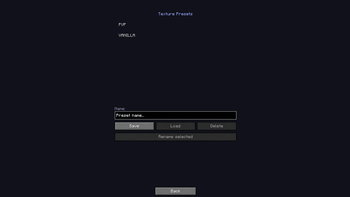
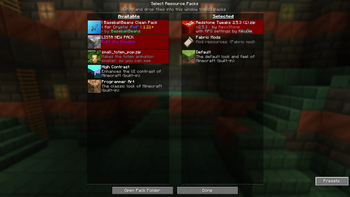
Texture Presets adds a simple but powerful preset system to Minecraft's resource pack menu. Save your current resource pack selection as a named preset, and load it back with a single click — no more manually enabling and reordering packs every time you switch between setups. Perfect for players who frequently switch between different resource pack combinations, whether for screenshots, recording, or just different playstyles. Features:
Save any resource pack selection as a named preset Load presets directly into the vanilla resource pack menu Rename and delete presets All presets are stored locally in a simple JSON file Lightweight client-side only mod — no server needed
- Edition: Minecraft Java
- File type: .jar
- Minecraft version listed: 1.21.1
- How to install: Install the matching mod loader (Forge, Fabric or NeoForge) for your Minecraft version. → Download the .jar. → Put it in the .minecraft/mods folder and launch that loader profile.
- Where to get it: Opens on Modrinth — not every file is mirrored on our own servers.
Install steps are the general flow for this file type — How to install Minecraft Java mods & modpacks walks through it step by step.
- Ships as texture-presets.jar — drop this file into the mods folder
- Download size: 21 KB
- Download link checked 24 Aug 2026 — working
These come from our own check of the pack file, not from the source page.