
Music Machine
I don't know my version or loader
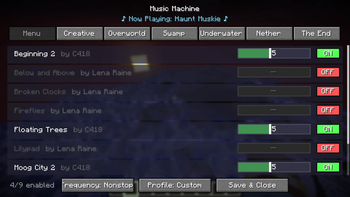
Music Machine
Music Machine is a client-side mod that gives you complete, granular control over Minecraft's dynamic background music.
Tired of hearing the same track play when you're building? Wish the game played music a bit more often? Want to listen exclusively to the classic C418 soundtrack? Music Machine lets you do exactly that through an easy-to-use in-game configuration menu.
🎵 Features
🎛️ Complete Track Control
The mod automatically hooks into the game's music system and provides a categorized list of every single vanilla music track (Menu, Creative, Overworld, Nether, The End, etc.). From the config menu, you can:
- Toggle Tracks: Turn individual songs ON or OFF. Dislike a specific ambient track? Disable it forever.
- Weight Sliders: Adjust the "weight" of each track to increase or decrease its chance of playing. Boost the odds of hearing your favorite songs!
- Resource Pack Support: Playing with custom music from resource packs? Music Machine automatically detects and registers custom tracks from your
sounds.jsonfiles so you can toggle and weigh them just like vanilla tracks!
⏱️ Music Frequency Settings
Take control of how often music actually plays in your world. The config allows you to switch between four distinct modes:
- Never: Completely mutes all background music.
- Sometimes: The standard vanilla pacing with long delays between tracks.
- Often: Shortens the delays so music plays more frequently.
- Nonstop: Music loops continuously with almost zero downtime between tracks.
🎭 Pre-Configured Profiles
Don't want to manually tweak every song? Use the built-in music profiles to instantly change the vibe:
- Default: Plays all tracks exactly as vanilla Minecraft intended.
- Legacy: Automatically restricts all music to only tracks composed by C418.
- Custom: Activates your personalized settings, custom toggles, and track weights.
💿 "Now Playing" Display
When opening the configuration menu, a stylish animated display will show you the exact title and author of the song currently playing in the background.
⚙️ How to Use
- Install the mod on your client.
- Launch the game and load into a world.
- Press
Mon your keyboard (rebindable in the Controls menu) to open the music management screen. - Adjust the settings to your liking—changes apply instantly!
🛠️ Compatibility & Installation
- Supported Loaders: Available for Fabric, Forge, and NeoForge (refer to the downloads section for specific Minecraft versions). Note: Fabric users must install the Fabric API.
- Environment: Client-Side Only. You can install this on your client and safely connect to vanilla servers, realms, or modded servers without the server needing the mod installed.
- Edition: Minecraft Java
- File type: .jar
- Minecraft versions listed: 1.20.1, 1.20.2, 1.20.3
- How to install: Install the matching mod loader (Forge, Fabric or NeoForge) for your Minecraft version. → Download the .jar. → Put it in the .minecraft/mods folder and launch that loader profile.
- Where to get it: Opens on Modrinth — not every file is mirrored on our own servers.
Install steps are the general flow for this file type — How to install Minecraft Java mods & modpacks walks through it step by step.
- Ships as musicmachine-1.0.1.jar — drop this file into the mods folder
- Download size: 33 KB
- Download link checked 20 Aug 2026 — working
These come from our own check of the pack file, not from the source page.