HomeJavaModsTab Info
Tab Info
ModsJava

Tab Info

by nwrenger · on Modrinth

Shows useful player stats like deaths, kills, playtime, position, and current dimension to everyone through a compact, configurable readout in the player…

Which build do you need?

This mod ships a separate file for every mod loader and every version of the game. Pick both, then download — the wrong build installs fine and then does nothing in the game.

Mod loader

Minecraft version

⬇ Download for 1.21.8–26.2 · Data pack⬇ Download for 1.21.8–26.2 · Fabric⬇ Download for 1.21.8–26.2 · Forge⬇ Download for 1.21.8–26.2 · NeoForge⬇ Download for 1.21.8–26.2 · Quilt
I don't know my version or loader
Open the Minecraft launcher and look at the profile you play on — it names both, like fabric-loader-1.21.4. The version also shows in the bottom-right corner of the game's main menu.
No loader in the profile name? Then it's plain Minecraft, and these mods won't run — you need Fabric or NeoForge installed first.
Tab Info — screenshot 1Tab Info — screenshot 2

Tab Info

Shows useful player stats like deaths, kills, playtime, position, and current dimension to everyone through a compact, configurable readout in the player list.

The readout rotates every 2 seconds, works in multiplayer and singleplayer, and is fully server-side, so players do not need to install anything.

Perfect for PvP servers, local worlds with friends, and more.

preview

Installation

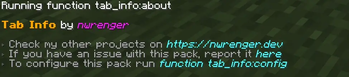
After adding the data pack/mod to your world or server, you should be able to open the about panel, which is fully controllable with the mouse:

/function tab_info:about

about_panel

Configuration

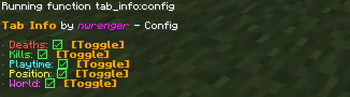
Open the configuration panel by the following command:

/function tab_info:config

config_panel

From here, you can toggle each info entry on or off. If every entry is disabled, Tab Info is hidden from the player list.

Uninstallation

To remove the vacant entry inside the player list after disabling/removing the data pack/mod, run the following command:

/scoreboard objectives setdisplay list

Contributing & Issues

I warmly welcome:

Please open issues or PRs on GitHub.

License

This project is licensed under the LGPLv3 License. See LICENSE for details.

Quick facts

Install steps are the general flow for this file type — How to install Minecraft Java mods & modpacks walks through it step by step.

Verified by MCModsHub

These come from our own check of the pack file, not from the source page.

Explore more