
PurrCast: Radio Jukebox
Features:
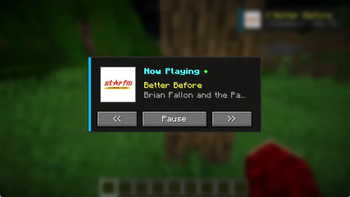
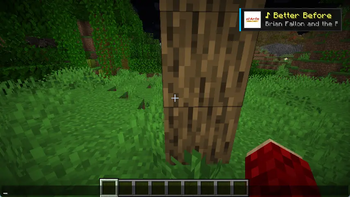
- Real-time Media HUD: A clean, unobtrusive overlay in the corner of your screen showing the currently playing track and artist.
- Interactive Jukebox GUI: Press 'M' to open the Jukebox control panel to Play/Pause, skip to the next track, or go back to the previous one.
- Toggleable HUD: Press 'H' at any time to instantly show or hide the media overlay in game.
How to use:
- Run the PurrCast App on your Device: The PurrCast mod requires the official PurrCast desktop app to interact with the current music playback on your device.
- Open Jukebox: Press 'M' in-game to manage your playback.
- Toggle HUD: Use 'H' to keep your screen clean when you don't want to see the track info.
Dependencies:
- Fabric Mod Loader: Required to run the mod.
- Fabric API: Required for HUD rendering and event handling.
Quick facts
- Edition: Minecraft Java
- File type: .jar
- Minecraft versions listed: 1.21.9, 1.21.10, 1.21.11
- How to install: Install the matching mod loader (Forge, Fabric or NeoForge) for your Minecraft version. → Download the .jar. → Put it in the .minecraft/mods folder and launch that loader profile.
- Where to get it: Opens on Modrinth — not every file is mirrored on our own servers.
Install steps are the general flow for this file type — see the MC Java Mods guides for the full walkthrough.
Verified by MCModsHub
- Ships as PurrCast for Minecraft.jar — drop this file into the mods folder
- Download size: 27 KB
- Download link checked 23 Aug 2026 — working
These come from our own check of the pack file, not from the source page.