Tablist Toggle
A tiny, no-dependency client mod that lets you toggle the player list (the tab list) instead of having to hold the key the whole time.
Where the idea came from
I was playing survival with some friends, and one of them had rebound Tab to a different action. The problem: out of pure habit he kept mashing Tab every few seconds, because that's the key your hand reaches for when you want to see who's online — except now it did something else entirely.
That's what this mod fixes. Put the player-list on a key you actually have free, flip it to Toggle, and now a single press keeps the tab list open — no more holding anything, and your Tab key is free for whatever you rebound it to. (And yes, it's equally great for those creatures who need to see who's online ALL THE TIME.)
What it does
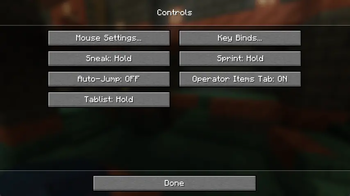
Adds a single option to the Controls settings screen, right next to the vanilla Toggle Sprint / Toggle Sneak options:
Tablist: Hold / Toggle
- Hold — vanilla behaviour: the list shows only while the key is held.
- Toggle — press the player-list key once to show it, press again to hide it.
The mode is saved and persists across restarts and across every world and server. The list itself always starts hidden when you join a world or server — only the Hold/Toggle mode is remembered, never the on/off state.
No dependencies
Tablist Toggle needs nothing but the mod loader. No Fabric API, no libraries, no extra
downloads. Drop the jar in your mods folder and you're done.
Supported versions
Built from one source tree, so every version below ships the exact same feature.
| Minecraft | Fabric | NeoForge |
|---|---|---|
| 1.20.6 | ✅ | ✅ |
| 1.21.1 | ✅ | ✅ |
| 1.21.7 | ✅ | ✅ |
| 26.1.2 | ✅ | ✅ |
1.20.6 is the oldest supported version: from there up the Controls screen exposes a clean options list to hook into, whereas 1.20.4 and below build the options as individual buttons (no list), which makes a tidy injection impractical. (maybe adding support at some point)
Usage
- Install Fabric or NeoForge for your Minecraft version.
- Put
tablisttoggle-*.jarin yourmodsfolder. - In game: Options → Controls, set Tablist to Toggle, and (optionally) rebind the player-list key to whatever you like.
Credits
Huge shoutout to Malenya for inspiring me to actually build this. 💛
- Edition: Minecraft Java
- File type: .jar
- Minecraft version listed: 1.21.1
- How to install: Install the matching mod loader (Forge, Fabric or NeoForge) for your Minecraft version. → Download the .jar. → Put it in the .minecraft/mods folder and launch that loader profile.
- Where to get it: Opens on Modrinth — not every file is mirrored on our own servers.
Install steps are the general flow for this file type — How to install Minecraft Java mods & modpacks walks through it step by step.
- Ships as tablisttoggle-1.0.1-neoforge+1.21.1-SNAPSHOT.jar — drop this file into the mods folder
- Download size: 17 KB
- Download link checked 10 Sept 2026 — working
These come from our own check of the pack file, not from the source page.