
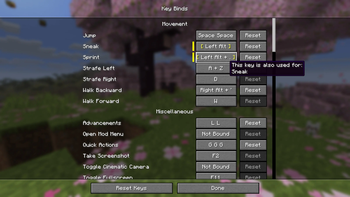
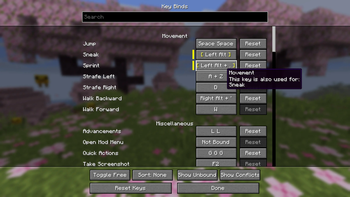
This mod expands vanilla keybinds with combo support, letting you bind any action to a chord or a key sequence instead of a single key.
It is client-side only and requires no server-side installation.
Features
Chord Combos
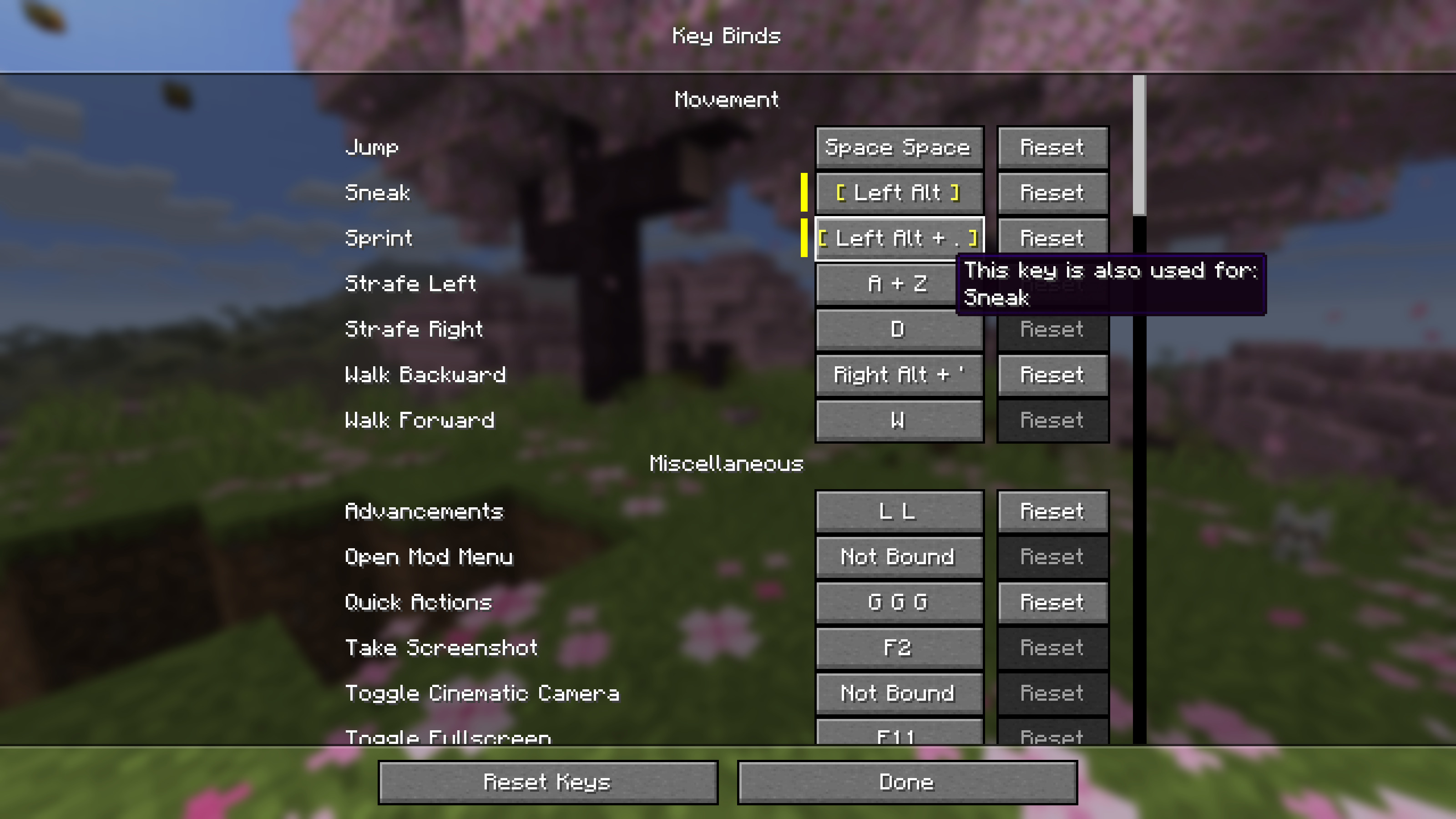
- Bind actions to key combinations such as Left Shift + E, Left Control + Left Button, or any other held key + trigger pair
- Any key or mouse button can be the trigger or a held key in a combo. The last key pressed during recording becomes the trigger, and all previously held keys complete the combination
- No limits! Hold as many keys as you want for as wild a combination as you need
- Can be followed by a sequence combo
Sequence Combos
- Bind actions to repeated key presses such as double-tap Q or triple-tap Space
- A configurable time window determines how quickly the taps must occur
- No limits! Bind to as many taps as you want
Controls Screen Integration
- Combo recording is embedded directly in the vanilla Controls > Key Binds screen, meaning no separate UI
- Press Escape to unbind a key
Configuration
- Allow Conflicts: When disabled, pressing a combo will not also trigger bindings whose keys are fully contained in it. For example, binding both E and Left Shift + E means pressing Left Shift + E would normally fire both. Disabling this ensures only Left Shift + E fires. The same applies to sequences: if a single press and a multi-tap are bound to the same key (e.g. Q and Q Q), pressing that key will only trigger the single press binding. Two bindings like Left Control + E and Left Shift + E are not considered conflicting, since pressing one can never accidentally fire the other. They only both trigger if you deliberately hold Left Control + Left Shift + E. This setting only applies to bindings that share the same trigger key (default: on)
- Sequence Window: How quickly you must press the key repeatedly in-game for a sequence to register (default: 400 ms)
- Sequence Recording Window: How long the recorder waits between taps when capturing a sequence in the Controls screen (default: 200 ms)
- Settings are saved to
config/combind.json
Use Cases
This mod shines in modpacks where keys are scarce and every binding needs to be deliberate, but works just as well in vanilla for extra flexibility.
A Practical Example
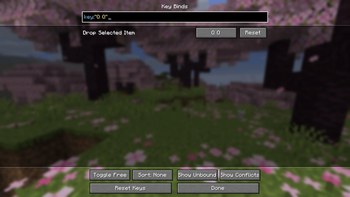
Double-tap Q (Q Q) (or even triple-tap Q (Q Q Q)!) to drop items instead of a single press. No more accidental drops.
Compatibility
This mod has no required dependencies beyond Fabric API. It works with:
- ModMenu (recommended) — adds a config button to the mod list as an alternative to manually editing
config/combind.json - Controlling and Searchables — search for bindings by their combo using syntax like
key:"Left Shift + E"orkey:"Q Q"
Note: Some niche vanilla interactions are tied to a specific input type and may not work when rebound. For example, a mouse button bound to "Open Inventory" will not close it the way a key would, and a key bound to "Pick Block" will not support block duplication dragging inside containers the way a mouse button would.
Note: If you encounter any compatibility issues, please report them on the GitHub Issues page.
For Mod Developers
Using the Combind APICombind exposes three API classes under net.pemiridosa.combind.api that let your mod register key bindings with full combo support.
Dependency Setup
Add Combind as a compile-time dependency via the Modrinth Maven repository:
// build.gradle
repositories {
    maven { url "https://api.modrinth.com/maven" }
}

dependencies {
    compileOnly "maven.modrinth:combind:VERSION"
    localRuntime "maven.modrinth:combind:VERSION" // optional: for dev runs
}
Declare the dependency in fabric.mod.json. Use depends if your mod requires Combind, or suggests if it is optional:
"depends": {
    "combind": "*"
}
API Classes
| Class | Purpose |
|---|---|
CombindKeyBinding |
Wraps a vanilla KeyMapping with combo support — the main entry point |
KeyCombo |
Describes a combo: single key, chord, sequence, or chord + sequence |
InputKey |
Represents one physical input — InputKey.keyboard(glfwCode) or InputKey.mouse(glfwButton) |
Examples
Chord — held modifier(s) + trigger key
Bind an action to Left Shift + E:
KeyMapping.Category category = KeyMapping.Category.register(
    Identifier.fromNamespaceAndPath("mymod", "mymod")
);

KeyMapping someActionMapping = KeyMappingHelper.registerKeyMapping(
    new KeyMapping("key.mymod.someaction", GLFW.GLFW_KEY_E, category)
);

// Left Shift + E
CombindKeyBinding someActionBinding = CombindKeyBinding.of(someActionMapping,
    new KeyCombo(
        InputKey.keyboard(GLFW.GLFW_KEY_E),
        new InputKey[]{ InputKey.keyboard(GLFW.GLFW_KEY_LEFT_SHIFT) }
    )
);

someActionBinding
    .onPress(ctx -> LOGGER.info("Some action PRESSED — combo: {}", ctx.combo().getDisplayName()))
    .onRelease(ctx -> LOGGER.info("Some action RELEASED — combo: {}", ctx.combo().getDisplayName()));
Chord with multiple modifiers
Bind an action to Left Control + Left Shift + E:
KeyMapping someActionMapping = KeyMappingHelper.registerKeyMapping(
    new KeyMapping("key.mymod.someaction", GLFW.GLFW_KEY_E, category)
);

// Left Control + Left Shift + E
CombindKeyBinding someActionBinding = CombindKeyBinding.of(someActionMapping,
    new KeyCombo(
        InputKey.keyboard(GLFW.GLFW_KEY_E),
        new InputKey[]{
            InputKey.keyboard(GLFW.GLFW_KEY_LEFT_CONTROL),
            InputKey.keyboard(GLFW.GLFW_KEY_LEFT_SHIFT)
        }
    )
);

someActionBinding
    .onPress(ctx -> LOGGER.info("Some action PRESSED — combo: {}", ctx.combo().getDisplayName()))
    .onRelease(ctx -> LOGGER.info("Some action RELEASED — combo: {}", ctx.combo().getDisplayName()));
Sequence — tap the same key multiple times
Bind an action to M M (double-tap) or M M M (triple-tap):
KeyMapping someActionMapping = KeyMappingHelper.registerKeyMapping(
    new KeyMapping("key.mymod.someaction", GLFW.GLFW_KEY_M, category)
);

// Double-tap M (M M)
CombindKeyBinding someActionBinding = CombindKeyBinding.of(someActionMapping,
    KeyCombo.sequence(InputKey.keyboard(GLFW.GLFW_KEY_M), 2)
);

// Triple-tap M (M M M) — even safer
CombindKeyBinding someActionBinding = CombindKeyBinding.of(someActionMapping,
    KeyCombo.sequence(InputKey.keyboard(GLFW.GLFW_KEY_M), 3)
);

someActionBinding
    .onPress(ctx -> LOGGER.info("Some action PRESSED — combo: {}", ctx.combo().getDisplayName()))
    .onRelease(ctx -> LOGGER.info("Some action RELEASED — combo: {}", ctx.combo().getDisplayName()));
Chord + sequence — hold modifier(s) while multi-tapping
Bind an action to Left Shift + Q Q (double-tap Q while holding Shift):
// Left Shift + Q Q
CombindKeyBinding binding = CombindKeyBinding.of(mapping,
    new KeyCombo(
        InputKey.keyboard(GLFW.GLFW_KEY_Q),
        new InputKey[]{ InputKey.keyboard(GLFW.GLFW_KEY_LEFT_SHIFT) },
        2
    )
);
Mouse button as trigger
Bind an action to Left Control + Left Button:
// Left Control + Left Mouse Button
CombindKeyBinding binding = CombindKeyBinding.of(mapping,
    new KeyCombo(
        InputKey.mouse(GLFW.GLFW_MOUSE_BUTTON_LEFT),
        new InputKey[]{ InputKey.keyboard(GLFW.GLFW_KEY_LEFT_CONTROL) }
    )
);
Single key (no explicit combo needed)
CombindKeyBinding.of(mapping) infers the initial combo from the KeyMapping's default key:
CombindKeyBinding binding = CombindKeyBinding.of(mapping); // defaults to the KeyMapping's key
Unbound — no key assigned by default
// Player must configure this in the Controls > Key Binds screen
CombindKeyBinding binding = CombindKeyBinding.of(mapping, KeyCombo.unbound());
Tick-Based Polling (Vanilla Style)
If you prefer the standard tick-polling pattern instead of callbacks, it works unchanged via the vanilla KeyMapping:
ClientTickEvents.END_CLIENT_TICK.register(client -> {
    while (someActionMapping.consumeClick()) {
        // handle each queued click
    }

    if (someActionMapping.isDown()) {
        // binding is currently held
    }
});
For more details, see the full implementation at src/client/java/net/pemiridosa/combind/api.
- Edition: Minecraft Java
- File type: .jar
- Minecraft version listed: 26.2
- How to install: Install the matching mod loader (Forge, Fabric or NeoForge) for your Minecraft version. → Download the .jar. → Put it in the .minecraft/mods folder and launch that loader profile.
- Where to get it: Opens on Modrinth — not every file is mirrored on our own servers.
Install steps are the general flow for this file type — How to install Minecraft Java mods & modpacks walks through it step by step.
- Ships as combind-1.0.0+26.2.jar — drop this file into the mods folder
- Download size: 48 KB
- Download link checked 7 Sept 2026 — working
These come from our own check of the pack file, not from the source page.