
Hex
Java mod listed for Minecraft 1.21. Downloads from the MC Java Mods app on Android.
⬇ Download on Modrinth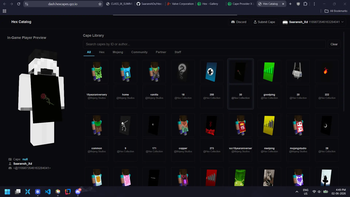

Hex
Create. Collect. Wear.
A community-driven Minecraft cosmetics platform.
Community · Catalog · API docs
About
Hex is a community-driven cosmetics platform for Minecraft focused on high-quality capes and player customization.
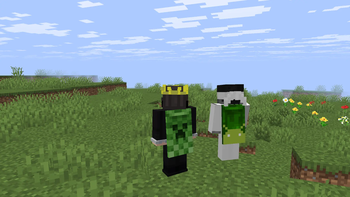
Browse community creations, collect your favorites, and wear them in-game through the Hex mod.
Features
- Community-created capes
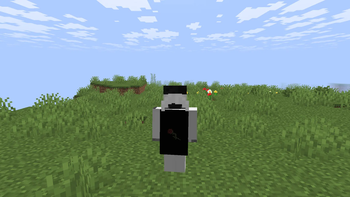
- In-game cape rendering
- Online cape catalog
- Discord account integration
- Fast cape synchronization
- Open catalog with public submissions
- Lightweight client-side implementation
Compatibility
⚠️ Hex is not compatible with other cape mods.
Running multiple cape providers at the same time may cause rendering issues or unexpected behavior.
Installation
- Download the latest release.
- Install the required mod loader version.
- Place the Hex mod into your
modsfolder. - Launch Minecraft.
- visit https://dash.hexcapes.qzz.io and follow the registration instructions
Community
Join the Hex community to submit capes, report issues, and stay updated with new releases.
- Discord: https://dsc.gg/hexcapes
- Catalog: https://dash.hexcapes.qzz.io
- Edition: Minecraft Java
- File type: .jar
- Minecraft version listed: 1.21.8
- How to install: Install the matching mod loader (Forge, Fabric or NeoForge) for your Minecraft version. → Download the .jar. → Put it in the .minecraft/mods folder and launch that loader profile.
- Where to get it: Opens on Modrinth — not every file is mirrored on our own servers.
Install steps are the general flow for this file type — How to install Minecraft Java mods & modpacks walks through it step by step.
- Ships as hex-1.1.2-1.21.8.jar — drop this file into the mods folder
- Download size: 77 KB
- Download link checked 22 Oct 2026 — working
These come from our own check of the pack file, not from the source page.