
HailWall
Server-side mod whitelist/blacklist: checks each player's client mods on join and kicks disallowed ones. (Install on server + client.)
I don't know my version or loader
HailWall — Mod Whitelist
HailWall checks the mods installed on a player's client when they join, and kicks them if they have disallowed mods (or are missing a required one). It's a modern, lightweight take on the classic Mod Whitelist idea.
⚠️ Install it on BOTH the server and every client. A purely server-side mod cannot read a client's full mod list — vanilla simply doesn't send it. So, like every mod of this kind, HailWall needs a tiny companion running on the client.
✨ Features
- Whitelist mode (default) — block everything except the mods you allow. The essentials (
minecraft, the loader,java,hailwall) are always allowed. - Blacklist mode — allow everything except specific mods (cheat clients, x-ray, …).
- Required mods — kick players who are missing a mandatory mod.
- Operator bypass — server operators are never kicked, even with extra mods (like a
usePermissiontoggle). - Transition / monitor mode (
enforce: false) — kick nobody, but still record everyone's mods. Perfect for rolling HailWall out without disrupting players while you build your list. - Access log — one JSON-Lines file per day (kept under
config/, so it's reachable even on hosts like Aternos) listing who joined and with which mods. Old files are pruned automatically. - Signed handshake — HMAC + per-connection challenge to stop trivial packet spoofing.
- Zero gameplay overhead — everything happens once, during login; the log is written off-thread. No per-tick cost.
⚙️ How it works
During the login handshake the server asks the client for its mod list. The client replies with its installed top-level mods (id + version), signed with HMAC. The server verifies the signature, compares the list against your config, and either lets the player in or disconnects them — all before they enter the world.
| Situation | Result |
|---|---|
| Installed on client and server | ✅ Full verification |
| Installed only on the client | You can still play on other servers; here it protects nothing |
| Installed only on the server | A client without HailWall can't join (when requireCompanionMod is on) |
📦 Setup
- Install the correct version of your chosen mod loader (e.g., Fabric, Forge, or NeoForge) and any required APIs on the server and on every client.
- Drop the
hailwall-x.y.z.jarinto themods/folder of the server and of each client. - Start the server once to generate
config/hailwall.json, edit it, and restart.
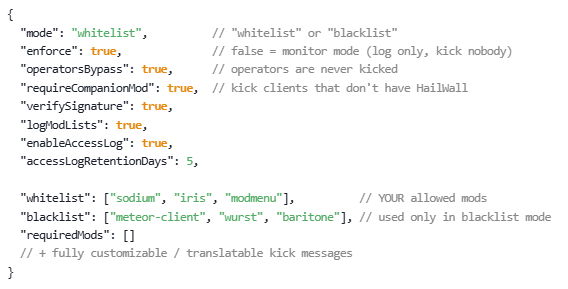
🔧 Configuration — config/hailwall.json
{
  "mode": "whitelist",          // "whitelist" or "blacklist"
  "enforce": true,              // false = monitor mode (log only, kick nobody)
  "operatorsBypass": true,      // operators are never kicked
  "requireCompanionMod": true,  // kick clients that don't have HailWall
  "verifySignature": true,
  "logModLists": true,
  "enableAccessLog": true,
  "accessLogRetentionDays": 5,

  "whitelist": ["sodium", "iris", "modmenu"],          // YOUR allowed mods
  "blacklist": ["meteor-client", "wurst", "baritone"], // used only in blacklist mode
  "requiredMods": []
  // + fully customizable / translatable kick messages
}
Find any mod's id in its mod.json (the id field). Easier: read it straight from the access log, or from the client's logs/latest.log, where HailWall prints the reported mod list.
🔒 Privacy & data
- The client sends only mod ids + versions of top-level mods — no file paths, no system info, no personal data.
- That data is used to allow/deny the join and is recorded only in the server's own access log (default 5-day retention). It's never sent anywhere else, and other players can't see it.
- Open source — you can verify exactly what it does.
🛡️ Honest security note
Like every client-side mod check, HailWall is not bulletproof: a determined user could still bypass it. The HMAC + challenge stops casual spoofing, not an expert. It works great against normal players and is best paired with online-mode=true. Treat it as one solid layer, not a silver bullet.
- Edition: Minecraft Java
- File type: .jar
- Minecraft versions listed: 1.16, 1.16.1, 1.16.2
- How to install: Install the matching mod loader (Forge, Fabric or NeoForge) for your Minecraft version. → Download the .jar. → Put it in the .minecraft/mods folder and launch that loader profile.
- Where to get it: Opens on Modrinth — not every file is mirrored on our own servers.
Install steps are the general flow for this file type — How to install Minecraft Java mods & modpacks walks through it step by step.
- Ships as hailwall_1.0.3_fabric_1.16-1.16.5.jar — drop this file into the mods folder
- Download size: 36 KB
- Download link checked 29 Sept 2026 — working
These come from our own check of the pack file, not from the source page.