
TinyHUD
Java mod listed for Minecraft 26.x. Downloads from the MC Java Mods app on Android.
⬇ Download on Modrinth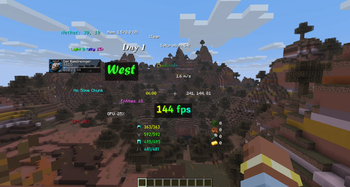
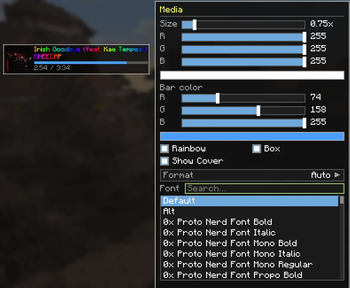
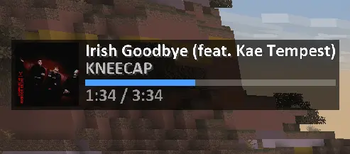
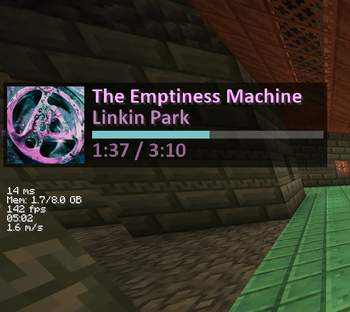
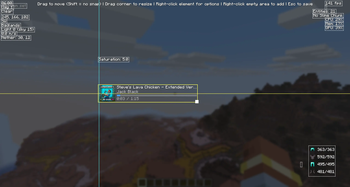


A lightweight, fully customizable HUD for NeoForge. Add the information you want to your screen, place it exactly where you like with a drag-and-drop editor, and style every element down to the font and color — no config files required.
Default Keybind is 'H'
TinyHUD is client-side only and works on Windows, macOS, and Linux.
HUD Elements
World
- Time — in-game time. Formats: 24h, 12h, 24h+seconds, 12h+seconds.
- Day — current world day count.
- Weather — current weather state.
- Biome — the biome you're standing in.
- Light Level — light level at your position.
- Looking At — the block you're currently targeting.
- Slime Chunk — shows whether your current chunk can spawn slimes.
- Entity Count — number of loaded entities around you.
Player
- Coordinates — your X/Y/Z. Formats: whole numbers, decimals, and variants that include the dimension.
- Direction — the way you're facing. Formats: short (N/E/S/W), full (North/East...), or degrees.
- Velocity — your current speed. Formats: m/s, horizontal m/s, km/h.
- Portal Coordinates — the corresponding Nether/Overworld coordinates for easy portal linking.
- Armor Durability — remaining durability of your equipped armor. Formats: X/Y or percent.
- Saturation — your hidden saturation value.
- Item Tracker — track the total count of any items across your inventory.
- Pick any number of items from a searchable item list.
- "Hide when 0" option — automatically hides items you're not currently carrying.
System
- FPS — current frames per second.
- Ping — your latency to the server.
- CPU Usage — system CPU load.
- GPU Usage — GPU utilization (NVIDIA, AMD, and Intel supported across Windows/Linux/macOS).
- Memory Usage — the Minecraft instance's heap usage (used vs. allocated). Formats: percent, MB, GB.
- Media — a now-playing widget for whatever you're listening to (see below).
Media element
A compact "now playing" display that reads directly from your operating system's media API:
- Windows — System Media Transport Controls (works with Spotify, browsers, and any media app).
- macOS — Spotify.
- Linux — MPRIS (
playerctl).
Features:
- Track title and artist.
- Album cover art, pulled straight from the OS media session (toggleable).
- Smooth, synchronized progress bar that stays in sync with actual playback.
- Source selection — Auto (whatever is currently playing) or Spotify-only.
- Full styling support, including rainbow title/artist and a custom accent color for the progress bar.
In-game editor
Everything is configured through a built-in visual editor (open it with the keybind, default unbound — set it in Controls).
- Drag-and-drop placement — move any element anywhere on screen.
- Smart snapping — elements snap to screen edges, screen center, and to the edges/centers of other elements, with on-screen alignment guides. Hold Shift to disable snapping for free placement.
- Resize by dragging — grab the bottom-right corner of any element to scale it up or down.
- Right-click an element for quick options (edit style, hide).
- Right-click empty space to add elements from a searchable, categorized menu (World / Player / System).
- Live preview — see exactly how everything looks while you edit.
Per-element styling
Every element can be individually styled:
- Size — scale from 0.5x to 3.0x.
- Color — full RGB color picker.
- Accent color — a second color for elements with bars (e.g. the media progress bar).
- Rainbow mode — smooth, animated per-character rainbow text.
- Background box — toggle a semi-transparent backdrop for readability.
- Custom fonts — use any font installed on your system (TrueType
.ttf/.ttc), with a searchable font picker, in addition to Minecraft's default and alt fonts. - Format options — many elements offer multiple display formats (see below).
- Edition: Minecraft Java
- File type: .jar
- Minecraft version listed: 26.2
- How to install: Install the matching mod loader (Forge, Fabric or NeoForge) for your Minecraft version. → Download the .jar. → Put it in the .minecraft/mods folder and launch that loader profile.
- Where to get it: Opens on Modrinth — not every file is mirrored on our own servers.
Install steps are the general flow for this file type — How to install Minecraft Java mods & modpacks walks through it step by step.
- Ships as tinyhud-1.0.2.jar — drop this file into the mods folder
- Download size: 774 KB
- Download link checked 21 Oct 2026 — working
These come from our own check of the pack file, not from the source page.