
The Copying Table
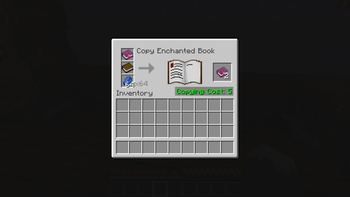
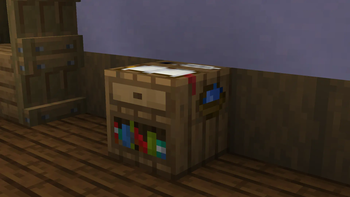
Introducing: the copying table, a new crafting block that lets you duplicate enchanted books. The mod aims to combine encouragement of exploration with the increased accessibility that you can also find with smithing templates.
Purpose
Once you have an enchanted book, you can spend lapis lazuli and XP to duplicate it, providing an alternative/supplement to mass villager trading. This rewards players who have explored the world and obtained treasure books like Soul Speed, Wind Burst, and Swift Sneak. Multiplayer servers benefit especially, because competition over local structures is reduced, allowing people to play at their own pace without needing to rush to beat other players to the loot tables!
How to use
Craft a copying table in the same way you would craft a smithing or fletching table, with four planks, an ink sac, and a feather.
To copy an enchanted book, you'll need:
- The desired enchanted book
- A new regular book
- Some lapis lazuli
Requirements/Dependencies
Mod needs to be installed on the server and on all connected clients, and depends on any version of the Fabric API.
- Edition: Minecraft Java
- File type: .jar
- Minecraft version listed: 1.21.11
- How to install: Install the matching mod loader (Forge, Fabric or NeoForge) for your Minecraft version. → Download the .jar. → Put it in the .minecraft/mods folder and launch that loader profile.
- Where to get it: Opens on Modrinth — not every file is mirrored on our own servers.
Install steps are the general flow for this file type — How to install Minecraft Java mods & modpacks walks through it step by step.
- Ships as copying-table-2.0.0.jar — drop this file into the mods folder
- Download size: 66 KB
- Download link checked 21 Aug 2026 — working
These come from our own check of the pack file, not from the source page.