Minecraft, But It Rains Random Blocks..
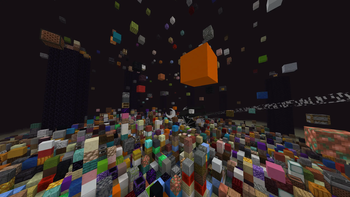
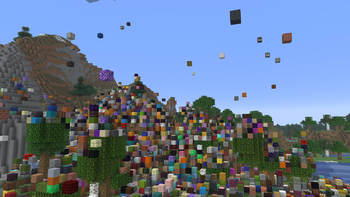
Random blocks begin falling from the sky, turning the world into a chaotic and ever-changing survival challenge. Adapt quickly, dodge the falling blocks…
I don't know my version or loader


Minecraft, But It Rains Random Blocks..
How to Change Rain Speed?
/trigger rbr_speed_up
/trigger rbr_speed_down
/trigger rbr_speed_status
Minecraft, But It Rains Random Blocks transforms the weather system into a chaotic survival challenge where hundreds of different blocks can fall from the sky at any moment. From simple stone and dirt to rare ores, decorative blocks, and even dangerous materials, every rainstorm reshapes the world around you.
What begins as a normal survival world can quickly turn into a constantly evolving landscape. Mountains can appear out of nowhere, caves can become sealed shut, and valuable resources may literally fall from the sky. Every playthrough is unique as the environment changes naturally over time.
Whether you're trying to survive the chaos, build automated farms around the falling blocks, or simply watch your world transform into a massive collection of random structures, this datapack adds an entirely new challenge to Minecraft survival.
Features
- Random blocks continuously fall from the sky.
- Hundreds of different block types can appear.
- The landscape evolves naturally as blocks accumulate.
- Valuable resources can become obtainable through rainfall.
- Compatible with singleplayer and multiplayer worlds.
- Creates unique survival scenarios every time you play.
- Lightweight and optimized for long-term survival worlds.
- Works alongside most vanilla-friendly datapacks.
Gameplay Ideas
- Start a new survival world and adapt to the changing terrain.
- Challenge yourself to survive only using resources provided by block rain.
- Compete with friends to survive the longest.
Installation Guide
Singleplayer Installation
- Download the datapack.
- Open Minecraft and create a new world, or select an existing world.
- Click Edit on the world you want to use.
- Click Open World Folder.
- Open the datapacks folder.
- Place the downloaded datapack ZIP file inside the folder.
- Launch the world.
- If installing into an existing world, run:
/reload
- The datapack should now be active.
Multiplayer Server Installation
- Stop your server.
- Open your server files.
- Navigate to:
world/datapacks
- Upload the datapack ZIP file into the datapacks folder.
- Start the server.
- Run:
/reload
or restart the server if necessary.
Verify Installation
Run:
/datapack list
If the datapack appears in the enabled list, the installation was successful.
Support
If you encounter bugs, have suggestions, or want to report compatibility issues, feel free to leave a comment. Feedback helps improve future updates.
Enjoy watching your world transform as random blocks rain from the sky!
- Edition: Minecraft Java
- File type: .jar
- Minecraft versions listed: 26.1, 26.1.1, 26.1.2
- How to install: Install the matching mod loader (Forge, Fabric or NeoForge) for your Minecraft version. → Download the .jar. → Put it in the .minecraft/mods folder and launch that loader profile.
- Where to get it: Opens on Modrinth — not every file is mirrored on our own servers.
Install steps are the general flow for this file type — see the MC Java Mods guides for the full walkthrough.
- Downloads as Random Block Rain 1.1.0.zip
- Download size: 24 KB
- Download link checked 5 Sept 2026 — working
These come from our own check of the pack file, not from the source page.