
InvAlert
A one-shot sound and on-screen warning when your inventory is almost full so you don't keep mining and silently lose drops.
⬇ Download on Modrinth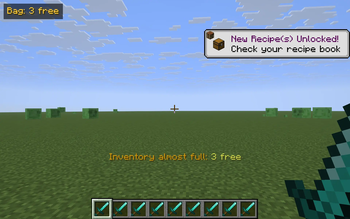
InvAlert watches your inventory and warns you the moment free space runs out. No more strip-mining a vein only to realize half the cobble fell on the floor — the moment your bag drops to a few free slots, you hear it and see it.
What it does
- Tracks the 36 main inventory slots (hotbar + backpack). Armor and the off-hand are excluded because picked-up items never go there anyway.
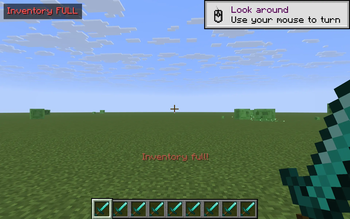
- When free slots drop to less than or equal to 3, it fires a one-shot warning:
- An action-bar message above the hotbar: "Inventory almost full: N free".
- A short pling sound, so you notice even when you're not looking at the corner.
- A persistent badge in the top-left of the HUD: "Bag: N free" (turns red and reads "Inventory FULL" when you hit zero).
- The warning re-fires only when free space drops further (3 -> 1 -> 0), so it doesn't spam you while you're managing items. The badge disappears the moment you free up a slot.
Controls
- V — toggle the alert on/off. Action-bar confirmation tells you the current state.
Why
You're deep in a cave, mining a vein. Your bag fills up. The next ten ores drop on the floor and despawn. By the time you check the inventory you've lost half the haul. InvAlert is the smallest possible fix: one badge, one sound, one alert, no config screens, no dependencies.
Notes
- Pure client-side — install on your client only. Works on any Fabric server, fully vanilla compatible.
- Sound and action bar are suppressed while an inventory or other screen is open, so the alert isn't noisy while you're already sorting.
- The HUD badge respects F1 (hide HUD).
- ~140 lines of code, no config files, no dependencies beyond Fabric API.
Compatibility
Minecraft 1.21.8, 1.21.9, 1.21.10, 1.21.11 — Fabric Loader 0.16+. One JAR covers all four. Drop into your mods/ folder alongside Fabric API.
- Edition: Minecraft Java
- File type: .jar
- Minecraft versions listed: 1.21.8, 1.21.9, 1.21.10
- How to install: Install the matching mod loader (Forge, Fabric or NeoForge) for your Minecraft version. → Download the .jar. → Put it in the .minecraft/mods folder and launch that loader profile.
- Where to get it: Opens on Modrinth — not every file is mirrored on our own servers.
Install steps are the general flow for this file type — How to install Minecraft Java mods & modpacks walks through it step by step.
- Ships as invalert-1.0.0.jar — drop this file into the mods folder
- Download size: 6 KB
- Download link checked 22 Aug 2026 — working
These come from our own check of the pack file, not from the source page.