
Armour Texture Toggle
This Mod make Armour texture invisible by pressing a key which is very helpfull to make intro in smp without any fear of death so u will be able to create…
⬇ Download on Modrinth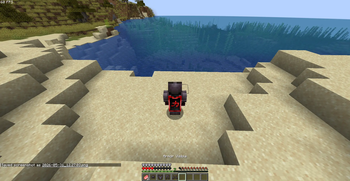
Armour Texture Toggle
Want to see your Minecraft skin without sacrificing protection?
Armour Texture Toggle is a lightweight client-side Fabric mod that allows you to hide the visual rendering of your equipped armor while keeping all armor functionality intact.
Features
✅ Hide equipped armor with a single key press
✅ Keep all armor protection and enchantments
✅ Works in first-person and third-person views
✅ Armor remains equipped and fully functional
✅ Client-side only — no server installation required
✅ Lightweight and performance-friendly
✅ Saves your preference between game launches
How It Works
When enabled, the mod prevents your armor from being rendered on your client. Your armor is still equipped, still provides protection, and still works exactly as normal.
You see:
Your skin
No visible armor
The server sees:
Full armor equipped
Other players see:
Full armor equipped
Default Keybind
H — Toggle armor visibility
Armor Hidden
Armor Visible
Perfect For
PvP players
Content creators
Skin showcases
Screenshot creators
Players who want to see their skin while staying protected
Hide your armor. Keep your protection. See your skin. 🔥
- Edition: Minecraft Java
- File type: .jar
- Minecraft version listed: 1.21.11
- How to install: Install the matching mod loader (Forge, Fabric or NeoForge) for your Minecraft version. → Download the .jar. → Put it in the .minecraft/mods folder and launch that loader profile.
- Where to get it: Opens on Modrinth — not every file is mirrored on our own servers.
Install steps are the general flow for this file type — How to install Minecraft Java mods & modpacks walks through it step by step.
- Ships as armour-texture-toggle-1.0.0.jar — drop this file into the mods folder
- Download size: 8 KB
- Download link checked 12 Sept 2026 — working
These come from our own check of the pack file, not from the source page.