
ModsJava
SecureChatUpdated
Java mod listed for Minecraft 26.x. Downloads from the MC Java Mods app on Android.
⬇ Download on Modrinth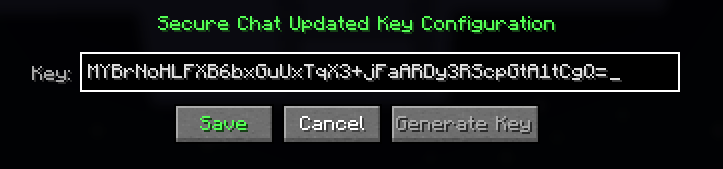

SecureChat Updated
An updated version of SecureChat for Minecraft 26.1.x.
Features
- AES-256-GCM encryption with authenticated ciphertext
- PBKDF2 key derivation with per-message random salt and IV
- Base4096 encoding (toggleable)
- Replay attack prevention
- Expired message detection (1 minute clock skew tolerance)
- Wrong key detection
- Spoof detection for fake
[Secure Chat]prefixes - Toggle encryption on/off per session
- Hold Shift to temporarily invert encryption state
- In-game configuration screen (Ctrl+Click the [SCU] button)
- Config persisted to
securechatupdated.properties
Usage
Click the [SCU] button in the chat screen to toggle encryption.
Ctrl+Click to open the configuration screen where you can set your key, prefix, alphabet, and toggle Base4096 encoding.
Hold Shift while the chat screen is open to temporarily invert the current state.
Requirements
- Minecraft 26.1.x
- Fabric Loader >= 0.18.4
- Fabric API
Quick facts
- Edition: Minecraft Java
- File type: .jar
- Minecraft versions listed: 26.1, 26.1.1, 26.1.2
- How to install: Install the matching mod loader (Forge, Fabric or NeoForge) for your Minecraft version. → Download the .jar. → Put it in the .minecraft/mods folder and launch that loader profile.
- Where to get it: Opens on Modrinth — not every file is mirrored on our own servers.
Install steps are the general flow for this file type — How to install Minecraft Java mods & modpacks walks through it step by step.
File checked by MCModsHub
- Ships as securechatupdated-1.1.0.jar — drop this file into the mods folder
- Download size: 37 KB
- Download link checked 23 Oct 2026 — working
These come from our own check of the pack file, not from the source page.