ModsJava
Stream Shield
Java mod listed for Minecraft 26.x. Downloads from the MC Java Mods app on Android.
⬇ Download on Modrinth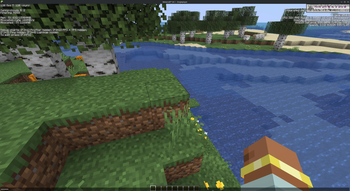
Stream Shield
A Fabric client mod that hides chat, F3 coordinates, and what you're typing from the game window, and mirrors them to a separate desktop window only you can see. Capture or share the Minecraft window without leaking DMs, server IPs, command history, or your location.
Client-side only. Vanilla servers welcome.
How it works
In the game window, when Stream Shield is enabled:
- Incoming chat is suppressed (the chat box is hidden entirely).
- Typing into chat shows mask characters in place of every character — no black bar, just bullets where your text would be.
- Command suggestions (the popup above the input and the inline gray autocomplete) are hidden.
- F3 lines that reveal your position (coords, facing, biome, world seed, etc.) are scrambled.
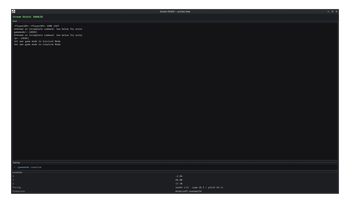
In the secondary window ("Stream Shield — private view"), you see the real thing:
- Full chat log, including messages received while obfuscation was on.
- What you're currently typing (live).
- Your real coordinates, facing, and dimension.
Quick facts
- Edition: Minecraft Java
- File type: .jar
- Minecraft version listed: 26.2
- How to install: Install the matching mod loader (Forge, Fabric or NeoForge) for your Minecraft version. → Download the .jar. → Put it in the .minecraft/mods folder and launch that loader profile.
- Where to get it: Opens on Modrinth — not every file is mirrored on our own servers.
Install steps are the general flow for this file type — How to install Minecraft Java mods & modpacks walks through it step by step.
File checked by MCModsHub
- Ships as stream-shield-0.1.1-PRE+mc.26.2.jar — drop this file into the mods folder
- Download size: 60 KB
- Download link checked 22 Oct 2026 — working
These come from our own check of the pack file, not from the source page.