
BetterChatHeads
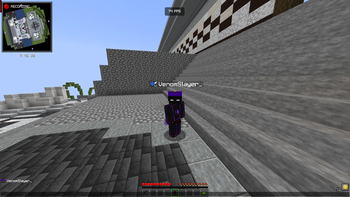
BetterChatHeads adds player heads next to chat messages, making multiplayer chat clearer, more visual, and easier to read.
I don't know my version or loader
Better Chat Heads
A high-performance, client-side chat visual enhancement utility for the Fabric ecosystem.




Overview
Better Chat Heads seamlessly injects real-time player head avatars next to chat messages within multiplayer environments. Engineered to enhance spatial awareness and visual readability in high-traffic chat streams, this client-side utility features intelligent skin synchronization pipelines and advanced regex pattern matching to support complex, rank-heavy server message formats without impacting frame rendering times.
Key Features
- Contextual Avatar Injection — Dynamically renders player heads alongside validated multiplayer chat vectors, fully supporting secondary skin layers, overlays, hats, and hair geometry.
- Smart Skin Sync+ & Live Swap — Features an automated retry pipeline for initially unresolved skin textures, transitioning smoothly from default asset fallbacks (Steve/Alex) to verified player skins in real-time.
- Per-Server Profile Isolation — Automatically preserves unique configuration parameters customized to individual server environments.
- Adaptive Pattern Ingestion — Utilizes a local learning cache to dynamically index, memorize, and parse server-specific chat prefixes, rank structures, and custom message separators.
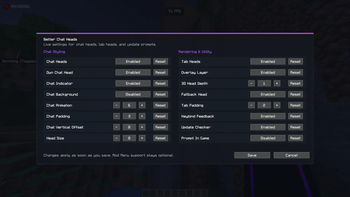
- Granular UI Scaling — Includes options for compact layout modes, custom head introduction animations, and adjustable frame-timing variables.
- Zero Server Overhead — Operates entirely within the local client runtime. Features an integrated configuration panel and optional Mod Menu compatibility with instant state saving.
Installation Guide
- Dependency Verification: Ensure the target environment has the correct iteration of the Fabric API installed.
- Deployment: Place the compiled
BetterChatHeadsbinary payload directly into your localmodsdirectory. - Initialization: Launch the runtime client and access the localized configuration panel layout to adjust pacing and cache rules.
Available exclusively for the Fabric Mod Loader ecosystem.
- Edition: Minecraft Java
- File type: .jar
- Minecraft versions listed: 1.21, 1.21.1
- How to install: Install the matching mod loader (Forge, Fabric or NeoForge) for your Minecraft version. → Download the .jar. → Put it in the .minecraft/mods folder and launch that loader profile.
- Where to get it: Opens on Modrinth — not every file is mirrored on our own servers.
Install steps are the general flow for this file type — How to install Minecraft Java mods & modpacks walks through it step by step.
- Ships as betterchatheads-2.0.0.jar — drop this file into the mods folder
- Download size: 2.4 MB
- Download link checked 9 Sept 2026 — working
These come from our own check of the pack file, not from the source page.