
Loot Injector
Inject custom loot into any chest in the game — vanilla or modded — using simple JSON config files. No coding required.
✦ Features
- Inject into any loot table — dungeons, bastions, strongholds, villages, shipwrecks, modded structures, mob drops, fishing loot, and more
- Works with every mod — uses Forge's item registry with a multi-stage lookup so items from any mod are supported
- Weighted probability — each item has its own independent drop chance (0.01%–100%) per chest opening
- Float counts — min/max stack sizes accept decimal values (e.g.
1.5averages to 2) - Full NBT support — attach any SNBT tag to items; required for mods that use generic items with NBT variants
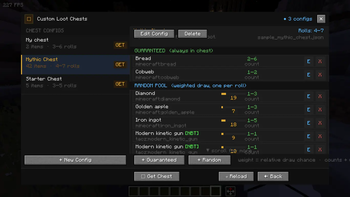
- Custom Loot Chests — define named chest configs and give them to players via command; items are pre-rolled per give
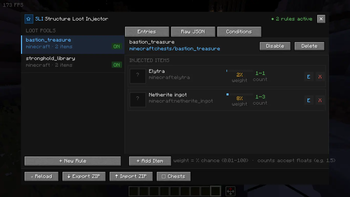
- In-game GUI editor — browse, add, edit, and delete loot rules without ever touching a file
- Live JSON preview — Raw JSON tab shows the exact file content as you edit
- Hot-reload — apply config changes without restarting the server via
/structureloot reload - Import / Export — share config sets as ZIP profiles with
/structureloot exportandimport - Validation command —
/structureloot validatescans every item ID and reports errors instantly - Debug commands —
/structureloot debug itemslists all items from any mod;debug itemtests a single lookup
✦ How It Works
Place a .json file in .minecraft/config/structureloot/pools/ and the mod injects your items into that loot table at runtime — no data pack, no /reload, no restart needed.
{
  "target_loot_table": "minecraft:chests/simple_dungeon",
  "enabled": true,
  "inject_items": [
    { "item": "minecraft:diamond",  "weight": 10.0, "min_count": 1.0, "max_count": 3.0 },
    { "item": "examplemod:rare_sword", "weight": 2.0, "min_count": 1.0, "max_count": 1.0,
      "nbt": "{display:{Name:'{\"text\":\"Ancient Blade\"}'}}" }
  ]
}
The weight field is a percentage chance per chest opening (not a pool weight). weight: 10.0 means a 10% chance each time that chest is opened.
✦ Custom Loot Chests
Define a named chest config in config/structureloot/chests/ and give it to any player via command:
/structureloot chest get mythic_chest
The player receives a named chest with pre-rolled items inside. The GUI lets you manage configs, add items, set rolls, and edit everything without editing files directly.
✦ Commands
All commands require OP level 2.
| Command | Description |
|---|---|
/structureloot reload |
Reload all JSON configs |
/structureloot list |
List all active pool rules |
/structureloot validate |
Check all item IDs for errors |
/structureloot export |
Export configs as a ZIP |
/structureloot import |
Import a ZIP profile |
/structureloot chest get |
Give a custom loot chest |
/structureloot chest list |
List all chest configs |
/structureloot debug items |
List registered items from a mod |
/structureloot debug item |
Test a specific item ID |
✦ GUI Editor
Open with the K keybind (rebindable in Controls → Structure Loot Injector).
The editor provides a full three-panel interface:
- Loot Pools — manage injection rules per loot table
- Entries tab — add/edit/remove items with weight bars and count ranges
- Raw JSON tab — live syntax-coloured view of the config file
- Custom Chests — manage named chest configs with guaranteed and weighted random item pools
✦ Finding Item IDs
- Press F3+H in-game to enable advanced tooltips
- Hover over any item — the registry ID appears at the bottom of the tooltip
- For mods with NBT-based item variants, the full NBT tag is also shown
Or use the built-in command:
/structureloot debug items
✦ Compatibility
- Minecraft 1.20.1 · Forge 47.2.0+
- Server-side only (clients do not need the mod installed)
- Compatible with all mods that use standard Forge item registration
- Uses Forge's Global Loot Modifier system — no conflicts with other loot mods
- Edition: Minecraft Java
- File type: .jar
- Minecraft versions listed: 1.20.1, 1.20.2, 1.20.3
- How to install: Install the matching mod loader (Forge, Fabric or NeoForge) for your Minecraft version. → Download the .jar. → Put it in the .minecraft/mods folder and launch that loader profile.
- Where to get it: Opens on Modrinth — not every file is mirrored on our own servers.
Install steps are the general flow for this file type — How to install Minecraft Java mods & modpacks walks through it step by step.
- Ships as lootinjector-1.0.0.jar — drop this file into the mods folder
- Download size: 81 KB
- Download link checked 20 Aug 2026 — working
These come from our own check of the pack file, not from the source page.