
Player Session Tracker — Forge 1.20.1 Port
This is a modernized, server-side-only port of the original Fabric mod Play Time Tracker by Circuit-Overtime.
Original mod: Play Time Tracker on Modrinth
Player Session Tracker brings the same clean, lightweight playtime-tracking system to Forge 1.20.1, rebuilt for stability, server-only compatibility, and improved command usability.
Features
Server-side only
Players can join with a completely vanilla client. All tracking and commands run entirely on the server.
Automatic session tracking
The mod records:
- Join time
- Leave time
- Session duration
- Server time of login
- Date of login
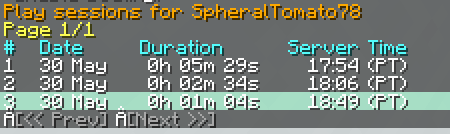
- Last 7 days of playtime history
All data is stored per-player in simple JSON files.
Command suite (/session)
/session check
- View your own offline session history
- Paginated output with clickable navigation buttons
- Clean, readable formatting
/session check
- View another player’s offline sessions
- Works for both online and offline players
- Auto-suggests known players
/session checkonline
- Shows your current live session
- No arguments needed
/session checkonline <player>also works for checking others
Clickable pagination buttons
Navigate session history with:
[<< Prev][Next >>]
Buttons run commands automatically.
Crash-safe disconnect handling
If a player crashes, times out, or loses connection, the session is still saved correctly.
No chat spam
Each command output is isolated to the player who ran it, and the display scrolls cleanly without flooding chat.
Credits
This mod is a Forge 1.20.1 port of the original Fabric mod Play Time Tracker by Circuit-Overtime.
Original project: Play Time Tracker on Modrinth
All core design credit goes to the original author. This port adapts the concept for Forge servers and adds quality-of-life improvements.
License
This project follows the same license as the original mod (Apache-2.0).
You are free to use, modify, and include it in modpacks.
- Edition: Minecraft Java
- File type: .jar
- Minecraft version listed: 1.20.1
- How to install: Install the matching mod loader (Forge, Fabric or NeoForge) for your Minecraft version. → Download the .jar. → Put it in the .minecraft/mods folder and launch that loader profile.
- Where to get it: Opens on Modrinth — not every file is mirrored on our own servers.
Install steps are the general flow for this file type — How to install Minecraft Java mods & modpacks walks through it step by step.
- Ships as playersessiontracker-1.3.0.jar — drop this file into the mods folder
- Download size: 18 KB
- Download link checked 14 Sept 2026 — working
These come from our own check of the pack file, not from the source page.