
Better No Chat
Better No Chat is a lightweight, client-side Fabric mod for Minecraft 1.21.11 that gives players complete control over in-game chat visibility. Instantly toggle player chat on or off with a customizable keybind while keeping important system messages, server notifications, and command feedback visible.
Whether you're recording content, streaming, focusing on gameplay, avoiding chat spam, or simply prefer a cleaner HUD, Better No Chat provides a seamless and vanilla-friendly solution without requiring server installation.
Features
- Toggle chat visibility with a customizable keybind
- Hide all player chat messages when chat is disabled
- Keep system messages and command feedback visible
- Optional whitelist for specific usernames
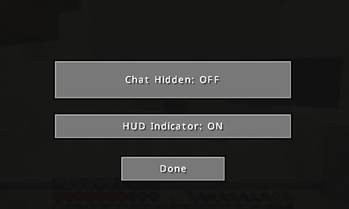
- Small HUD indicator showing current chat status
- Easy configuration with Cloth Config
- Lightweight and optimized for performance
- Fully client-side — works on any server
- Compatible with Minecraft 1.21.11 Fabric
Why Use Better No Chat?
Minecraft chat can often become distracting due to spam, advertisements, excessive conversations, or simply too much on-screen clutter. Better No Chat allows players to instantly disable player chat while still receiving important game information. This makes it ideal for:
- Content creators and streamers
- PvP players
- Speedrunners
- Builders
- AFK sessions
- Accessibility and focus improvements
- Multiplayer servers with active chat
Compatibility
- Minecraft 1.21.11
- Fabric Loader
- Fabric API
- Cloth Config
Keywords
Minecraft chat mod, disable chat Minecraft, Fabric chat toggle mod, Minecraft 1.21.11 Fabric mod, client-side chat mod, hide player chat Minecraft, chat filter Fabric, Minecraft HUD indicator mod, Fabric utility mod, Minecraft quality of life mod, Better No Chat, Minecraft chat control, multiplayer chat toggle, Minecraft chat management, Fabric QoL mod.
- Edition: Minecraft Java
- File type: .jar
- Minecraft version listed: 1.21.11
- How to install: Install the matching mod loader (Forge, Fabric or NeoForge) for your Minecraft version. → Download the .jar. → Put it in the .minecraft/mods folder and launch that loader profile.
- Where to get it: Opens on Modrinth — not every file is mirrored on our own servers.
Install steps are the general flow for this file type — How to install Minecraft Java mods & modpacks walks through it step by step.
- Ships as better-no-chat-1.0.0.jar — drop this file into the mods folder
- Download size: 971 KB
- Download link checked 9 Sept 2026 — working
These come from our own check of the pack file, not from the source page.