
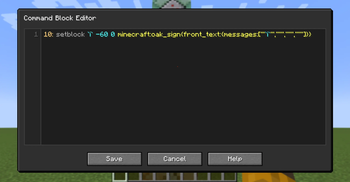
Command Block Editor
Command Block Editor is a utility mod that makes creating and managing command block systems much faster and more convenient.
Instead of editing command blocks one by one, you can write multiple commands in a single editor and automatically generate complete command block chains.
Perfect for map makers, technical builders, and anyone who works with large command block setups.
Opening the Editor
Press the configured keybind (default: =) to open the editor.
- If you are looking at a command block, the editor will open with that command block's commands loaded.
- Otherwise, a new command block will be created at your current position and opened in the editor.
- Press
Ctrl + Sto save and close the editor.
Editor Syntax
| Syntax | Description |
|---|---|
<number> |
Repeat a command multiple times. |
! |
Make the first command block a repeating command block. |
@ |
Toggle auto mode. On the first command it enables auto mode, on subsequent commands it disables it. |
? |
Make a command block conditional. |
`expression` |
Evaluate a mathematical expression. |
Expressions support:
iiteration index+addition-subtraction*multiplication/division( )parentheses;separates values in a repeating pattern (for example,`1;2`produces1, 2, 1, 2, ...)
Example
Input:
3: say `i+1`
5: say `1;2`
say hi
?: say hi
Output:
say 1
say 2
say 3
say 1
say 2
say 1
say 2
say 1
say hi
say hi (conditional)
Keyboard Shortcuts
| Shortcut | Action |
|---|---|
Ctrl + S |
Save and close the editor. |
Ctrl + Shift + K |
Delete the current line. |
Alt + ↑ / Alt + ↓ |
Move the current line up or down. |
Alt + Shift + ↓ |
Duplicate the current line. |
Quick facts
- Edition: Minecraft Java
- File type: .jar
- Minecraft version listed: 1.21.11
- How to install: Install the matching mod loader (Forge, Fabric or NeoForge) for your Minecraft version. → Download the .jar. → Put it in the .minecraft/mods folder and launch that loader profile.
- Where to get it: Opens on Modrinth — not every file is mirrored on our own servers.
Install steps are the general flow for this file type — How to install Minecraft Java mods & modpacks walks through it step by step.
Verified by MCModsHub
- Ships as CommandBlockEditor-4.0 1.21.11.jar — drop this file into the mods folder
- Download size: 63 KB
- Download link checked 21 Aug 2026 — working
These come from our own check of the pack file, not from the source page.