
Enchanting Table Magic Circle
Java resource pack listed for Minecraft 1.21. File opened and checked on 28 Oct 2026; downloads from the MC Java Mods app on Android.
I don't know my version or loader

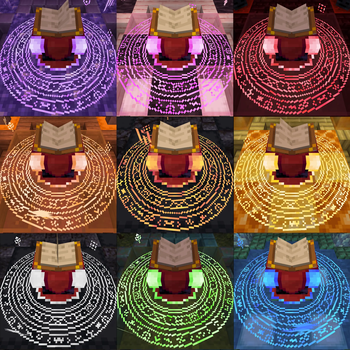




🧩 Dependencies
- EMF is required!
- For color variants use Respackopts mod
- For animated textures to work on fabric use Animatica mod
if you're playing in versions above 1.21.6 you can download this version of Animatica, it works, but if you're playing in versions above 1.21.8 you'll need to activete the BRUTEFORCE mode in the texture settings (more about this below)
✅️ Mod Support
Should work for every mod that uses a book entity, like Easy Magic mod or Quark Oddities mod
🛠️ Shaders Troubleshooting
First make sure to enable labPBR support at your shaders config normally it looks like this:
Complementary shaders:

BSL (at the materials tab):

If just this doesn't fix it, try disabling the animated textures, 99% of the time it works
🚨 BRUTEFORCE mode:
Don't use BRUTEFORCE mode if you're trying to use shaders, it was only made to make the animated textures work in versions >= 1.21.9
To use it you'll probably have to set RenderLayer override to Translucent, to do this go to the mods tab, enter the Entity Model Features mod config and follow this path:
Per entity settings > Enchanting Table > Textures
Now set RenderLayer override to Translucent
🎨 Color Variants

BSL:

Complementary Shader:


Super Duper Vanilla:

Miniature Shader (Custom build):

💼 My works


- Edition: Minecraft Java
- File type: .zip (resource pack)
- Minecraft versions listed: 1.21.9, 1.21.10, 1.21.11
- How to install: Download the .zip resource pack — do not unzip it. → Put it in .minecraft/resourcepacks. → Enable it in Options → Resource Packs.
- Where to get it: Opens on Modrinth — not every file is mirrored on our own servers.
Install steps are the general flow for this file type — How to install Minecraft Java resource packs walks through it step by step.
- Downloads as Enchanting Table Magic Circle v.2.5 (1.21.9 - 1.21.11).zip
- Download size: 27.5 MB
- Download link checked 25 Oct 2026 — working
These come from our own check of the pack file, not from the source page.