
Dual Drive
Java mod listed for Minecraft 1.21. Downloads from the MC Java Mods app on Android.
Two players, one body. Split movement, vision, and actions with a friend in a chaotic co-op survival challenge where teamwork is the only way forward.
⬇ Download on Modrinth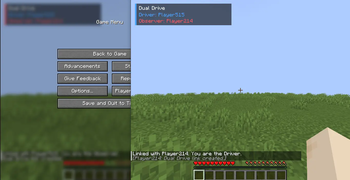

Ever wondered what it would be like to sprint through a terrifying cave while your friend controls exactly where you look, what you hit, and what you place?
Dual Drive takes Minecraft co-op to a chaotic new level by splitting the core controls of a single shared player body across two separate players.
One body. Two players. Total chaos.
Whether you're tackling intense survival challenges, playing custom horror maps, setting up server minigames, hosting a LAN session, or just trying to find out how bad your teamwork really is, Dual Drive turns communication into your ultimate survival tool.
👥 The Roles
When two players link up, their controls are immediately divided into two distinct roles:
- The Driver (The Body): You control movement. Walk, sprint, jump, sneak, and steer the body through the world. Your main job is navigation and keeping the shared body alive.
- The Observer (The Eyes): You control the camera and world interactions. Look around, attack, mine blocks, place blocks, use items, and manage hotbar selection. Your normal movement keys are disabled—you must trust your Driver!
Both players share a single synchronized state, meaning you share the same inventory, health, hunger, experience, active status effects, and attributes.
🎭 Role Presets
Want to mix up the gameplay? Dual Drive features three built-in presets that server operators can swap on the fly:
- Classic: The ultimate split. Driver moves; Observer handles all vision, combat, building, and item usage.
- Balanced: Gives the Driver a bit more autonomy, allowing them to handle body-centric actions like eating, using shields, controlling boats, and managing the inventory.
- Hardcore: Designed for horror maps and extreme challenges. Reduces the Driver's visibility, shares nasty debuffs, and forces a heavy reliance on the Observer’s ping system.
✨ Key Features
- 🔄 On-the-Fly Role Swapping: Press V to request a role swap. Servers can require mutual consent, enforce cooldowns, or lock roles entirely.
- 🧭 Observer Ping System: Communication is hard. Observers can use quick keybinds to send Look, Run, Stop, or Danger directional pings directly to the Driver's screen.
- 💓 Immersive Danger Feedback: In Hardcore mode, danger pings trigger realistic visual and audio heartbeat cues for the Driver.
- 🖥️ Lightweight HUD: A minimal, clean UI overlay fades in when linking or swapping roles to keep you updated on who is currently steering.
- 🔧 Desync Recovery Tools: If internet hiccups cause a glitch, quick tools like
/dualdrive resyncfix things up immediately without requiring a server reboot.
🛠️ Requirements & Installation
⚠️ Important: Dual Drive is a hybrid mod and must be installed on both the client and the server to function properly (this includes LAN setups).
| Property | Requirement |
|---|---|
| Mod Loader | Fabric |
| Minecraft Version | 1.21.11 |
| Java Version | Java 21 |
🔑 Default Keybinds
All keys can be completely remapped inside Minecraft's standard Controls menu.
| Key | Action |
|---|---|
| V | Request Role Swap |
| G | Send "Look" Ping |
| R | Send "Run" Ping |
| X | Send "Stop" Ping |
| H | Send "Danger" Ping |
💬 Command Reference
Player & Team Commands
/dualdrive request <player> <preset> <gamemode>  # Invite a player to link with a specific style
/dualdrive accept                               # Accept an incoming link request
/dualdrive invite cancel                        # Cancel your outgoing link request
/dualdrive unlink                               # Break your current link connection
/dualdrive relink                               # Quickly re-establish your last active link
/dualdrive status                               # Check current link status and role assignments
/dualdrive resync                               # Forces a client-server sync if state gets stuck
/dualdrive bugreport                            # Copies a compressed debug report to your clipboard
Admin & Config Commands
/dualdrive link <player1> <player2> <preset> <gamemode>  # Forcefully link two players
/dualdrive unlink <player>                              # Forcefully break a player's link
/dualdrive swapmode <consent | instant>                  # Toggle whether swaps require agreement
/dualdrive config reload                                 # Reload the configuration file from disk
/dualdrive config hardcorevision <low | medium | brutal> # Tune the Driver's visual impairment strength
Cooldown & Utility Commands
/dualdrive cooldown set <amount> <seconds | minutes | hours>        # Global swap cooldown
/dualdrive cooldown setplayer <player> <amount> <seconds... >       # Target player swap cooldown
/dualdrive cooldown setplayer reset <player>                        # Clear a player's cooldown
/dualdrive config pingcooldown <seconds>                            # Adjust ping frequencies
/dualdrive config pingtextsize <small | medium | large>             # Adjust overlay text size
/dualdrive config pingsound <off | subtle | loud>                   # Adjust ping notification audio
/dualdrive config allowroleswap <true | false>                      # Toggle role swapping completely
/dualdrive config allowrequests <true | false>                      # Toggle incoming link requests
/dualdrive config swapcountdown <seconds>                           # Change role swap countdown delay
- Edition: Minecraft Java
- File type: .jar
- Minecraft version listed: 1.21.11
- How to install: Install the matching mod loader (Forge, Fabric or NeoForge) for your Minecraft version. → Download the .jar. → Put it in the .minecraft/mods folder and launch that loader profile.
- Where to get it: Opens on Modrinth — not every file is mirrored on our own servers.
Install steps are the general flow for this file type — How to install Minecraft Java mods & modpacks walks through it step by step.
- Ships as dual-drive-1.0.0.jar — drop this file into the mods folder
- Download size: 197 KB
- Download link checked 22 Oct 2026 — working
These come from our own check of the pack file, not from the source page.