ArmorNotifier
Java mod listed for Minecraft 1.12. Downloads from the MC Java Mods app on Android.
⬇ Download on Modrinth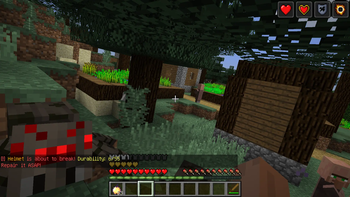
ArmorNotifier
Never forget to repair your armor again!
ArmorNotifier is a lightweight utility mod that warns you in chat when your armor durability drops below 15%. Stay prepared and never let your armor break in the middle of a fight!
✨ Features
- Automatic Durability Check — Scans your armor every 5 seconds
- Chat Warnings — Sends colored warning messages when armor is about to break
- Exact Numbers — Shows remaining durability and percentage for each piece
- Smart Notifications — Warns only once per armor piece until repaired
- Lightweight — No GUI, no configs, just works out of the box
- Multiplayer Compatible — Works on servers and singleplayer
⚠️ Warning Messages
When your armor drops below 15% durability, you'll see:
WARNING! 🥾 Boots is about to break! Durability left: 45/300 (15.0%) Repair it as soon as possible!
📦 Installation
- Install Minecraft Forge 1.12.2 (version 14.23.5.2859 or higher)
- Download the mod
.jarfile - Place it in your
.minecraft/modsfolder - Launch the game with Forge profile
- Done! The mod works automatically
🔧 Compatibility
- Minecraft Version: 1.12.2
- Mod Loader: Forge 14.23.5.2859+
- Client/Server: Client-side only
- Conflicts: None known
📋 Supported Armor
✅ All vanilla armor (Leather, Iron, Gold, Diamond, Chainmail) ✅ Armor from other mods (if they use standard durability system) ✅ Any item in armor slots with durability
🎯 Why Use ArmorNotifier?
- Stop losing expensive enchanted armor
- Perfect for hardcore mode
- Essential for long mining sessions
- Great for PvP and PvE combat
- Never waste resources on emergency repairs
🆓 License
This mod is free and open source. Feel free to use it in modpacks!
💬 Feedback
Found a bug or have a suggestion? Leave a comment below!
Stay protected! ⚔️🛡️
- Edition: Minecraft Java
- File type: .jar
- Minecraft version listed: 1.12.2
- How to install: Install the matching mod loader (Forge, Fabric or NeoForge) for your Minecraft version. → Download the .jar. → Put it in the .minecraft/mods folder and launch that loader profile.
- Where to get it: Opens on Modrinth — not every file is mirrored on our own servers.
Install steps are the general flow for this file type — How to install Minecraft Java mods & modpacks walks through it step by step.
- Ships as ArmorNotifier-1.0.jar — drop this file into the mods folder
- Download size: 3 KB
- Download link checked 12 Nov 2026 — working
These come from our own check of the pack file, not from the source page.