
ResourcepacksJava
Maxi's JourneyMap Cobblemon Minimap Icons
No matter the dimension nor form (regional, normal & shiny), you will see your Pokémon! This resource pack adds entity icons of Pokémon found in the…
⬇ Download on Modrinth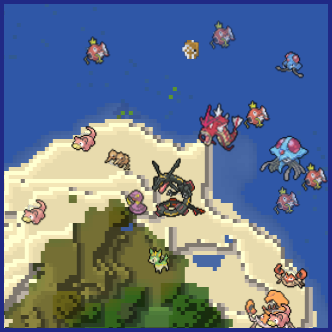
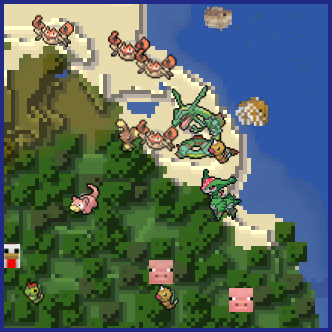

No matter the dimension nor form (regional, normal & shiny), you will see your Pokémon!
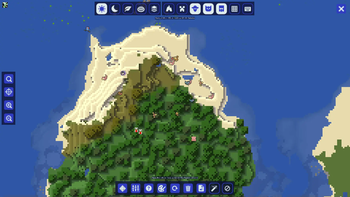
This resource pack adds entity icons of Pokémon found in the Cobblemon Mod to JourneyMap' minimap and fullscreen map, in pixel-art style. Supports up-to-date Cobblemon version.

- JourneyMap version 5.9.5 or newer

 |
 |
|---|---|
| Pixel Icons & Shinier Shinies: For those who want an old style and also want to spot Shinies slightly easier. | Shuffle Icons: For those who want a fun style while searching for those Pokémon. |

- Download the JourneyMap+Cobblemon.zip.
- Put it inside the folder resourcepacks of your Minecraft installation. An easy way to access this folder is via the ingame Options → Resource Packs, and click the bottom left button (Open Pack Folder).
- Select the JourneyMap+Cobblemon resourse pack from the available packs ingame (Options → Resource Packs).
- Click Done.
- On JourneyMap Options, both minimap Preset and Fullscreen map, set Mob Display to Icons.

-
I can't see any Pokémon on my map
For you to see Pokémon on your minimap/fullscreen map, you have to set Mob Display to Icons in your JourneyMap options. You have to set this for both presets and fullscreen map options.

-
I've set Mob Display to Icons but I still can't see any Pokémon
You have to make sure to, at least, have the version 5.9.5 of JourneyMap for the resourcepack to work. -
I have the correct JM version but I still don't see my Pokémon
Remember to Select (move to the right column) the correct resourcepack from your Available list on your game Options → Resource Packs. -
How can I make the icons bigger?
Just as seen above, aside from the Mob Display option is Mob Display Scale, you can set this number to your preference. Remember to set this number on the preset you will be using and/or on the fullscreen map.
Check out my other projects!


Quick facts
- Edition: Minecraft Java
- File type: .zip (resource pack)
- Minecraft version listed: 1.21.1
- How to install: Download the .zip resource pack — do not unzip it. → Put it in .minecraft/resourcepacks. → Enable it in Options → Resource Packs.
- Where to get it: Opens on Modrinth — not every file is mirrored on our own servers.
Install steps are the general flow for this file type — How to install Minecraft Java resource packs walks through it step by step.
Verified by MCModsHub
- Downloads as Maxi's-JM+CM_Pixel-U11.zip
- Download size: 2.7 MB
- Download link checked 15 Sept 2026 — working
These come from our own check of the pack file, not from the source page.