


World Home Command 🏠✨ World Home Command is a lightweight Fabric mod that allows players to save multiple base locations (homes) and teleport to them at any time. It's incredibly useful for survival adventures and managing bases on multiplayer servers!
🌟 Features Multiple Homes: Save as many locations as you want by giving them custom names.
Cross-Dimension Support: Works perfectly across the Overworld, Nether, and End. Teleports you to the exact dimension where the home was set.
Server-Side Only: This mod only needs to be installed on the server! Your friends or server members do not need to download this mod. They can join with a vanilla client and use the commands right away.
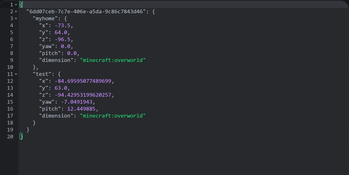
Safe Data Storage: Home data is safely saved as a dedicated JSON file within the world's saves folder. Your data won't be lost even if the server restarts or crashes.
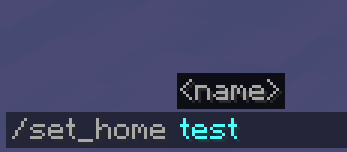
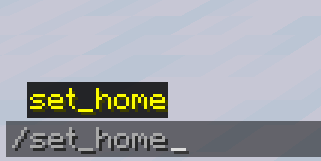
Action Bar Notifications & Auto-completion: Success messages are displayed neatly on the action bar (above the hotbar) to prevent chat spam. Fully supports command auto-completion (suggestions) while typing!
⌨️ Commands /set_home Registers your current location as a home with the specified name. (e.g., /set_home base)
/home Teleports you to the registered home. (e.g., /home base)
/delete_home Deletes the registered home.
⚙️ Requirements Mod Loader: Fabric Dependencies: Fabric API (Recommended)
📥 Installation [Singleplayer] Drop the .jar file into your mods folder.
[Multiplayer (Server)] Drop the .jar file into your server's mods folder. Players joining the server do NOT need to install it on their clients.
- Edition: Minecraft Java
- File type: .jar
- Minecraft version listed: 1.20.1
- How to install: Install the matching mod loader (Forge, Fabric or NeoForge) for your Minecraft version. → Download the .jar. → Put it in the .minecraft/mods folder and launch that loader profile.
- Where to get it: Opens on Modrinth — not every file is mirrored on our own servers.
Install steps are the general flow for this file type — How to install Minecraft Java mods & modpacks walks through it step by step.
- Ships as worldhomecommand-1.0.0.jar — drop this file into the mods folder
- Download size: 15 KB
- Download link checked 13 Sept 2026 — working
These come from our own check of the pack file, not from the source page.