
BetterBundleHUD
Java mod listed for Minecraft 26.x. Downloads from the MC Java Mods app on Android.
⬇ Download on Modrinth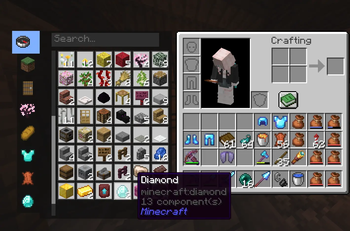
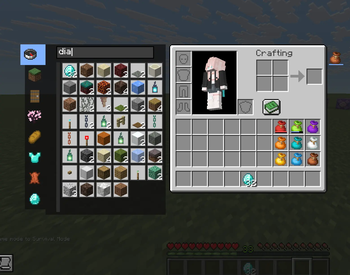
Tired of running out of inventory space? Sick of placing shulker boxes just to grab one item, or worried someone might snatch them? This mod solves it all! Adds a bundle content panel on the left side of your inventory screen — sort and organize massive amounts of items like creative mode tabs, gain tons of extra storage, and access everything as fast as a shulker box. Features 8 category filters, Chinese pinyin search, and one-click quick insert. Fully client-side, no cheating, works on servers!
你还在为背包空间不足而烦恼吗!??你还在因为潜影盒需要放出来才能拿东西,害怕被抢或觉得太麻烦吗!???这个mod完美解决了这个烦恼!在背包界面左侧添加收纳袋内容面板,可以像创造模式一样分类整理大量物品的同时,获得海量背包空间,像潜影盒一样快速存取物品。支持8种分类筛选、中文拼音搜索、快捷键快速放入,纯客户端无作弊,服务器可用!
AI assisted in development.
- Edition: Minecraft Java
- File type: .jar
- Minecraft versions listed: 26.1, 26.1.1, 26.1.2
- How to install: Install the matching mod loader (Forge, Fabric or NeoForge) for your Minecraft version. → Download the .jar. → Put it in the .minecraft/mods folder and launch that loader profile.
- Where to get it: Opens on Modrinth — not every file is mirrored on our own servers.
Install steps are the general flow for this file type — How to install Minecraft Java mods & modpacks walks through it step by step.
- Ships as better-bundle-1.2.1.jar — drop this file into the mods folder
- Download size: 367 KB
- Download link checked 12 Oct 2026 — working
These come from our own check of the pack file, not from the source page.