
Inventory Saver
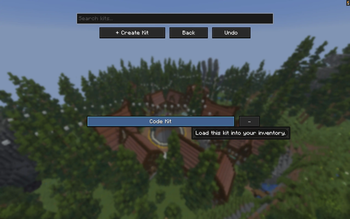
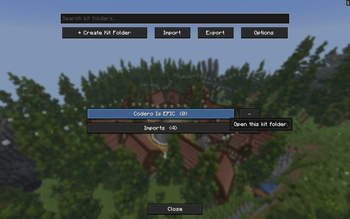
Inventory Saver is a simple Fabric client-side mod that lets you save, organize, and reload inventory presets quickly. It is made for players who swap between kits, building setups, tools, armor, or different loadouts and want an easy way to manage them without rebuilding their inventory every time.
Features
- Save your current inventory as a preset
- Create named preset folders
- Clean in-game UI for managing presets
- Quick preset selection menu
- Organized layout that supports more presets as your list grows
- Client-side focused and lightweight
- Built for Fabric 1.21.11
How It Works
Open the preset menu, create a new preset, name it, and save your current inventory setup. You can then return to the menu later and select the preset whenever you want to use that setup again.
This is useful for:
- PvP kits
- Building inventories
- Mining setups
- Redstone tools
- Event/loadout presets
- Creative mode organization
Controls
The mod includes an in-game menu for creating and selecting presets. The default keybind Kit Presets is "i".
Requirements
- Minecraft 1.21.11
- Fabric Loader
- Fabric API
Notes
This mod is designed to stay simple and clean. It does not try to add complicated systems or extra gameplay mechanics. It just helps you save and manage inventory setups faster.
Credits
Made by Galaxy6 and JudahXP.
- Edition: Minecraft Java
- File type: .jar
- Minecraft version listed: 1.21.11
- How to install: Install the matching mod loader (Forge, Fabric or NeoForge) for your Minecraft version. → Download the .jar. → Put it in the .minecraft/mods folder and launch that loader profile.
- Where to get it: Opens on Modrinth — not every file is mirrored on our own servers.
Install steps are the general flow for this file type — How to install Minecraft Java mods & modpacks walks through it step by step.
- Ships as KitPresetsV3.jar — drop this file into the mods folder
- Download size: 115 KB
- Download link checked 10 Sept 2026 — working
These come from our own check of the pack file, not from the source page.