
ModsJava
Show Your Identity
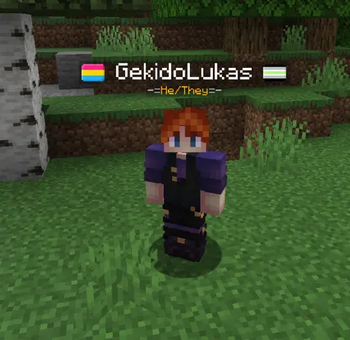
Show your support for the LGBTQ+ community and present your identity by displaying your pronouns and a pride flag next to your name.
⬇ Download on Modrinth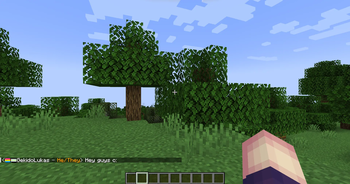


Express yourself in whatever way you want!






Tell players your Pronouns
by selecting one of the presets or using your own!

by selecting one of the presets or using your own!
Show how proud you are
You can display up to 2 pride flags from a big selection!
The flag position can be changed too.


You can display up to 2 pride flags from a big selection!
The flag position can be changed too.
Players will also be able to see your flags

Important!
Some players might act in bad faith, so SYI comes with a "Slur Filter"
By default a list of over 500 words are banned from being used. These include homophobic and transphobic slurs as well as words from hateful ideology like fascism. Feel free to add your own words to create safe spaces either by using the /syi command or by manually adding words to the list.
The file can be found in your .../config/ directory with the name slurs_filter.txt
The data is generated from the github repository sawdev1/better-profane-words if no file is found.
Some players might act in bad faith, so SYI comes with a "Slur Filter"
By default a list of over 500 words are banned from being used. These include homophobic and transphobic slurs as well as words from hateful ideology like fascism. Feel free to add your own words to create safe spaces either by using the /syi command or by manually adding words to the list.
The file can be found in your .../config/ directory with the name slurs_filter.txt
The data is generated from the github repository sawdev1/better-profane-words if no file is found.
Player Commands
(Anyone can use these)
Get a player's pronouns
/syi pronouns get <player>
Set your own pronouns
/syi pronouns set <pronouns>
Reset your own pronouns
/syi pronouns reset
Set your own pride flags
/syi flag set <primary|secondary> <flag>
Reset your own pride flags
/syi flag reset <primary|secondary>
Position your pride flags
/syi flag position <player_name|pronouns>
Get an short description of the flag and identity/orientation
/syi flag info <flag>
Get a player's pronouns
/syi pronouns get <player>
Set your own pronouns
/syi pronouns set <pronouns>
Reset your own pronouns
/syi pronouns reset
Set your own pride flags
/syi flag set <primary|secondary> <flag>
Reset your own pride flags
/syi flag reset <primary|secondary>
Position your pride flags
/syi flag position <player_name|pronouns>
Get an short description of the flag and identity/orientation
/syi flag info <flag>
Admin Commands
(OPs can use these)
Reset a player's Identity Data
/syi reset player <player>
Reset a everyone's Identity Data
/syi reset all
Add a word you don't want people to set as their pronouns (mainly slurs)
/syi slur_filter add <word>
Reload the slur filter file
/syi slur_filter reload
Reset a player's Identity Data
/syi reset player <player>
Reset a everyone's Identity Data
/syi reset all
Add a word you don't want people to set as their pronouns (mainly slurs)
/syi slur_filter add <word>
Reload the slur filter file
/syi slur_filter reload
Supported Languages


Translations in Collaboration with Lusobit Studio
 by @EUSOUEFEMERO and @iago_emanuel15
 by @franstachiotti and @firemortal10
 by @milomiletto and @PieroAzZZ
 by @daisy_comment
 by @ashwall_penguin
 by @RoseDorleans
Translations in Collaboration with Lusobit Studio
by @EUSOUEFEMERO and @iago_emanuel15
by @franstachiotti and @firemortal10
by @milomiletto and @PieroAzZZ
by @daisy_comment
by @ashwall_penguin
by @RoseDorleans
Quick facts
- Edition: Minecraft Java
- File type: .jar
- Minecraft version listed: 1.21.1
- How to install: Install the matching mod loader (Forge, Fabric or NeoForge) for your Minecraft version. → Download the .jar. → Put it in the .minecraft/mods folder and launch that loader profile.
- Where to get it: Opens on Modrinth — not every file is mirrored on our own servers.
Install steps are the general flow for this file type — How to install Minecraft Java mods & modpacks walks through it step by step.
Verified by MCModsHub
- Ships as showyouridentity-fabric-1.21.1-1.1.0.jar — drop this file into the mods folder
- Download size: 440 KB
- Download link checked 19 Sept 2026 — working
These come from our own check of the pack file, not from the source page.