
ModsJava
Player Capes
A beautiful client-side Fabric mod to wear any premium player's cape or elytra with an interactive 3D preview GUI!
⬇ Download on Modrinth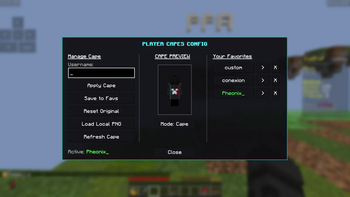
🌟 Player Capes
Have you ever wanted to wear your favorite Minecraft player's cape, or preview how an Elytra looks on your skin before buying or earning it? Player Capes is a premium, client-side cosmetic mod that lets you customize your cape and elytra textures in real-time using a beautiful, interactive 3D GUI!
✨ Features
- 🎭 Premium Cape Redirection: Apply any premium Minecraft player's cape (e.g., Mojang, Minecon, OptiFine) to your character instantly just by typing their username!
- 📦 Local Custom Capes: Load any local custom
.pngcape file directly from your computer using a LWJGL-native file picker! - 🧍 Interactive 3D Preview Pane: Features a 360-degree continuously rotating 3D preview of your player skin!
- Drag-to-Rotate: Click and drag your character horizontally to rotate them and inspect your cape from any angle. Releasing the mouse smoothly resumes the automatic rotation!
- Upright Head Alignment: The preview model's head remains completely straight and forward-facing, unaffected by where your in-game player is looking.
- Nametag Hidden: The floating nametag above the character is completely hidden for a clean, professional outline preview!
- ⚡ Instant Elytra/Cape Toggle: Seamlessly swap between a flat cape and a full 3D Elytra in the preview.
- In Cape Mode, standard chestplates (Netherite, Diamond, etc.) you are wearing in-game are preserved and rendered beneath the cape!
- ⭐ Favorites Naming Modal: Save your favorite capes to a local favorites list. When saving, a beautiful naming dialog prompts you for a custom name, keeping your main control panel clean and uncluttered.
- 🟢 Active Highlight: Applied favorites instantly light up in vibrant green in your sidebar list so you always know which custom look is active.
- 🚀 Native Drag-and-Drop / File Pickers: A robust dual file-picking system that seamlessly falls back to LWJGL text fields to ensure file picking works on all platforms and launchers.
🛠️ How to Use
Simply launch the game and open the configuration screen:
- Open the GUI: Use the client command
/pcapes(or/pcapes info) to open the customized tri-pane configuration screen. - Add a Cape: Type a premium player's username in the text field and click Apply Cape!
- Save to Favorites: Click Save to Favs, type a custom name in the dialog popup, and hit Enter.
- Reset: Click Reset Original (or run
/pcapes reset) to return to your default in-game look.
💻 Commands
/pcapes <premium_username>- Instantly sets your cape to that player's cape./pcapes favourite- Saves the current cape to your favorites./pcapes reset- Resets your cape back to your default skin look./pcapes info- Opens the interactive split-pane 3D Preview GUI.
Quick facts
- Edition: Minecraft Java
- File type: .jar
- Minecraft version listed: 1.21.7
- How to install: Install the matching mod loader (Forge, Fabric or NeoForge) for your Minecraft version. → Download the .jar. → Put it in the .minecraft/mods folder and launch that loader profile.
- Where to get it: Opens on Modrinth — not every file is mirrored on our own servers.
Install steps are the general flow for this file type — How to install Minecraft Java mods & modpacks walks through it step by step.
Verified by MCModsHub
- Ships as playercapes-1.21.7.jar — drop this file into the mods folder
- Download size: 49 KB
- Download link checked 6 Sept 2026 — working
These come from our own check of the pack file, not from the source page.