
Laminar
Java mod listed for Minecraft 26.x. Downloads from the MC Java Mods app on Android.
A low-overhead Fabric mod that unleashes your idle Integrated GPU to assist the CPU with heavy AI pathfinding, acoustics, and Line-of-Sight.
⬇ Download on Modrinth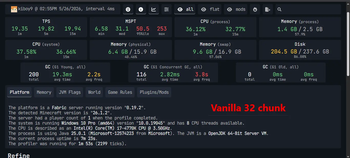
Laminar Engine


-orange.svg)

Asynchronous iGPU Co-Processing for Minecraft AI, Acoustics, and Line-of-Sight.
Laminar is an optimization suite designed to interface the CPU with the built-in integrated graphics processor (Intel HD/UHD Graphics, AMD Radeon Graphics) using explicit OpenCL 1.2/1.1 pipelines.
By offloading computationally intensive CPU tasks, Laminar assists in maintaining server tick rates (TPS) while reducing CPU utilization on the rendering and main logic threads.
⚠️ Note: Laminar doesn't increase the maximum FPS you can achieve. It simply improves stability and the ability to handle multiple mobs and sounds simultaneously without lag or significant FPS drops using parallel processing on the iGPU.
Important: The issue with the dedicated server has been fixed without having to separate it into 2 editions(Standart and Server Edition) in version 1.3.1+
Core Engine Architecture
1. Project "Hive" (Asynchronous Flow-Field AI Pathfinding)
High-density mob farms or massive siege events normally bring servers to their knees due to heavy, single-threaded CPU pathfinding loops. Project Hive completely bypasses this limitation by offloading global routing to the GPU co-processor.
- Integrated Flow-Field Co-Processing: Instead of generating hundreds of individual, CPU-heavy paths, the iGPU calculates a single, unified 3D vector field spanning over 110,000 voxels around the player. Hundreds of hostile entities can then simultaneously read their movement directions from this single grid in constant O(1) time, saving massive amounts of CPU cycles.
- Intelligent Hybrid Navigation: Global macro-pathing is calculated dynamically on the GPU, while micro-level physics (such as jumping, swimming, and block collision avoidance) are handed back to the native Minecraft engine, maintaining authentic movement and animation behaviors.
- Fluid-Agnostic Routing: Voxel-level filtering automatically ignores non-obstructive ocean blocks (like water, kelp, and seagrass), preventing server lag and pathfinding errors when mobs navigate underwater biomes.
- Dynamic Swarm Intelligence: Mobs behave like a coordinated pack. When one hostile entity spots you, it dynamically alerts nearby pack members within a physical auditory radius, allowing them to instantly coordinate a swarm attack via the GPU flow-field.
2. Project "Echo" (Environmental Acoustics & 3D Sound Occlusion)
Experience Minecraft's audio like never before. Project Echo completely transforms how sound propagates through the world, delivering rich, physical, and highly immersive acoustics powered by your integrated GPU.
- True Physical Occlusion: Sound waves now dynamically react to the block materials separating you from the source. Whether it is a zombie groaning behind a thick stone wall, a piston firing in a deep cavern, or water flowing overhead, the audio is realistically muffled and dampened using hardware-accelerated low-pass filtering.
- Dynamic Cave Reverb: Deep caves, narrow tunnels, and massive hollow caverns now feel physically alive. Using a 16-ray Fibonacci sphere, the iGPU continuously measures the size of your surroundings, automatically applying cinematic echoes and reverberation that adapt seamlessly as you transition from tight stone passages to wide underground chambers.
- Intelligent Open-Sky Guard: The acoustic engine is smart enough to differentiate enclosed spaces from the open sky. Sound waves escaping into the open atmosphere dissipate naturally, ensuring zero artificial echoes under the sky while preserving rich, atmospheric acoustics inside caves and buildings.
- Seamless Mod & Media Compatibility: Built to support custom music discs, instruments, and complex audio additions from other mods out of the box. By dynamically scaling range calculations with in-game sound properties, every custom audio event in your modpack propagates and dampens with authentic physical properties.
- Decoupled Performance Engine: All heavy raymarching calculations are quarantined to a dedicated background co-processor thread. By utilizing a local RAM caching system, the client's rendering thread is completely isolated from audio compute overhead, maintaining fluid, stutter-free frame rates even during chaotic, noisy encounters.
3. Project "Aura" (Parallel Raymarching Line-of-Sight)
Hostile mobs constantly run expensive line-of-sight checks on the CPU to see if they can target you. Project Aura moves this heavy workload entirely to the integrated GPU.
- Parallel GPU Raymarching: Executes parallel raymarching checks from the eye level of up to 1,024 active entities to the player simultaneously on the iGPU, entirely freeing the server thread from expensive visibility checks during dense encounters.
- Symmetric Trust Validation: The engine fully trusts the GPU's highly precise visibility calculations. If the GPU determines a mob can see you, or is completely blocked by a wall, it immediately bypasses the CPU's expensive raycast, reducing the CPU's line-of-sight workload by up to 90% during massive chases.
- Instant Shadow Cache: Stores visibility states in a lightning-fast, local CPU-side memory registry. The main server thread can query whether a mob can see the player in constant O(1) time, eliminating all tick spikes.
4. Adaptive Entity AI Throttling (Level of Detail AI)(has been removed since version 1.2.9)
- Dynamic 4-Zone LOD Engine:
- Zone 1a (Active Pursuit): Mobs with an active target run at 20 TPS.
- Zone 1b (Proximity Combat): Mobs within a 10-block radius of a player run at 20 TPS, preventing delayed aggro or inactive AI behaviors when players are close.
- Zone 2 (Close Idle): Mobs within a 24-block radius run at 5 TPS (delay = 4).
- Zone 3 (Far Idle): Mobs outside 24 blocks run at 1.6 TPS (delay = 12).
- Event-Driven Target Registry: Mobs register to an event-driven via hooks. This reduces the requirement for world scans on every tick, minimizing server CPU overhead.
- UUID-Staggered Ticking: Tick execution is staggered across frames using a positive bitwise modulo of the mob's UUID to flatten CPU usage spikes.
- Momentum & Animation Resets: On target loss (e.g., Creative mode transition), a 48-block sweep resets physical velocity, terminates active navigation paths, and resets aggressive state animations.
Performance Benchmarks
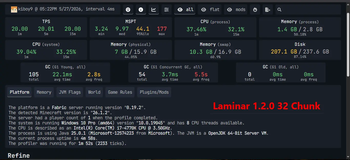
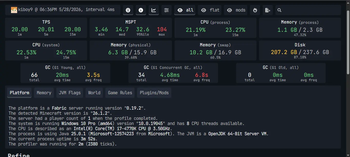
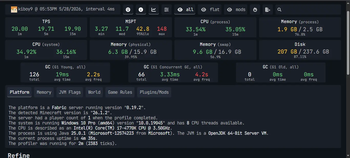
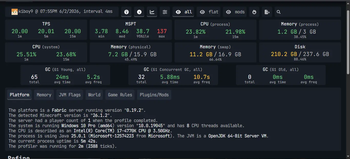
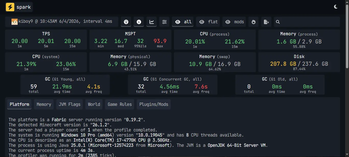
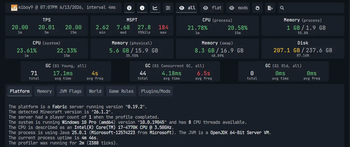
Tested on: Intel Core i7-4770K (Haswell @ 4.3 GHz OC, AVX2), Intel HD 4600 iGPU (OpenCL 1.2), NVIDIA GTX 1050. Scenario: 500 active Zombies, 32 Chunks loaded. Client optimization pack contains Sodium, FerriteCore, and Lithium.
| Performance Metric | Vanilla Minecraft | Laminar v1.2.7 + Pack | Net Improvement |
|---|---|---|---|
| Server Tick Rate | 19.35 TPS | 20.00 TPS | +0.65 TPS (Locked 20) |
| Median MSPT | 31.1 ms | 7.68 ms | -75.3% (4x faster) |
| 95th% MSPT | 50.5 ms | 27.8 ms | -44.9% (Smoother) |
| CPU Process Usage | 36.12% | 21.78% | -39.7% (Lower CPU overhead) |
| Memory Footprint | 1.4 GB | 1.0 GB | -28.5% (Less RAM allocation) |
| GC Young Frequency | 2.2s | 4.0s | +81.8% (Infrequent GCs) |
| GC Young Avg Pause | 19.3 ms | 17.1 ms | -11.4% (Shorter GC pauses) |
| GC Young Total Runs | 200 runs (in 113s) | 71 runs (in 120s) | -64.5% fewer GC events |
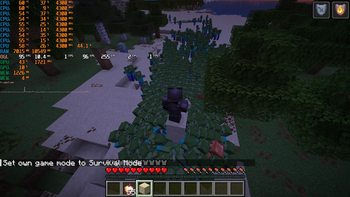
By increasing the maximum simultaneous audio occlusion capacity to 256 channels (previously 64) and the simultaneous Line-of-Sight Raymarching capacity to 1,024 active entities (previously 256), the rendering frame rate during dense crowd chases has increased.
Client Rendering Framerates during Dense Crowd Chases:
- Laminar v1.2.5: 64 - 71 FPS
- Laminar v1.2.6b (Current): 76 - 84 FPS
Result: A highly responsive +10 to +20 FPS gain under heavy entity stress, ensuring smoother camera movement and consistent frametimes when actively pursued by large hordes.
NoteTesting Note regarding ImmediatelyFast:
ImmediatelyFast has been excluded from our standardized benchmark environment. While it is an exceptional mod that successfully boosts client-side FPS and lowers overall CPU utilization, our testing indicates that its aggressive rendering buffer optimizations can introduce slight memory bandwidth contention when paired with Laminar's asynchronous OpenCL host-mapping on older architectures (causing a marginal increase in median MSPT and GC frequency).
It remains 100% compatible and safe to use alongside Laminar if you prioritize maximum visual frame rates over strict server-tick consistency.
Compatibility & Requirements
- Fabric Loader: v0.19.2+ (Minecraft 26.1.2+)
- Hardware: A dual-GPU configuration (CPU + Integrated GPU) or an APU.
- OpenCL: The iGPU must support OpenCL 1.1 or higher.
- Java: Java 25 (GraalVM recommended for vectorization optimizations).
Compatible Modifications
Laminar is designed to operate alongside other render and system optimization modifications.
- Compatible with Sodium, Lithium, FerriteCore, and ImmediatelyFast.
- VulkanMod Compatible: Operates alongside Vulkan rendering by bypassing GPU memory conflicts through host memory-mapped buffers.
Incompatible
- CPU-Bound Sound Physics Modifications (
Sound Physics Remastered,Acoustic Overhaul). Project Echo serves as a hardware-accelerated alternative to these modifications.
FAQ (Frequently Asked Questions)
Q: Will this work on a Dedicated Server?
A: Most enterprise server CPUs (Xeon/EPYC) do not contain an integrated GPU. Laminar will detect this condition and disable itself without crashing. Laminar is designed for Single-Player, LAN, or Self-Hosted servers running on consumer desktop/laptop processors (Intel Core / AMD Ryzen).
Q: Does it change any vanilla behaviour?
A: For the most part, no. Mobs still walk, jump, and behave exactly like vanilla.
The only gameplay changes are:
- Sounds get muffled realistically when you are behind walls.
- Mobs nearby will alert each other to join the chase (like piglins when they are angry).
If you want 100% vanilla gameplay, you can easily disable both of these features in the config file (laminar.json).
Q: Do I need to configure anything?
A: Laminar operates with default configurations out of the box.
Q: What if I only have an Integrated GPU (iGPU) with no dedicated graphics card?
A: The effectiveness depends on current iGPU utilization and your rendering backend:
- iGPU with headroom (Usage < 85%): Laminar will utilize the remaining GPU cores to offload CPU calculations, resulting in lower tick latency.
- iGPU fully utilized (Usage ~ 100%, e.g., due to shaders): Introducing OpenCL compute tasks may cause resource contention on the GPU silicon, which could lead to a reduction in visual FPS.
- Vulkan Backend on iGPU-only setups (Minecraft 26.2+): Due to the highly optimized nature of the Vulkan rendering engine, it will naturally saturate the integrated GPU's execution units to their absolute peak limits. On an iGPU-only configuration, this maximum utilization leaves virtually zero headroom for Laminar's OpenCL compute queues, which can result in frame-time drops and context stalls.
Note: If operating on an iGPU-only configuration, it is recommended to pair Laminar with performance modifications like Sodium and use optimized graphics settings. Furthermore, if you are using the experimental Vulkan backend on an iGPU-only setup, it is highly recommended to cap your in-game framerate (e.g., to 60 or 90 FPS) to artificially create the necessary GPU headroom for Laminar's asynchronous co-processing loops.
- Edition: Minecraft Java
- File type: .jar
- Minecraft version listed: 26.2
- How to install: Install the matching mod loader (Forge, Fabric or NeoForge) for your Minecraft version. → Download the .jar. → Put it in the .minecraft/mods folder and launch that loader profile.
- Where to get it: Opens on Modrinth — not every file is mirrored on our own servers.
Install steps are the general flow for this file type — How to install Minecraft Java mods & modpacks walks through it step by step.
- Ships as laminar-1.3.1+26.2.jar — drop this file into the mods folder
- Download size: 299 KB
- Download link checked 12 Oct 2026 — working
These come from our own check of the pack file, not from the source page.