
Vanilla Storage Interface
A sleek, Vanilla-friendly storage terminal! Access all items – even those nested inside Shulker Boxes – via a searchable, sortable, and scrollable UI…
⬇ Download on Modrinth
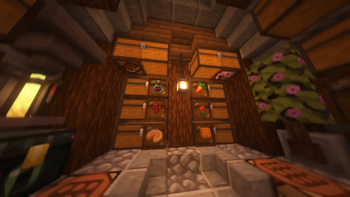
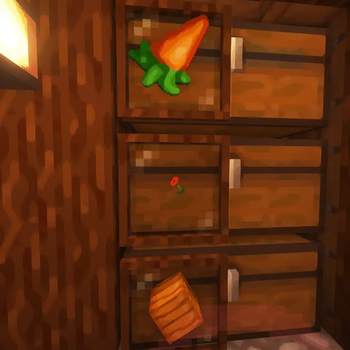
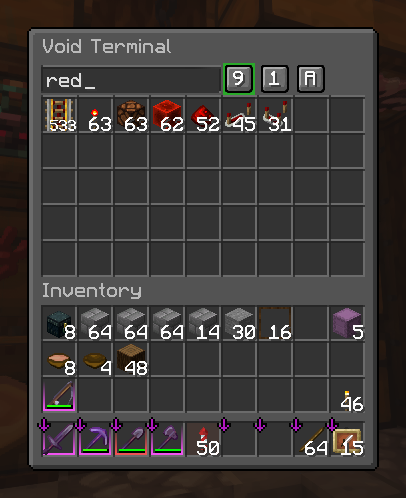
Note: IRL responsibilities quieted down for the moment so we're back to working on our Minecraft projects, including this one ^^.
A sleek, Vanilla-oriented storage terminal mod for Minecraft 1.21.1 (Fabric).
If you wish to have this mod ported to a newer/older version of the game, or see new block variants or features added, you can create a Feature Request here :). If you have any questions, reach out to us in the Discussions section.
If you find any bugs or issues, please fill out a 🐞BUG report here.




Tired of digging through massive walls of chests and sifting through countless Shulker Boxes? This mod offers a stupidly simple way to access large quantities of items in one convenient place – using nothing but standard Vanilla inventories.
The Storage Interface is a smart terminal block. Attach it to a Chest, Barrel, or almost any other block with an inventory to access a unified, searchable, sortable, and scrollable virtual inventory.
✨ Features
- Unified Smart Terminal: Quickly find what you need with a live search bar, smart sorting (A-Z, Ascending, Descending), and a scrollable grid that bypasses Vanilla slot limits. Enchanted Books dynamically sort by enchantment names, and scroll-extracting smoothly pauses the grid to prevent misclicks.
- Smart Storage Defragmentation: Press a hotkey to instantly optimize your storage! The server vacuums items, merges partial stacks, sorts them based on your settings, and repacks them to maximize density and free up Shulker Boxes.
- Portable Access: Access your storage on the go without placing blocks!
- Void Terminal: Deep-scan all Shulker Boxes inside your Ender Chest.
- Player Terminal: Browse all Shulker Boxes sitting in your inventory at once.
- Shulker Terminal: Open a Shulker Box just by hovering over or holding it.
- Zero-Lag Visual Labels: Place an item in the UI's Ghost Slot to display it on the block like an Item Frame. It renders statically into the chunk mesh – meaning you can have 1,000 of these with zero frame drops. Resize, rotate, make it glow!
- Intelligent Auto-Packing: Utilizes a smart 3-pass algorithm when shift-clicking loose items. The system automatically groups matching items into corresponding Shulker Boxes before packing overflow into empty boxes to save space.
- Stackable Shulker Safety: Fully compatible with mods that increase Shulker Box stack sizes (like Carpet). It safely auto-splits stacked boxes to prevent duplication or deletion.
- Aesthetic Integration: Comes in 34 variants (all 11 wood types + Black Stained Glass). Right-click with a Glow Ink Sac to make the screen glow!
📖 How to Use
- Craft a Frame: Combine your wood of choice (Planks, Logs, or Stripped) to create a
Storage Frame. - Craft the Interface: Upgrade your Frame into the final
Storage Interface. - Place and Connect:
Sneak + Right-Clickto place the Interface against any compatible Vanilla storage block. - Interact:
Right-clickthe block to open the terminal.
⌨️ Controls & Integrations
- Rapid Movement:
Shift + Scroll Downto rapidly pull full stacks.Ctrl + Scroll Downfor single items.Shift + Double-Clickto move all matching items. - Throw Items: Press your drop key (Default
Q) to throw items directly out of the terminal. HoldCtrl+Qfor full stacks. Hold the key to throw a continuous stream! - Defragmentation: Press
Ctrl + Sto compress Shulker Boxes. PressCtrl + Shift + Sto fully compress and sort all loose items and Shulkers in the terminal. - IPN Integration: Operates as a soft dependency for Inventory Profiles Next. Dynamically reads live IPN hotkeys and configuration from memory to mimic custom "Move All Items", "Move Matching", and "Include Hotbar" logic natively inside the terminal!
- REI Integration: Hover over any item in the grid and press
RorUto instantly pull up recipes and uses.
Default Keybinds:
V: Open Void Terminal (Requires Ender Chest in player inventory)N: Open Player Inventory TerminalH: Open hovered Shulker BoxB: Open held Shulker Box
⚙️ Requirements
- Minecraft 1.21.1 (Fabric Loader >= 0.16.14)
- Fabric API
- Cloth Config API (Server & Client: Required for settings)
- ModMenu (Client: Required for client-side settings screen)
Side note:
This mod was primarily developed for our 'Vanilla++' survival server which is still running on 1.21.1 since we were too busy IRL to update our modpack... We are planning on updating the modpack and the server to a newer game version whenever we have the time (summer most likely). As such, we will definitely be updating this mod (and other custom mods made by us) to a newer game version as well.
Side note 2:
Only limited playtesting has been done so far, so if you encounter any issues, bugs, unintended features or game-breaking behavior, please please do let us know by submitting a 🐞BUG report. Thank you :)
- Edition: Minecraft Java
- File type: .jar
- Minecraft version listed: 1.21.1
- How to install: Install the matching mod loader (Forge, Fabric or NeoForge) for your Minecraft version. → Download the .jar. → Put it in the .minecraft/mods folder and launch that loader profile.
- Where to get it: Opens on Modrinth — not every file is mirrored on our own servers.
Install steps are the general flow for this file type — How to install Minecraft Java mods & modpacks walks through it step by step.
- Ships as vanilla-storage-interface-0.9.6.jar — drop this file into the mods folder
- Download size: 327 KB
- Download link checked 21 Aug 2026 — working
These come from our own check of the pack file, not from the source page.