
Even Better Developer Tools
In-game developer tooling for Fabric modders — log viewer, registry browser, config hot-reload, and mixin inspector.
⬇ Download on Modrinth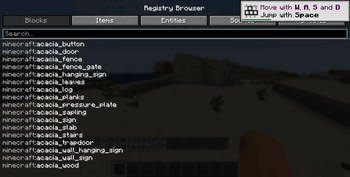
Even Better Developer Tools
A mod for Minecraft mod developers that adds developer-focused tooling directly inside the game — no external IDE or console required.
What's new in v1.1
Performance HUD
Toggle a compact always-on overlay showing FPS, frame time, heap memory usage (used / max, with % fill), GC collection count and total pause time, and server ping. Color-coded green / yellow / red at a glance. Press the bound key (unbound by default, set in Controls) to toggle it on or off.
Full feature list
In-Game Log Viewer
View the full game log without alt-tabbing. Filter by level (DEBUG / INFO / WARN / ERROR) and text, with auto-scroll, color-coded severity, and a timestamp on every line.
Registry Browser
Instantly look up any registered identifier — Blocks, Items, Entity Types, Sound Events, and Particle Types. Click any entry to copy its namespaced ID to the clipboard.
Config Hot-Reload
Watches your entire config directory. When any config file changes on disk, the game fires a ConfigReloadEvent your mod can subscribe to and shows a toast notification — no restart required.
Mixin Inspector
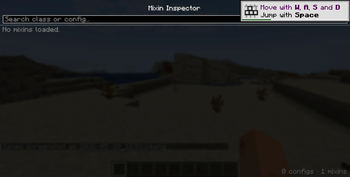
Lists every loaded Mixin configuration and all the classes it injects into, with a live search filter. Great for debugging Mixin conflicts during development.
All features are keybind-accessible (unbound by default, set them in Controls). No server-side component required.
This mod is intended for mod developers. It exposes internal game state and tooling that is not useful for normal gameplay.
- Edition: Minecraft Java
- File type: .jar
- Minecraft version listed: 1.21.1
- How to install: Install the matching mod loader (Forge, Fabric or NeoForge) for your Minecraft version. → Download the .jar. → Put it in the .minecraft/mods folder and launch that loader profile.
- Where to get it: Opens on Modrinth — not every file is mirrored on our own servers.
Install steps are the general flow for this file type — How to install Minecraft Java mods & modpacks walks through it step by step.
- Ships as devtools-neoforge-1.1.0.jar — drop this file into the mods folder
- Download size: 31 KB
- Download link checked 21 Aug 2026 — working
These come from our own check of the pack file, not from the source page.