
Bigger Items PvP
Java mod listed for Minecraft 1.20. Downloads from the MC Java Mods app on Android.
BiggerItems lets you resize dropped items in Minecraft from 0.01× to 10×. Press H to open the GUI, search items, and save custom sizes for every item.
⬇ Download on Modrinth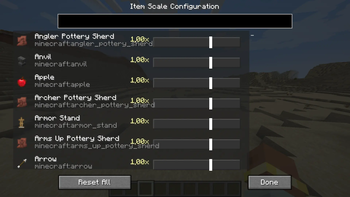
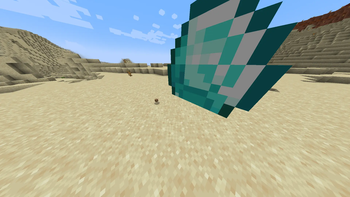
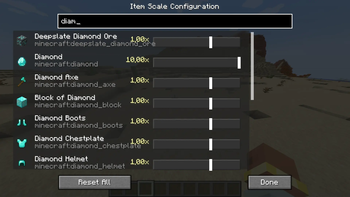
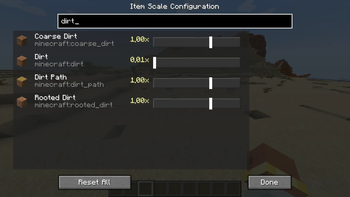
BiggerItems is a Minecraft Forge mod for version 1.20.1 that gives players full control over the visual size of dropped item entities (items lying on the ground). Why? In vanilla Minecraft, every dropped item is the same size, making it hard to visually distinguish valuable loot from common junk. BiggerItems fixes this by letting you scale items independently. How it works:
Press the H key (configurable) to open the Item Scale Configuration GUI. The GUI lists every registered item in the game with a search bar to quickly find what you need. Adjust any item's ground scale from 0.01× (barely visible) to 10.0× (huge) using a logarithmic slider for precise control. Changes are saved immediately to config/biggeritems_scales.json and persist across restarts. A "Reset All" button restores every item back to its default 1.0× scale. Technical details: Uses a Mixin ( ItemRendererMixin.java ) to inject scale transformations into the item rendering pipeline — only affects ItemDisplayContext.GROUND , so inventory icons, item frames, and name tags are unaffected. The scale is applied via PoseStack.scale() wrapped in pushPose()/popPose() calls to isolate the transform. Built with Minecraft Forge (v47.4.20) for Minecraft 1.20.1 using the official Mojang mappings. Written in Java 17 using the ForgeGradle build system. Use cases: Make rare items like Netherite ingots or diamonds appear larger to stand out. Shrink common junk items to reduce visual clutter. Create dramatic visual effects for adventure maps or modpacks. Improve clarity when many items are dropped in the same spot.
- Edition: Minecraft Java
- File type: .jar
- Minecraft versions listed: 1.20.1, 1.20.2, 1.20.3
- How to install: Install the matching mod loader (Forge, Fabric or NeoForge) for your Minecraft version. → Download the .jar. → Put it in the .minecraft/mods folder and launch that loader profile.
- Where to get it: Opens on Modrinth — not every file is mirrored on our own servers.
Install steps are the general flow for this file type — How to install Minecraft Java mods & modpacks walks through it step by step.
- Ships as biggeritems-1.0-SNAPSHOT.jar — drop this file into the mods folder
- Download size: 25 KB
- Download link checked 23 Oct 2026 — working
These come from our own check of the pack file, not from the source page.