
Creat Aeronautics Structures
Java mod listed for Minecraft 1.21. File opened and checked on 30 Sep 2026; downloads from the MC Java Mods app on Android.
This mod adds natural-looking structures built from Create and Create: Aeronautics blocks to Minecraft 1.21.1. The ruins of engineering houses, abandoned…
⬇ Download on Modrinth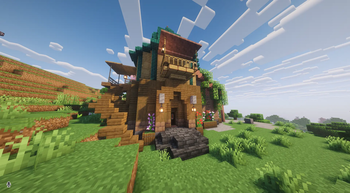

Create Aeronautics Structures
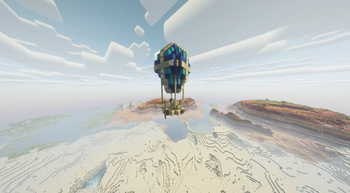
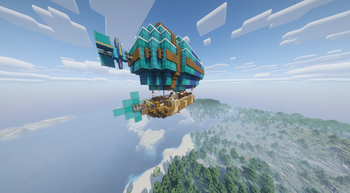
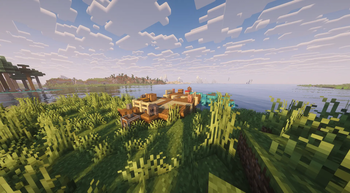
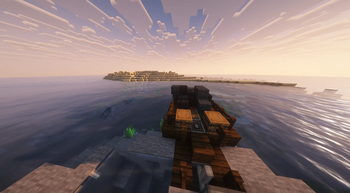
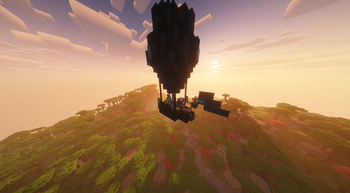
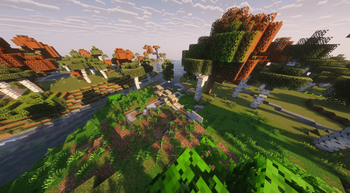
This mod adds natural-looking structures built from Create and Create: Aeronautics blocks to Minecraft 1.21.1. Ruins of engineering houses, abandoned boats, soaring airships and robber balloons will fit organically into your worlds without breaking the progression and balance of the game.
Features:
Several types of structures located in different biomes: plains, deserts, mountains, oceans. A peaceful engineer trader now lives in the Engineering House – the villager_create_engineer. Right-click on him to trade for items from Create and Create: Aeronautics (shafts, cogwheels, andesite alloy, mechanical presses, and much more). All buildings look as if they were part of the world always, and do not give a game advantage – only atmosphere.
Configuration: The welcome message with the Telegram link can be disabled. Open the config file cr_aero_structures-client.toml and set showLoginMessage = false.
The mod is in active development: near plans include improving the quality of structures and adding more variety.
Dependencies (must be installed):
Create 6.0.10 Create Aeronautics 1.1.3 (newer versions may work) Sable 1.1.3 (newer versions may work) GeckoLib 4.8.4 (newer versions may work)
You can follow the development on the Telegram channel – https://t.me/cr_aero_structurs
Create Aeronautics Structures
Этот мод добавляет в Minecraft 1.21.1 натурально выглядящие структуры, построенные из блоков Create и Create: Aeronautics. Руины инженерных домов, заброшенные лодки, парящие дирижабли и воздушные шары разбойников органично впишутся в ваши миры, не нарушая прогрессию и баланс игры.
Особенности:
Несколько типов структур, расположенных в разных биомах: равнины, пустыни, горы, океаны. В доме инженера теперь живёт мирный торговец — villager_create_engineer. Нажмите ПКМ, чтобы торговать предметами из Create и Create: Aeronautics (валы, шестерни, андезитовый сплав, механические прессы и многое другое). Все постройки выглядят так, будто были частью мира всегда, и не дают игрового преимущества — только атмосферу.
Настройка: Приветственное сообщение со ссылкой на Telegram-канал можно отключить. Откройте файл конфигурации cr_aero_structures-client.toml и установите showLoginMessage = false.
Мод находится в активной разработке: в ближайших планах — улучшить качество структур и добавить больше разнообразия.
Для работы обязательно установите:
Create 6.0.10 Create Aeronautics 1.1.3 (можно ставить более новые версии) Sable 1.1.3 (можно ставить более новые версии) GeckoLib 4.8.4 (можно ставить более новые версии)
За разработкой можно следить в Telegram-канале – https://t.me/cr_aero_structurs
- Edition: Minecraft Java
- File type: .jar
- Minecraft version listed: 1.21.1
- How to install: Install the matching mod loader (Forge, Fabric or NeoForge) for your Minecraft version. → Download the .jar. → Put it in the .minecraft/mods folder and launch that loader profile.
- Where to get it: Opens on Modrinth — not every file is mirrored on our own servers.
Install steps are the general flow for this file type — How to install Minecraft Java mods & modpacks walks through it step by step.
- Ships as cr_aero_structures.jar — drop this file into the mods folder
- Download size: 263 KB
- Download link checked 9 Oct 2026 — working
These come from our own check of the pack file, not from the source page.