ModsJava
CircuitSim
CircuitSim is a Minecraft Forge mod for version 1.20.1 that lets you build and simulate real electronic circuits inside the game. Place component blocks…
⬇ Download on Modrinth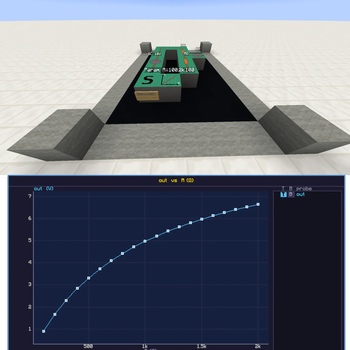
CircuitSim — A Minecraft Circuit Simulation Mod
This mod was built entirely with AI assistance.
CircuitSim is a Minecraft Forge mod for version 1.20.1 that lets you build and simulate real electronic circuits inside the game. Place component blocks in the world, connect them with wires, and right-click the Simulate Block to run a full SPICE simulation powered by ngspice.

Features
Passive & basic components
- Resistor, Capacitor, Inductor
- Voltage sources: DC, sinusoidal (SIN), pulse (PULSE)
- Current source
- Diode
- Wire and Ground
Controlled (dependent) sources
- VCVS — voltage-controlled voltage source (E)
- VCCS — voltage-controlled current source (G)
- CCVS — current-controlled voltage source (H)
- CCCS — current-controlled current source (F)
IC / PDK components
- IC Resistor, IC Capacitor
- IC NMOS4, IC PMOS4 (4-terminal MOSFETs)
- SKY130A PDK support with
.libpath configuration, plus a generic placeholder PDK and a free-form.includemode for custom libraries
Multi-cell blocks
- Amplifier — 5×5 op-amp subcircuit with selectable 5-pin or 7-pin (offset-null) variants and a vertical-mirror toggle for swapping inverting/non-inverting inputs and supply rails
Measurement
- Voltage Probe — labelled, measures node voltage
- Current Probe — placed in series to measure branch current
Simulation control
- Simulate Block — runs the analysis. Supported types:
.OP— DC operating point.AC— frequency sweep (start/stop/points-per-decade, log-frequency axis).TRAN— transient analysis (time step, stop time)
- Temperature — single value (e.g.
27) or sweep spec (e.g.20:40:5or20,30,40) for one run per temperature - ngspice compat modes:
hsa,psa,lt,ki,va - Parametric Block — sweeps a target component's parameter (value, W, L, mult, nf) across runs
- Commands Block — multi-line block of raw ngspice commands injected verbatim into the netlist
.controlsection - Sim Link Block — bridges two physically-disconnected sub-circuits into the same netlist without unioning their nodes (useful for routing a CCVS/CCCS controlling source from a remote region)
Output
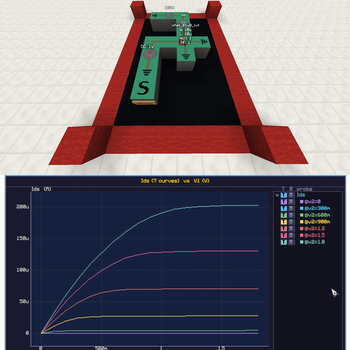
- Graph screen — plot up to two probes simultaneously (stacked), with hover tooltips showing exact values; log10 X axis for AC sweeps
- SPICE simulation via ngspice as a subprocess — real node voltages and branch currents
.OPresults printed to the in-game chat- In-game GUI for every component to configure values with SI-suffix parsing (p, n, u, m, k, M, …)
Requirements
- Minecraft 1.20.1
- Minecraft Forge 47.3.0
- Java 17
- ngspice installed and available on your system
PATH
Installation
Method 1: Just take it
- Install Java 17 and Minecraft Forge 47.3.0 for Minecraft 1.20.1.
- Install ngspice and make sure
ngspice_con(Windows) orngspice(Linux/Mac) is accessible from your terminal. - Grab the Latest Release
- Put the mod into your Minecraft
mods/folder
Method 2: Build it yourself
- Install Java 17 and Minecraft Forge 47.3.0 for Minecraft 1.20.1.
- Install ngspice and make sure
ngspice_con(Windows) orngspice(Linux/Mac) is accessible from your terminal. - Clone this repository:
git clone https://github.com/Dank0v/circuitsim.git cd circuitsim - Build the mod using the Gradle wrapper:
# Windows gradlew.bat build # Linux / Mac ./gradlew build - Find the compiled
.jarinbuild/libs/— it will be named something likecircuitsim-x.x.x.jar. - Drop that
.jarinto your Minecraftmods/folder. - Launch the game.
How to Use
- Open the Circuit Simulator creative tab to find all blocks.
- Place component blocks and connect them with Wire blocks. Every circuit needs at least one Ground block.
- Right-click any component to open its configuration GUI and set its value.
- Place a Simulate Block anywhere connected to the circuit.
- Right-click the Simulate Block to run the simulation. Results appear in chat.
Probes
- Voltage Probe — place adjacent to a wire node. Right-click to give it a label. The simulation will report the voltage at that node.
- Current Probe — place in series (between two wires) to measure current through that branch.
Known Issues / TODO
License
GPL-3.0 — see LICENSE.
Quick facts
- Edition: Minecraft Java
- File type: .jar
- Minecraft versions listed: 1.20.1, 1.20.2, 1.20.3
- How to install: Install the matching mod loader (Forge, Fabric or NeoForge) for your Minecraft version. → Download the .jar. → Put it in the .minecraft/mods folder and launch that loader profile.
- Where to get it: Opens on Modrinth — not every file is mirrored on our own servers.
Install steps are the general flow for this file type — How to install Minecraft Java mods & modpacks walks through it step by step.
Verified by MCModsHub
- Ships as circuitsim-1.5.0.jar — drop this file into the mods folder
- Download size: 824 KB
- Download link checked 22 Aug 2026 — working
These come from our own check of the pack file, not from the source page.