
facetrackermod
WARNING: THIS IS A DIFFICULT MOD TO HANDLE! THIS MOD REQUIRES A SPECIAL CLIENT.
Download it at https://github.com/tia9os/facetracker or Download it at(legacy) https://github.com/tia9os/facetrackmod/releases
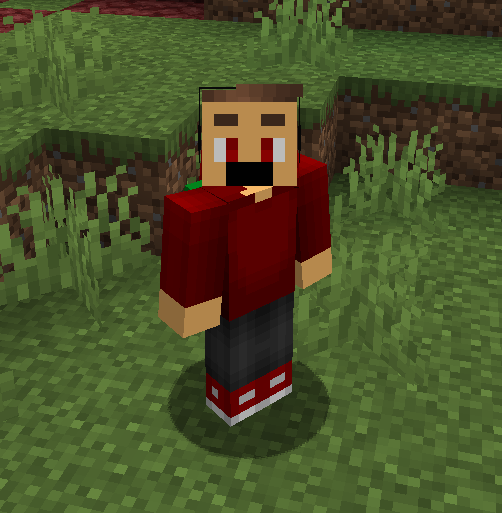
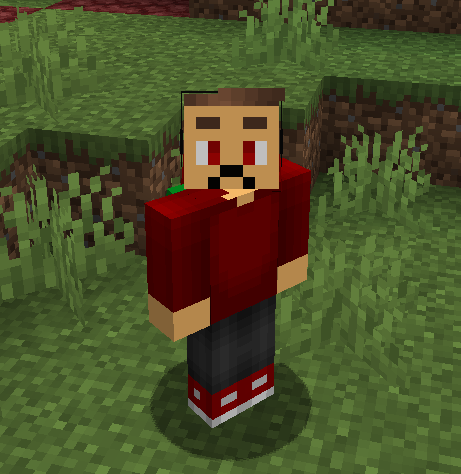
facetrackermod connects a local webcam expression tracker to Minecraft and displays the detected emotion on the player's face. It is built for Fabric 1.21.1 by Antara89 and includes a standalone Java desktop client in the ./client folder.
The companion client reads your webcam locally, estimates your current facial expression, and sends compact expression data to Minecraft over localhost. The Fabric mod receives that data, syncs it through the server, and renders face overlay textures on players so other players can see the expression too.
Features
- Real-time webcam expression tracking through the included Java client.
- Multiplayer expression sync through Fabric networking.
- Player face overlays for neutral, happy, sad, surprised, talking, blinking, winking, and focused expressions.
- Optional layered face parts for mouth, left eye, right eye, left eyebrow, and right eyebrow.
- Custom 8x8 PNG face textures loaded from
run/expressions. base.pngsupport for replacing the original face background before the expression is drawn.- Texture sync: each player's local expression texture set is uploaded to the server and distributed to other clients when they join.
- Optional local HUD face preview with configurable corner, offset, and scale.
- Local recording and snapshot tools in the desktop client for testing and tuning.
How It Works
- Install the Fabric mod on the Minecraft client and server.
- Start Minecraft with the mod installed.
- Run the companion app from the repository root:
./gradlew -p client run
On Windows, use:
.\gradlew.bat -p client run
- Start the camera in the Face Expression Client.
- The client sends expression updates to the Minecraft client over
127.0.0.1:34321. - If the server has the mod installed, the Minecraft client sends the expression state and texture set to the server.
- Modded servers distribute it to other modded clients. On normal servers, the expression face still renders locally for you, but other players cannot see it.
Custom Textures
Expression textures are stored in:
run/expressions/
Supported files:
base.png
neutral.png
happy.png
sad.png
surprised.png
talking.png
blinking.png
winking.png
focused.png
Each file should be an 8x8 PNG. Transparent pixels in expression textures allow the base.png layer to show through. Transparent pixels in base.png allow the original Minecraft skin face to show through.
Layered face parts are opt-in. Create this folder to enable them:
run/expressions/parts/
When the parts folder exists, the mod creates and syncs missing default part textures and renders these layers instead of the full-expression PNG whenever all selected parts are available:
parts/mouth/neutral.png
parts/mouth/happy.png
parts/mouth/sad.png
parts/mouth/surprised.png
parts/mouth/talking.png
parts/left_eye/open.png
parts/left_eye/closed.png
parts/left_eye/focused.png
parts/right_eye/open.png
parts/right_eye/closed.png
parts/right_eye/focused.png
parts/left_eyebrow/neutral.png
parts/left_eyebrow/raised.png
parts/left_eyebrow/sad.png
parts/left_eyebrow/focused.png
parts/right_eyebrow/neutral.png
parts/right_eyebrow/raised.png
parts/right_eyebrow/sad.png
parts/right_eyebrow/focused.png
Local Bridge
The local UDP bridge listens on:
127.0.0.1:34321
The mod still accepts the original FaceTrack packet format:
facetrack|1|timestampMillis|expression|confidence|faceCount|smileScore|mouthOpen|mouthWide|sadScore|blinkScore|winkScore
The companion client now sends part-aware packets:
facetrack_parts|1|timestampMillis|expression|confidence|faceCount|smileScore|mouthOpen|mouthWide|sadScore|blinkScore|winkScore|fps|mouth|leftEye|rightEye|leftEyebrow|rightEyebrow
The base.png face layer is rendered for the local player even before the first expression packet arrives. Synced remote player base textures render after their texture set has been received.
The mod can be used client-side on normal servers. In that mode, /facetrack status reports Server sync: local only; local face overlays and the HUD preview still work, but remote players do not receive your expression state or textures.
HUD Face Preview
The mod can also render your local expression face as a HUD preview. It is disabled by default and defaults to the top-right corner when enabled.
/facetrack hud on
/facetrack hud off
/facetrack hud status
/facetrack hud corner top_right
/facetrack hud corner top_left
/facetrack hud corner bottom_right
/facetrack hud corner bottom_left
/facetrack hud offset 8 8
/facetrack hud scale 6
The offset is measured inward from the selected corner. HUD settings are saved in:
run/config/facetrackermod-client.properties
Privacy
The webcam video is processed locally by the companion Java client. Video frames are not sent to the Minecraft server. The client only sends compact expression values to the local Minecraft client, and the mod syncs expression state and small 8x8 texture PNGs through the server.
Requirements
- Minecraft 1.21.1
- Fabric Loader
- Fabric API
- Java 21
- A webcam for live expression tracking
- The included
./clientapp for webcam input
Notes
Expression detection uses OpenCV Haar cascades and lightweight heuristics, so accuracy depends on lighting, camera position, and calibration. For best results, start with your face clearly visible and hold a neutral expression during calibration.
- Edition: Minecraft Java
- File type: .jar
- Minecraft version listed: 1.21.1
- How to install: Install the matching mod loader (Forge, Fabric or NeoForge) for your Minecraft version. → Download the .jar. → Put it in the .minecraft/mods folder and launch that loader profile.
- Where to get it: Opens on Modrinth — not every file is mirrored on our own servers.
Install steps are the general flow for this file type — How to install Minecraft Java mods & modpacks walks through it step by step.
- Ships as facetrackermod-1.1.5.jar — drop this file into the mods folder
- Download size: 181 KB
- Download link checked 22 Aug 2026 — working
These come from our own check of the pack file, not from the source page.