
NSEW Compass HUD
Java mod listed for Minecraft 26.x. Downloads from the MC Java Mods app on Android.
⬇ Download on Modrinth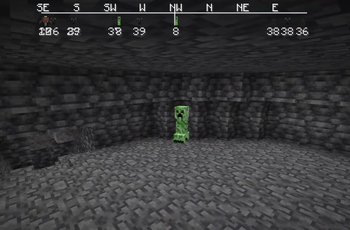
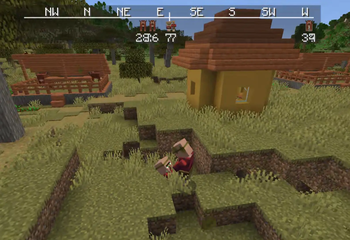
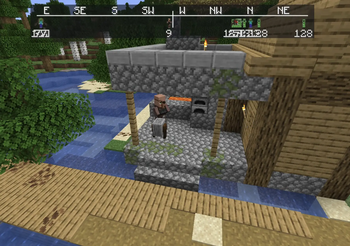
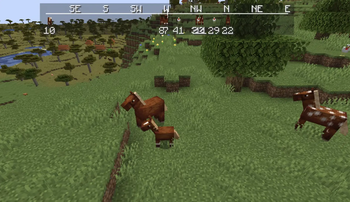
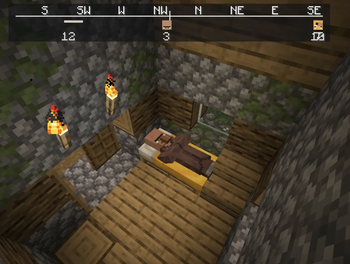
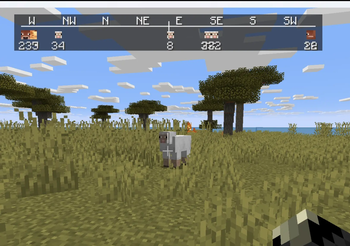
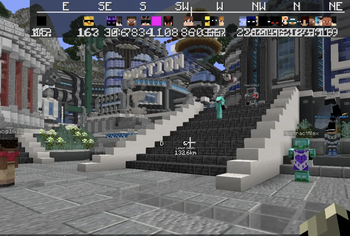
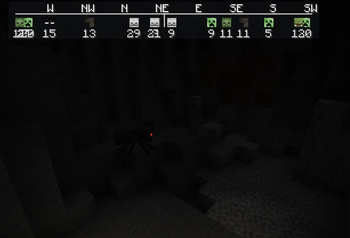
NSEW (North, South, East, West) Compass HUD adds a customizable QoL compass overlay that shows the direction of nearby players, passive mobs, and hostile mobs. It includes profile-style icons, per-mob filters, separate distance controls, and an in-game settings menu!
To get to settings, click Esc, Options, and lastly NSEW!
Settings:
HUD Enabled = Turns the compass HUD on or off.
Players = Shows nearby players on the compass.
Player Faces = Replaces the normal player marker with that player’s face icon.
Passive Mobs = Shows passive mobs on the compass.
Hostile Mobs = Shows hostile mobs on the compass.
Show Distances = Shows the number of blocks away under each marker.
Fade Far Targets = Makes markers fade more as they get closer to the edge of your tracking distance.
Edge Clamping = Keeps markers pinned inside the compass instead of letting them disappear off the sides.
Player Distance = Sets how far away players can be and still show on the compass.
Passive Distance = Sets how far away passive mobs can be and still show on the compass.
Hostile Distance = Sets how far away hostile mobs can be and still show on the compass.
Update Speed = Controls how often the mod refreshes nearby entities. 1 = updates very often 25 = recommended 200 = updates less often, but uses fewer refresh checks
Mob Filters = Opens the mob list where you can choose exactly which mobs are allowed to appear on the compass.
Search Mobs = Lets you search the mob filter list by mob name or ID.
[x] / [ ] in Mob Filters = Enables or disables that specific mob from showing on the compass.
Green Mob Names = Passive mob entries.
Red Mob Names = Hostile mob entries.
Done = Saves settings and closes the menu. Problems?? Post it on the official NSEW discord
Fabric Api is required!
- Edition: Minecraft Java
- File type: .jar
- Minecraft version listed: 26.2
- How to install: Install the matching mod loader (Forge, Fabric or NeoForge) for your Minecraft version. → Download the .jar. → Put it in the .minecraft/mods folder and launch that loader profile.
- Where to get it: Opens on Modrinth — not every file is mirrored on our own servers.
Install steps are the general flow for this file type — How to install Minecraft Java mods & modpacks walks through it step by step.
- Ships as nsew-ALPHA-v2-26.2.jar — drop this file into the mods folder
- Download size: 46 KB
- Download link checked 20 Oct 2026 — working
These come from our own check of the pack file, not from the source page.