
Version Mod Sorter
I don't know my version or loader
Version Mod Sorter
Tired of swapping mods every time you switch Minecraft versions or loaders? Version Mod Sorter loads mods from version-specific and loader-specific subfolders so you don't have to. Keep one instance, organize your mods folder with nested folders, and let VMS sort out which mods to load.
How It Works
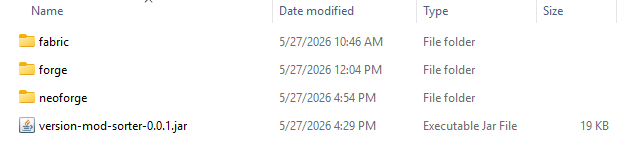
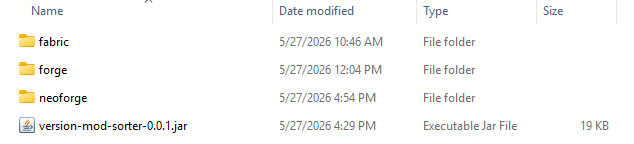
Place your mods in mods/<loader>/<version>/ (e.g. mods/fabric/1.20.4/), and only the mods matching the current loader and Minecraft version will be loaded — in addition to mods in the regular mods/ folder.
You can also drop mods directly in mods/<loader>/ (e.g. mods/fabric/) to share them across all Minecraft versions of that loader. Subfolders inside a version folder are also picked up, so you can organize and categorize mods however you like — by category, by modpack, or by client/server side.
The version folder is automatically created on first launch. Just drop your mods in and go.
Folder structure example:
📁 mods
├─ version-mod-sorter-x.x.x.jar
│  (VMS itself)
├─ ModA.jar
│  (mods/ root: loaded on every loader and version)
├─ 📁 fabric
│  ├─ ModB.jar
│  │  (Fabric: loaded on every version)
│  └─ 📁 26.1.2
│     ├─ ModC.jar
│     │  (Fabric MC26.1.2 only)
│     └─ 📁 folder
│        └─ ModD.jar
│           (subfolders can be used for organization)
├─ 📁 forge
│  ├─ ModE.jar
│  │  (Forge: loaded on every version)
│  └─ 📁 1.21.4
│     └─ ModF.jar
│        (Forge MC1.21.4 only)
└─ 📁 neoforge
   ├─ ModG.jar
   │  (NeoForge: loaded on every version)
   └─ 📁 1.20.6
      └─ ModH.jar
         (NeoForge MC1.20.6 only)
Features
- Works with Fabric, Forge, and NeoForge — a single jar supports all three
- Per-loader shared folder for mods that work across all Minecraft versions
- Subfolder organization inside each version folder — organize, sort, and categorize your mods
- No need for separate game directories, profiles, or instances
- No Minecraft class modifications or bytecode patching
FAQ
Can Fabric load mods from subfolders?
Not by default. Fabric Loader only loads mods placed directly in the mods/ folder, and subfolder support has been declined by the loader developers. Version Mod Sorter adds this missing feature: it loads mods from subfolders inside mods/, sorted by loader and Minecraft version.
Can I use one instance for multiple Minecraft versions?
Yes. That is exactly what this mod is for. Put version-specific mods in their matching version folders and shared mods in the loader folder or mods/ root, then switch versions freely from your launcher without touching the mods folder.
Do I need to rename or move mods when updating Minecraft?
No. Mods in non-matching version folders are simply ignored, so old versions' mods can stay where they are.
Crash Analysis (Fabric)
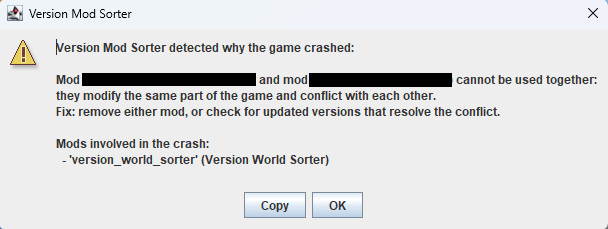
When the game crashes on Fabric, VMS analyzes the cause and shows a dialog. It checks crash reports (crash-reports/) first, then falls back to the tail of logs/latest.log.
It detects two categories of crashes and shows the involved mods and suggested fixes:
- Mod conflicts — when multiple mods modify the same code and collide, both mod names are shown with the suggestion to remove one or check for updates
- Version mismatch — when a mod references code that does not exist in the current Minecraft version, the mod name is shown with the suggestion to move it to the matching version folder, update it, or remove it
For crashes that match neither category, VMS still lists mods inferred from the stack trace. If the loader itself reports a mod resolution failure (Mod resolution failed, etc.), VMS stays silent because the loader already shows its own error screen.
Requirements
- Fabric Loader 0.13.0+ / Forge 41.1.0 (MC 1.19)+ / NeoForge 20.6.62-beta (MC 1.20.6)+
Notes
- The version folder name must exactly match the Minecraft version reported by the loader.
- Startup may take slightly longer when loading mods.
- This mod relies on internal loader implementations. A major loader update may cause it to stop working, but it will never affect the game or other mods.
- Edition: Minecraft Java
- File type: .jar
- Minecraft versions listed: 1.19, 1.19.1, 1.19.2
- How to install: Install the matching mod loader (Forge, Fabric or NeoForge) for your Minecraft version. → Download the .jar. → Put it in the .minecraft/mods folder and launch that loader profile.
- Where to get it: Opens on Modrinth — not every file is mirrored on our own servers.
Install steps are the general flow for this file type — How to install Minecraft Java mods & modpacks walks through it step by step.
- Ships as version-mod-sorter-0.1.0.jar — drop this file into the mods folder
- Download size: 43 KB
- Download link checked 9 Sept 2026 — working
These come from our own check of the pack file, not from the source page.