
Better Books Fabric
Better Books is an open-source Fabric mod that replaces the vanilla book screen with an advanced two-page editor. It allows text formatting, color…
⬇ Download on ModrinthBetter Books
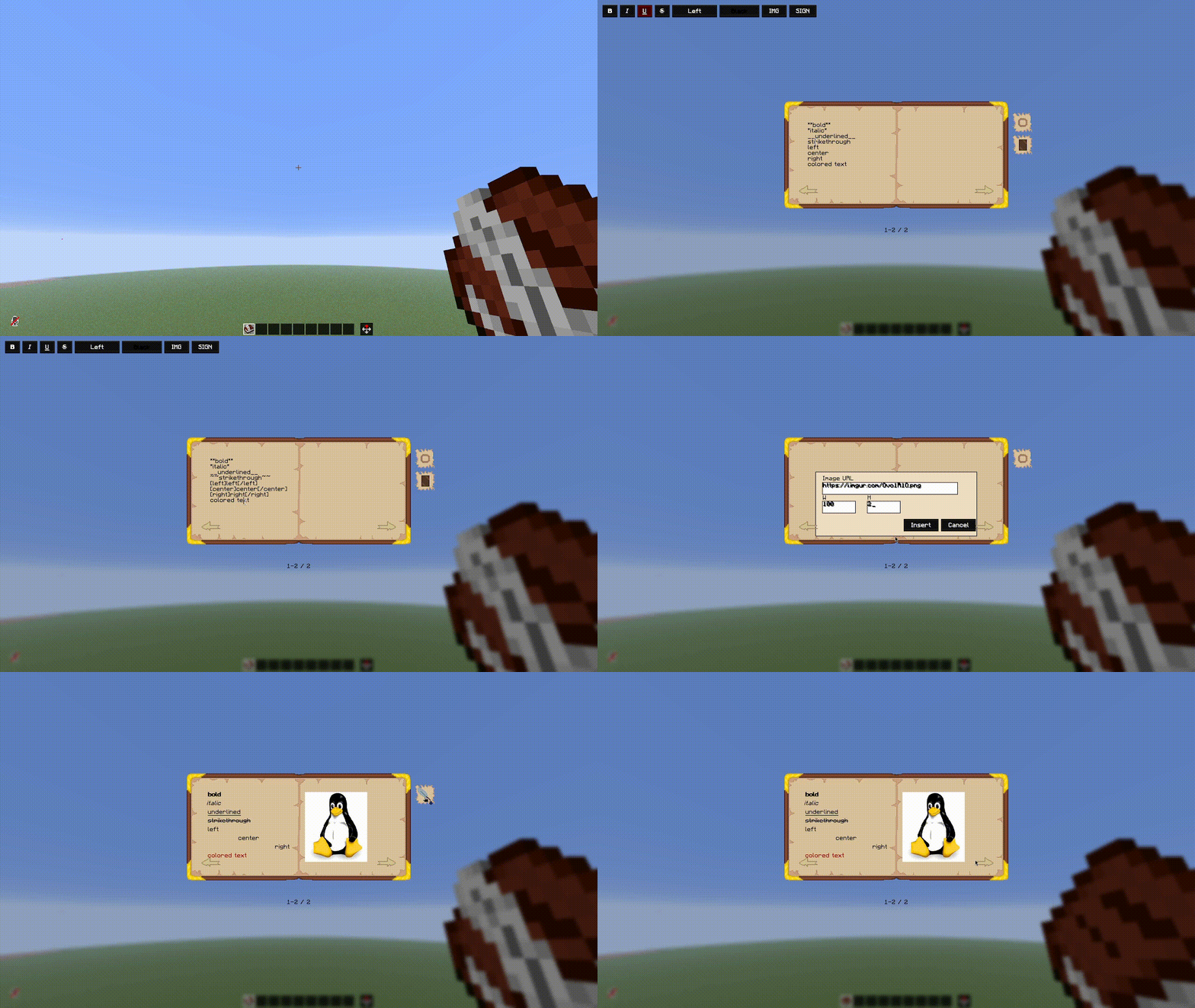
Better Books is a Fabric mod for Minecraft that completely replaces the vanilla book-and-quill workflow with an advanced, custom two-page editor. It enhances the in-game reading and writing experience by introducing rich text formatting, alignment settings, and the ability to view remote images directly on the book pages.
Preview
Features
- Advanced Two-Page Editor: Replaces the standard book-and-quill screen with an open-book interface featuring two fully editable pages. Text smoothly flows from the left page to the right page as you type.
- Rich Text Formatting: Easily format text using standard options like bold, italic, underline, and strikethrough.
- Customization Controls: Align text (left, center, right) and change text colors on the fly using dedicated interface selectors.
- Image Integration: Embed external images onto book pages using web links. Images are automatically sized to fit nicely within the page boundaries.
- Preview & Reading Modes: Review your layout using a dedicated preview mode before finalizing your work. Once signed, books become read-only and can be shared with other players.
Usage
Simply open a standard book and quill to access the new editor. Use the on-screen buttons to format your text, insert image URLs, or jump between page spreads. When you are done, sign the book to protect it from further changes, or close it to save your current progress as a draft.
Credits & Thanks
DVORSS - Huge thanks for creating the beautiful textures!
- Edition: Minecraft Java
- File type: .jar
- Minecraft version listed: 1.21.11
- How to install: Install the matching mod loader (Forge, Fabric or NeoForge) for your Minecraft version. → Download the .jar. → Put it in the .minecraft/mods folder and launch that loader profile.
- Where to get it: Opens on Modrinth — not every file is mirrored on our own servers.
Install steps are the general flow for this file type — How to install Minecraft Java mods & modpacks walks through it step by step.
- Ships as betterbooks-1.0.2.jar — drop this file into the mods folder
- Download size: 119 KB
- Download link checked 20 Aug 2026 — working
These come from our own check of the pack file, not from the source page.