
ModsJava
WynnToolZ
Java mod listed for Minecraft 1.21. Downloads from the MC Java Mods app on Android.
WynnToolZ is a client-side Fabric mod that adds practical Wynncraft utilities for mounts and some other optional quality of life additions.
⬇ Download on Modrinth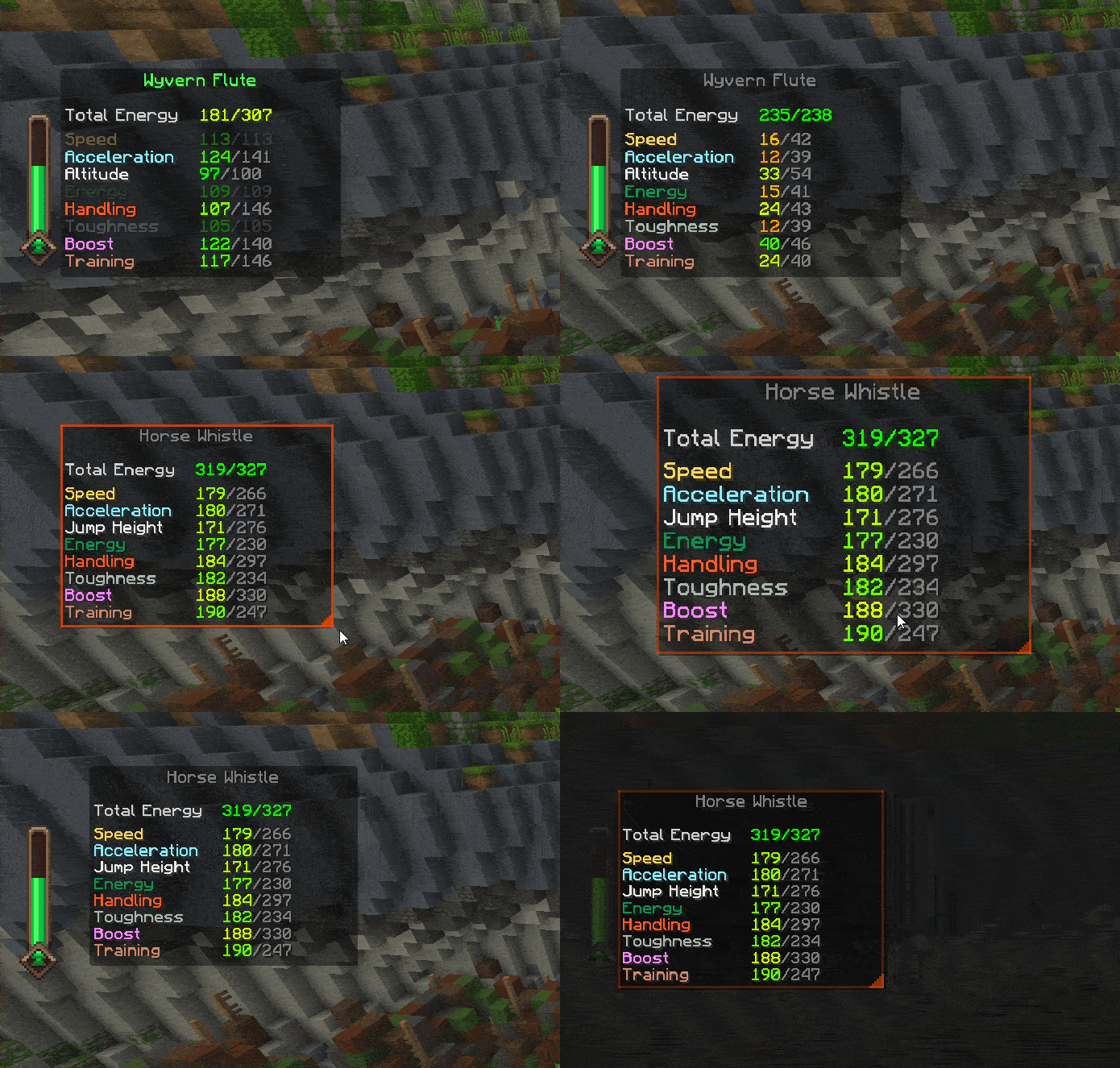

WynnToolZ
This mod provides features and quality of life improvements for Wynncraft.
For more information about the server, visit https://wynncraft.com/
Mounts
- Mount Helper: Highlights nearby powerups in the world with name labels and other relevant info.
- Mount Stats Overlay: A draggable, resizable, and lockable HUD showing your mount's stats, limits, level, and total energy. Includes auto-updating for real-time tracking.
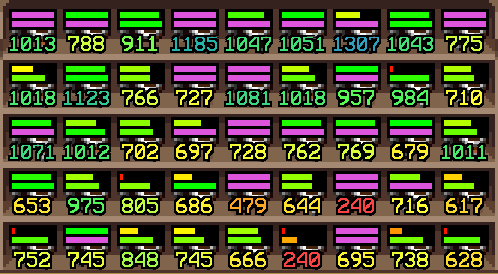
- Mount Item Overlay: Adds potential info and stat bars on top of mount items (including Mount Potential and Level/Limit visualization), perfect for browsing the Trade Market.
- Mount Camera: Automatically switches perspective when you mount and dismount, with scroll zoom, offset controls, and a hold-to-look-around mode.
- Mount Skin Reporting: Collects the skin of every mount you purchase from an NPC to send to the WTZ API if you have linked the mod.
Bank Filters
- Adds mount-specific filters to Wynntils bank search — search by mount type, primary color, or secondary color.
Shopping & Trade Market
- Shopping List: A draggable in-game overlay with multiple lists, quantity tracking, and import/export functionality.
- Trade Market Search: Click any shopping list entry to instantly search for it in the Trade Market.
User Interface
- Look Line: Draws a configurable line from your camera toward the block you're looking at — great for use with shoulder-surfing style mods.
Quality of Life
- Quick Back Navigation: Right-click empty menu space to go back when available.
- Overlay Tweaks: Hide the Wynncraft UI while chat is open, or move it above the chat input (keeps NPC dialogue above the chat box).
Miscellaneous
- Shout TTS: Reads Wynncraft shouts aloud using TikTok TTS voices, with volume control, random voice mode, and previews.
Commands
/wtz link— Opens the WynnToolZ authentication page to enable Mount Skin Reporting and other features./wtz link status— Shows your current link and connection status./wtz unlink— Removes the saved token.
Support
Join The Mount Tryhards Discord for Support & Feedback
Quick facts
- Edition: Minecraft Java
- File type: .jar
- Minecraft version listed: 1.21.11
- How to install: Install the matching mod loader (Forge, Fabric or NeoForge) for your Minecraft version. → Download the .jar. → Put it in the .minecraft/mods folder and launch that loader profile.
- Where to get it: Opens on Modrinth — not every file is mirrored on our own servers.
Install steps are the general flow for this file type — How to install Minecraft Java mods & modpacks walks through it step by step.
File checked by MCModsHub
- Ships as wtz-2.3.1.jar — drop this file into the mods folder
- Download size: 911 KB
- Download link checked 18 Oct 2026 — working
These come from our own check of the pack file, not from the source page.