
NetworkJS-Reloaded
Java mod listed for Minecraft 1.21. Downloads from the MC Java Mods app on Android.
KubeJS addon for NeoForge 1.21.1: HTTP fetch, Discord bot & PostgreSQL in server_scripts. Server-wide or per-world scripts. Singleplayer: network off by…
⬇ Download on Modrinth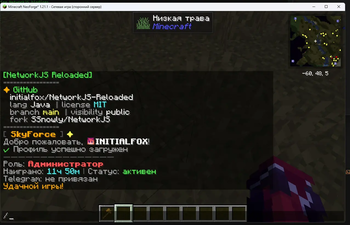
NetworkJS Reloaded is a server-side addon for KubeJS on NeoForge 1.21.1. It lets your KubeJS server scripts make HTTP requests, connect to a Discord bot, and run SQL queries against PostgreSQL. You write logic in JavaScript under kubejs/server_scripts like any other KubeJS script.
This project is a fork of NetworkJS by SSnowly, extended with PostgreSQL support (connection pool, async queries, prepared statements).
What it does
- HTTP: synchronous and async requests (
fetch,fetchAsync) - PostgreSQL: read and write data from scripts (
postgresQuery,postgresExecute,Postgres) - Discord: send messages and listen to chat (
DiscordBot) - Server helpers: broadcast colored messages and read player list (
Server) - Safety: on singleplayer / integrated server, network access is off until an operator runs
/networkjs enable
Requirements
- Minecraft 1.21.1
- NeoForge 21.1.200 or newer (21.1.x only)
- KubeJS 2101.7.1 or newer
- Java 21
- Server only (not needed on client)
Installation
- Install NeoForge 1.21.1, KubeJS, and this mod in the
modsfolder. - Restart the dedicated server (or your singleplayer world).
- On a dedicated server, features are enabled automatically.
- In singleplayer: run
/networkjs enable, then/kubejs reload server.
Where to put KubeJS files
Scripts can live at the server root (all worlds) or inside one world folder (that world only).
Server-wide (recommended for dedicated):
- Scripts:
kubejs/server_scripts/ - PostgreSQL config:
kubejs/config/networkjs/postgres.json(only at server root, not inside a world folder)
Per world only:
- Scripts:
world/kubejs/server_scripts/(or your world save path)
PostgreSQL configuration
NetworkJS reads one JSON file at server root only:
kubejs/config/networkjs/postgres.json
Do not put this file inside a world folder (world/.../kubejs/). Scripts can still use the database from any world's server_scripts, but the config is always loaded from the instance / dedicated server root (same folder as mods/).
Setup steps
- Create folders if needed:
kubejs/config/networkjs/ - Copy the example from the repo:
examples/kubejs/config/networkjs/postgres.json.example→kubejs/config/networkjs/postgres.json - Edit the file (see fields below). Set
"enabled": true. - Restart the server or run
/networkjs postgres reload(operator). - Check:
/networkjs postgres status— should show host, port, and database name. - Run
/kubejs reload serverafter your scripts are in place.
On singleplayer, run /networkjs enable before database queries will work.
Example postgres.json
{
  "enabled": true,
  "host": "localhost",
  "port": 5432,
  "database": "minecraft",
  "username": "postgres",
  "password": "your_secret_here",
  "maxPoolSize": 5,
  "connectionTimeoutMs": 10000
}
Config fields
| Field | Type | Default | Description |
|---|---|---|---|
enabled |
boolean | false |
true — connect on load / reload. false — PostgreSQL bindings stay off. |
host |
string | localhost |
PostgreSQL server hostname or IP. |
port |
number | 5432 |
PostgreSQL port. |
database |
string | minecraft |
Database name. |
username |
string | postgres |
DB user. |
password |
string | "" |
DB password. Keep this file private; do not commit it to git. |
maxPoolSize |
number | 5 |
HikariCP connection pool size (max concurrent connections). |
connectionTimeoutMs |
number | 10000 |
Timeout in ms when waiting for a connection from the pool. |
The mod builds the JDBC URL automatically:jdbc:postgresql://<host>:<port>/<database>
Remote database example
{
  "enabled": true,
  "host": "db.example.com",
  "port": 5432,
  "database": "my_server",
  "username": "mc_user",
  "password": "strong_password",
  "maxPoolSize": 10,
  "connectionTimeoutMs": 15000
}
Ensure PostgreSQL accepts connections from your Minecraft server IP (pg_hba.conf / firewall).
If connection fails
- File path must be
<server root>/kubejs/config/networkjs/postgres.json "enabled"must betrue- Wrong password or database name — check server
latest.logfor[NetworkJS]/ PostgreSQL errors /networkjs status— shows registry + postgres connected / disconnected/networkjs postgres reload— re-read config without full restart- Dedicated server: registry is on by default; singleplayer needs
/networkjs enable
Security
- Never paste real passwords in public issue trackers or Modrinth comments.
- Use SQL placeholders
?in scripts — do not build SQL from player chat input. - Give the DB user only the permissions your scripts need (SELECT/INSERT/UPDATE on specific tables).
Examples
After adding scripts, run /kubejs reload server. In singleplayer, run /networkjs enable first.
Async callbacks run off the main thread — use event.server.scheduleInTicks(0, ...) before chat, teleport, or world changes.
HTTP — sync GET
PlayerEvents.loggedIn(function (event) {
  var name = String(event.player.username)
  var response = fetch('https://httpbin.org/get')
  if (response.isOk()) {
    event.server.scheduleInTicks(0, function () {
      Server.sendRawMessageToPlayer(name, '&aHTTP &8' + response.getStatus())
    })
  }
})
HTTP — async GET
ServerEvents.loaded(function (event) {
  fetchAsync('https://httpbin.org/get').thenAccept(function (response) {
    console.info('Status: ' + response.getStatus() + ' — body length: ' + response.text().length)
  })
})
HTTP — POST with JSON
ServerEvents.loaded(function (event) {
  fetchAsync('https://httpbin.org/post', {
    method: 'POST',
    headers: { 'Content-Type': 'application/json' },
    body: JSON.stringify({
      online: true,
      players: Server.getPlayerCount(),
      names: Server.getPlayerNames()
    })
  }).thenAccept(function (response) {
    console.info('Posted status: ' + response.getStatus())
  })
})
HTTP — mini example (chat on join, multi-line)
PlayerEvents.loggedIn(function (event) {
  var name = String(event.player.username)
  var r = fetch('https://api.github.com/repos/initialfox/NetworkJS-Reloaded')
  if (!r.isOk()) return
  var repo = JSON.parse(r.text())
  var lines = [
    '&6✦ &aGitHub',
    '&f  ' + repo.full_name,
    '&7  ' + repo.language + ' &8│ &b' + repo.license.spdx_id + ' &8│ &e' + repo.default_branch
  ]
  if (repo.fork && repo.parent) lines.push('&7  fork &f' + repo.parent.full_name)
  event.server.scheduleInTicks(0, function () {
    for (var i = 0; i < lines.length; i++) Server.sendRawMessageToPlayer(name, lines[i])
  })
})
PostgreSQL — SELECT on join
PlayerEvents.loggedIn(function (event) {
  var name = String(event.player.username)
  postgresQuery('SELECT username, role FROM users WHERE username = ? LIMIT 1', [name])
    .thenAccept(function (result) {
      event.server.scheduleInTicks(0, function () {
        if (!result.isOk()) {
          Server.sendRawMessageToPlayer(name, '&cDB error: ' + result.getError())
          return
        }
        if (result.getRowCount() === 0) {
          Server.sendRawMessageToPlayer(name, '&eNo row in database for this player')
          return
        }
        var row = result.getRows().get(0)
        Server.sendRawMessageToPlayer(name, '&aRole: &e' + row.get('role'))
      })
    })
})
PostgreSQL — INSERT session row
PlayerEvents.loggedIn(function (event) {
  var uuid = String(event.player.uuid)
  var name = String(event.player.username)
  postgresExecute(
    'INSERT INTO player_sessions (uuid, username, joined_at) VALUES (?, ?, NOW())',
    [uuid, name]
  ).thenAccept(function (result) {
    if (result.isOk()) {
      console.info('Session insert, rows affected: ' + result.getUpdateCount())
    }
  })
})
PostgreSQL — class API (Postgres)
PlayerEvents.loggedOut(function (event) {
  var uuid = String(event.player.uuid)
  Postgres.executeAsync(
    'UPDATE player_sessions SET left_at = NOW() WHERE uuid = ? AND left_at IS NULL',
    [uuid]
  )
})
PostgreSQL — check connection
ServerEvents.loaded(function (event) {
  if (Postgres.isConnected()) {
    console.info('[NetworkJS] PostgreSQL pool is ready')
  } else {
    console.warn('[NetworkJS] PostgreSQL not connected — check kubejs/config/networkjs/postgres.json')
  }
})
Discord — send a message
var bot = new DiscordBot({
  token: 'YOUR_BOT_TOKEN',
  guild: 'GUILD_ID',
  channels: { chat: 'CHANNEL_ID', log: 'ANOTHER_CHANNEL_ID' }
})

ServerEvents.loaded(function (event) {
  bot.sendMessage('log', 'Server started!')
})
Discord — embed
bot.sendEmbed('chat', {
  title: 'Server online',
  description: 'Players: ' + Server.getPlayerCount(),
  color: 0x00ff00
})
Discord — Minecraft chat to Discord
PlayerEvents.chat(function (event) {
  var player = String(event.player.username)
  var msg = String(event.message)
  bot.sendMessage('chat', '**' + player + '**: ' + msg)
})
Discord — Discord to Minecraft
bot.onMessage(function (msg) {
  if (msg.isFromConfiguredChannel() && !msg.isBot()) {
    Server.sendRawMessage('&9[Discord] &f' + msg.getAuthor() + ': ' + msg.getContent())
  }
})
Server — broadcast and player list
ServerEvents.loaded(function (event) {
  Server.sendRawMessage('&a[NetworkJS] &7Server loaded. Online: &f' + Server.getPlayerCount())
  var names = Server.getPlayerNames()
  console.info('Players: ' + names)
})
Server — message one player
PlayerEvents.loggedIn(function (event) {
  Server.sendRawMessageToPlayer(event.player.username, '&aWelcome! &7NetworkJS is active.')
})
Commands (operator, level 2)
/networkjs enable— enable network bindings (singleplayer)/networkjs disable— disable network access/networkjs reload— reload bindings/networkjs status— registry and database status/networkjs postgres reload— reload database config/networkjs postgres status— database connection info
Links
- Source and more examples: https://github.com/initialfox/NetworkJS-Reloaded/tree/main/examples/kubejs
- Original NetworkJS: https://github.com/SSnowly/NetworkJS
License: MIT
- Edition: Minecraft Java
- File type: .jar
- Minecraft version listed: 1.21.1
- How to install: Install the matching mod loader (Forge, Fabric or NeoForge) for your Minecraft version. → Download the .jar. → Put it in the .minecraft/mods folder and launch that loader profile.
- Where to get it: Opens on Modrinth — not every file is mirrored on our own servers.
Install steps are the general flow for this file type — How to install Minecraft Java mods & modpacks walks through it step by step.
- Ships as networkjs-1.21.1-1.2.0.jar — drop this file into the mods folder
- Download size: 18.4 MB
- Download link checked 24 Oct 2026 — working
These come from our own check of the pack file, not from the source page.