
Chromium Browser
Java mod listed for Minecraft 26.x. Downloads from the MC Java Mods app on Android.
Browse the web inside Minecraft with portable split-screen, full history, and standard browser controls. Powered by MCEF.
⬇ Download on Modrinth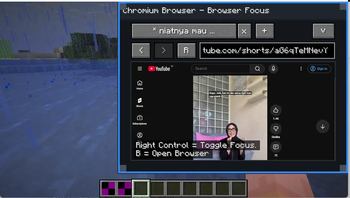
Overview
Chromium Browser mod brings a fully functional web browser directly into your Minecraft world. It features a unique portable split-screen mode alongside standard viewing, letting you browse tutorials, videos, or wikis without ever leaving your game.
Key Features
- Portable Split-Screen: View web pages simultaneously alongside your active gameplay.
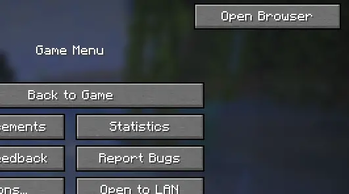
- Normal Mode: Access a dedicated, full-screen browser interface.
- Standard Controls: Equipped with a URL bar, browser tabs, refresh, back, and forward \n navigation.
- Browser History: Easily track and revisit your previously viewed web pages.
- Open Source: Built transparently with community contribution in mind.
Requirements & Dependencies
This mod requires the following dependencies to function properly: Fabric API MCEF (Keksuccino's Fork)
Information & Links
- **Platform: Fabric
- Minecraft Version: Uses Fabric and minecraft 26.1.2**
- Source Code: Github Repository
- Edition: Minecraft Java
- File type: .jar
- Minecraft version listed: 26.2
- How to install: Install the matching mod loader (Forge, Fabric or NeoForge) for your Minecraft version. → Download the .jar. → Put it in the .minecraft/mods folder and launch that loader profile.
- Where to get it: Opens on Modrinth — not every file is mirrored on our own servers.
Install steps are the general flow for this file type — How to install Minecraft Java mods & modpacks walks through it step by step.
- Ships as chromium-browser-1.0.0.jar — drop this file into the mods folder
- Download size: 114 KB
- Download link checked 19 Oct 2026 — working
These come from our own check of the pack file, not from the source page.