
Refreshed Backup
Adds an Advanced Menu to Minecraft's world editor with Bedrock-inspired world duplication and .zip export tools.
⬇ Download on Modrinth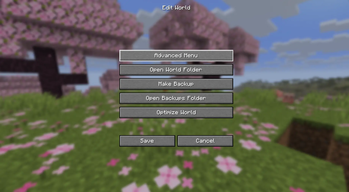
Refreshed Backup
Refreshed Backup is a lightweight utility mod that adds an Advanced Menu to Minecraft's world editing screen, making common world management tasks easier to access.
The Advanced Menu is available through the vanilla Edit button in the Singleplayer world list and currently includes:
- Duplicate World – Create a copy of an existing world.
- Export as .zip – Export a world as a compressed
.ziparchive.
These features are inspired by the world management options available in Minecraft Bedrock Edition, bringing similar convenience to Java Edition.
Usage
- Open the Singleplayer menu.
- Select a world and click Edit.
- Click Advanced Menu.
- Choose the desired action.
Installation
- Requires Fabric Loader
- Requires Fabric API
- Place the mod
.jarfile in yourmodsfolder
Development Status
This mod is currently a learning project and is still in early development. More world management features may be added in future versions. While the mod should work as intended, bugs or unexpected issues may occur.
- Edition: Minecraft Java
- File type: .jar
- Minecraft versions listed: 26.1, 26.1.1, 26.1.2
- How to install: Install the matching mod loader (Forge, Fabric or NeoForge) for your Minecraft version. → Download the .jar. → Put it in the .minecraft/mods folder and launch that loader profile.
- Where to get it: Opens on Modrinth — not every file is mirrored on our own servers.
Install steps are the general flow for this file type — How to install Minecraft Java mods & modpacks walks through it step by step.
- Ships as refreshed-backup-1.0.0.jar — drop this file into the mods folder
- Download size: 911 KB
- Download link checked 11 Sept 2026 — working
These come from our own check of the pack file, not from the source page.