Progressive Smithing
I don't know my version or loader
Progressive Smithing
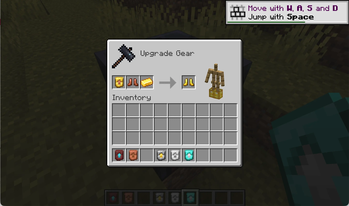
Progressive Smithing is a vanilla‑plus progression mod that expands the Smithing Table into a true upgrade path for tools, weapons, and armor. Instead of jumping straight from iron to diamond, players now advance through a tiered material ladder that feels natural, rewarding, and fully integrated into Minecraft’s world generation.
What the Mod Adds
- A full upgrade progression: leather -> copper -> gold -> chainmail -> iron -> diamond
- Custom smithing templates for every upgrade step
- Naturally generated loot placement for templates (dungeons, ruins, structures, etc.)
- New smithing recipes for all armor pieces, tools, and weapons
- Balanced, vanilla‑style progression that feels like it could be part of the base game
- Cross‑loader support via Architectury (Fabric + NeoForge)
Why Use Progressive Smithing
Players who enjoy vanilla‑friendly progression will appreciate how this mod:
- Makes early‑ and mid‑game gear meaningful again
- Encourages exploration to find upgrade templates
- Gives the Smithing Table a real purpose before Netherite
- Adds depth without adding grind or complexity
It’s a lightweight, intuitive enhancement that fits seamlessly into survival gameplay.
Dependencies
This mod requires:
- Architectury API: https://modrinth.com/mod/architectury-api
- Fabric Loader or NeoForge, depending on the version
Be sure to install the correct version for your mod loader.
Installation
- Works on Minecraft 1.21.1
- Download the appropriate JAR from Modrinth
- Place it in your
modsfolder along with Architectury API
Development
export JAVA_HOME="$(brew --prefix openjdk@21)/libexec/openjdk.jdk/Contents/Home"
./gradlew build
Artifacts are generated in each platform’s build/libs directory.
License
Licensed under the MIT License.
- Edition: Minecraft Java
- File type: .jar
- Minecraft versions listed: 1.21.10, 1.21.11
- How to install: Install the matching mod loader (Forge, Fabric or NeoForge) for your Minecraft version. → Download the .jar. → Put it in the .minecraft/mods folder and launch that loader profile.
- Where to get it: Opens on Modrinth — not every file is mirrored on our own servers.
Install steps are the general flow for this file type — How to install Minecraft Java mods & modpacks walks through it step by step.
- Ships as progressive_smithing-neoforge-1.0.0.jar — drop this file into the mods folder
- Download size: 37 KB
- Download link checked 21 Aug 2026 — working
These come from our own check of the pack file, not from the source page.