
InventoryInspect
Java mod listed for Minecraft 1.21. Downloads from the MC Java Mods app on Android.
⬇ Download on Modrinth
InventoryInspect
A barebones mod that allows server admins to view and manage the inventories and ender chests of other players.
Supports both online and offline players.
Main Command: /oinv
Requires operator status or vanilla permission level 2 (GAMEMASTERS).
Inventory Commands
/oinv inventory
Ender Chest Commands
/oinv enderchest
After entering the command, specify the target player's username.
GUI Access
/oinv inventory [player] open- Opens a chest-style GUI for viewing and editing the player's inventory or ender chest.
The GUI is the recommended method, though several command-line subcommands are also available:
/oinv inventory [player] clear [slot]- Clears the specified slot.
/oinv inventory [player] get [slot]- Retrieves the item from the specified slot.
/oinv inventory [player] list- Lists all inventory contents.
/oinv inventory [player] set [slot] [item]- Sets an item in the specified slot.
Example Inventory GUI
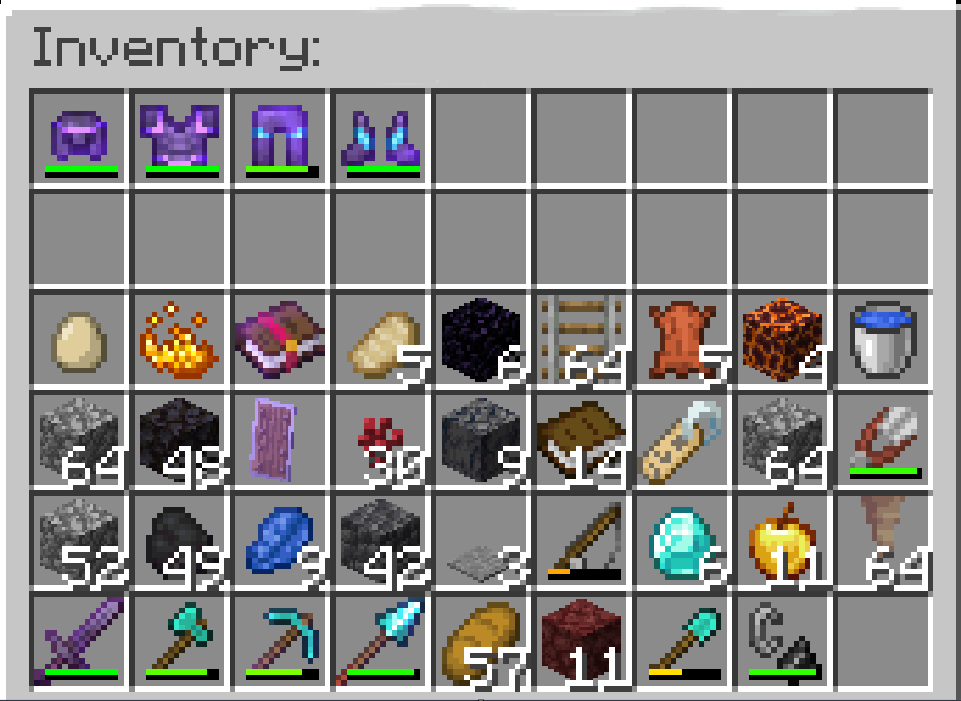
This works the same with ender chests.
- Edition: Minecraft Java
- File type: .jar
- Minecraft version listed: 1.21.11
- How to install: Install the matching mod loader (Forge, Fabric or NeoForge) for your Minecraft version. → Download the .jar. → Put it in the .minecraft/mods folder and launch that loader profile.
- Where to get it: Opens on Modrinth — not every file is mirrored on our own servers.
Install steps are the general flow for this file type — How to install Minecraft Java mods & modpacks walks through it step by step.
- Ships as InventoryInspect-1.21.11.jar — drop this file into the mods folder
- Download size: 18 KB
- Download link checked 22 Oct 2026 — working
These come from our own check of the pack file, not from the source page.