
WhereIsMyStuff?
A client-side QoL mod that remembers your inventory layout upon death, rendering faded ghost icons in empty slots and automatically restoring recovered…
⬇ Download on Modrinth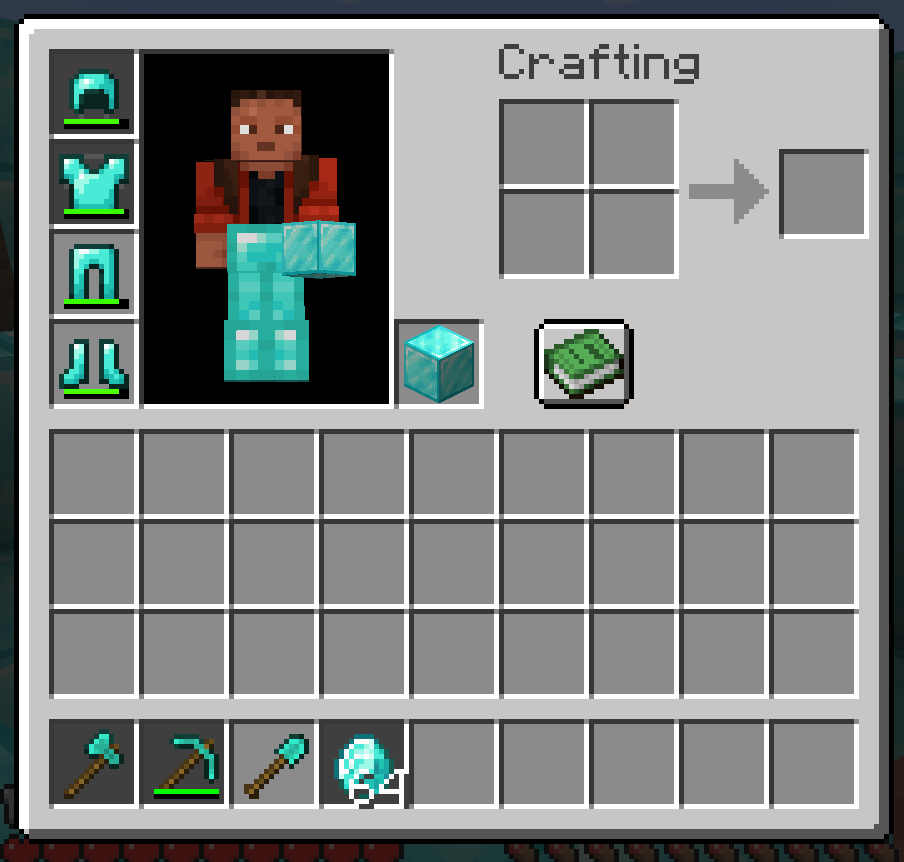

WhereIsMyStuff? (WIMS)



Tired of losing your items upon death and forgetting exactly which slot your enchanted sword, pickaxe, or food were in? WhereIsMyStuff? (WIMS) is the ultimate client-side QoL mod for Minecraft that visually caches your inventory upon death and renders faded ghost icons in empty slots until you recover them.
No more inventory clutter, no more sorting hassle, and no more guessing!
📽️ Preview
WIMS works seamlessly without any configuration. Here is how it behaves in practice:
1. Before Death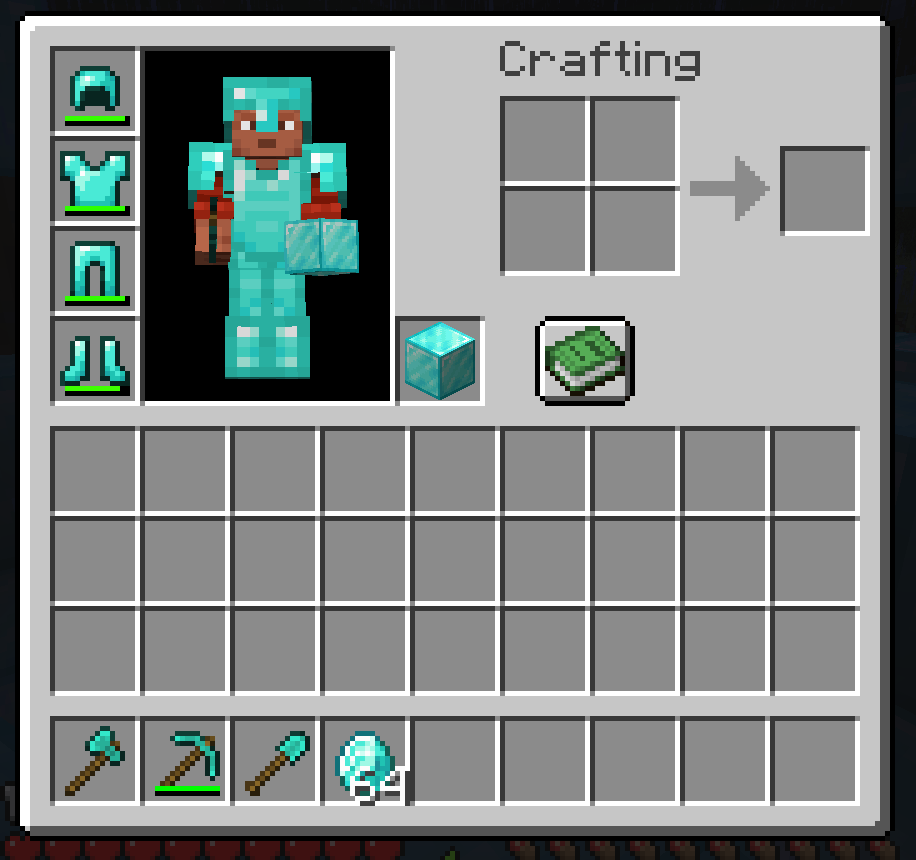
A typical fully loaded inventory with diamond armor, tools, and valuable materials before death. |
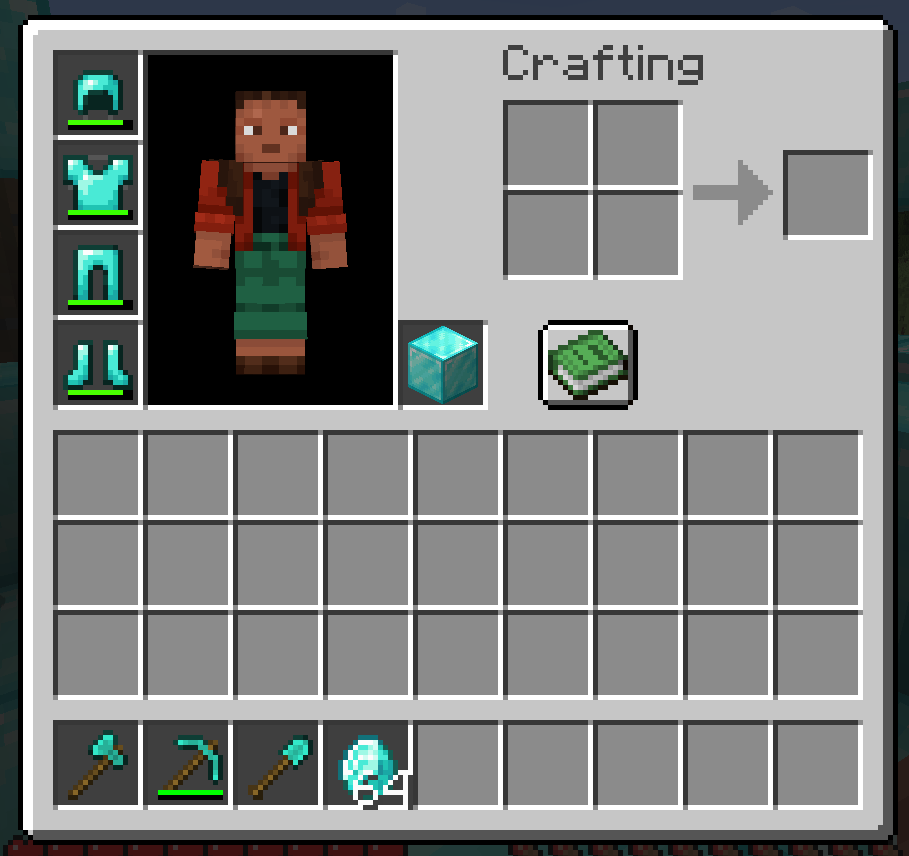
2. After Death (Ghosting)
Upon respawning, empty slots where items were lost display ghost items covered by a 55% opacity dark dimming overlay, showing you exactly where each item belongs. |
3. Partial Recovery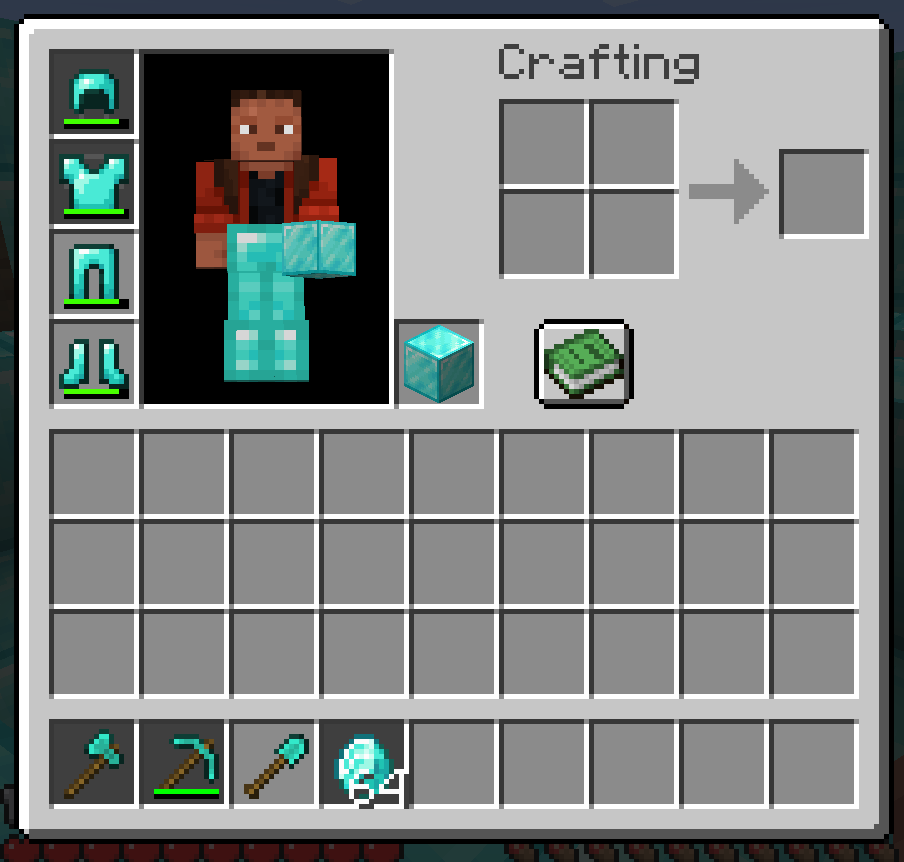
Picked up items automatically snap back to their original slots. Ghost indicators remain visible for items you haven't recovered yet (like the helmet, leggings, boots, and axe). |
✨ Comparison
Many mods attempt to solve death recovery, but they either change vanilla gameplay too much or require server installation. WIMS is designed to keep vanilla balance while offering pure client-side convenience.
| Feature | Vanilla Default | Gravestone / Corpse Mods | /keepInventory true |
 WIMS (WhereIsMyStuff?) WIMS (WhereIsMyStuff?) |
|---|---|---|---|---|
| 100% Client-Side Only | Yes | ❌ No (Requires Server) | Yes | ⭐ Yes (Works everywhere!) |
| Vanilla Server Compatible | Yes | ❌ No | Yes | ⭐ Yes (Hypixel, Realms, etc.) |
| Keeps Vanilla Death Challenge | Yes | Yes | ❌ No (No item drop penalty) | ⭐ Yes (Items still drop & despawn) |
| Visually Remembers Item Slots | ❌ No | ❌ No | Yes | ⭐ Yes (Dimmed ghost overlay) |
| Automatic Slot Restoration | ❌ No | ❌ No | Yes | ⭐ Yes (Snaps items back) |
🚀 Features
- 👻 Elegant Ghost Slots: Displays lost items with a highly compatible, cross-version safe 55% opacity dark dimming overlay (
0x8C000000) in their exact pre-death slots, completely avoiding any rendering orRenderSystemversion mismatches. - 📊 Hotbar HUD Rendering: Ghost items now appear directly on your hotbar (HUD) when you are not in a menu, featuring a subtle pulsating animation to help you keep track of your missing tools while you explore.
- 🌐 Multi-Language Support: Fully translated into 5 languages: English, Turkish, German, Spanish, and French.
- 👁️ Spectator Mode Support: Automatically hides ghost indicators while in Spectator mode to keep your screen clean.
- 🔌 Zero Server Dependency: Plays perfectly on singleplayer, LAN, Realms, vanilla servers, and heavily-modded multiplayer networks.
- 🎯 Smart Slot Restore: Picked-up recovered items are automatically routed back to their original slots, saving you from tedious manual sorting.
- 🔀 Occupant Relocation (Auto-Swap): If a ghost slot gets occupied by another item before recovery (e.g. picking up dirt first), picking up the correct item later will automatically relocate the temporary occupant to another empty slot, restoring the correct item to its rightful original slot!
- 🔄 Partial Recovery Support: Ghost indicators stay visible until the full stack count is recovered. Got back only 2 of your 5 lost diamonds? The ghost item remains with count
3until they are all recovered! - ⚡ High Performance: Purely client-side, event-driven, and highly optimized. Features clean, on-demand mixin hooks to guarantee zero per-tick overhead or FPS stutter.
- 🪶 Featherweight Footprint: Extremely lightweight compiled jar! Utilizing custom pixel-perfect color-quantized asset compression, WIMS provides top-tier visual convenience without bloating your modpack or increasing launch times.
- ✨ Creative Mode Bypass: Automatically skips caching your inventory if you die in Creative mode, keeping your ghost slots completely clean from testing or building deaths.
- 🔒 In-Memory Security: Death snapshots are stored purely in memory. No disk clutter, no temporary file footprint, safe, temporary, and clean.
🛠️ Mechanics
- Death Snapshot: The exact tick you die, WIMS captures a client-side clone of your inventory slots (0-40, main inventory, hotbar, armor, offhand).
- Ghosting Stage: Upon respawn, empty slots containing your lost items render their icons covered by an elegant 55% opacity dark vignette overlay with item count labels.
- Active Syncing & Swapping: As you pick up items from your death point, WIMS routes them back to their original slots. If a slot is already blocked by a different item, WIMS automatically relocates the blocker to an empty slot to make room for your recovered item!
- Automatic Clear: Once the slot meets or exceeds the lost stack count, the ghost state is cleared.
📦 Installation
🎮 Versions
While WIMS is programmatically compatible with the entire range of Minecraft versions, we manually test specific releases to ensure stability and compatibility:
| Version | Status | Compatibility |
|---|---|---|
| 1.21 | Stable | ⭐ Verified |
| 1.21.1 - 1.21.3 | Dev / Partial | 🧪 Partially Tested |
| 1.21.4 | Stable | ⭐ Verified |
| 1.21.5 - 1.21.7 | Dev / Partial | 🧪 Partially Tested |
| 1.21.8 - 1.21.11 | Stable | ⭐ Verified |
🚀 Setup
- Make sure you are running a supported Minecraft version from the list above.
- Install Fabric Loader (0.16.9 or newer).
- Download and place the Fabric API jar in your
modsfolder. - Drop the
whereismystuff-1.0.0.jarinto yourmodsfolder and enjoy!
🏷️ Tags
- Categories: QoL (Quality of Life), Utility, Inventory, Client-side
- Keywords: death cache, death inventory, corpse finder, keep inventory alternative, client-side gravestone, visual death recovery, slot helper, fabric death mod, lost item tracker, minecraft 1.21 client mods
📄 License
This project is licensed under the GNU General Public License v3.0 (GPL-3.0). Feel free to use it in any modpack, fork it, or reference it in your own mods, as long as any modifications and derived works remain open-source under the same GPL-3.0 license!
- Edition: Minecraft Java
- File type: .jar
- Minecraft versions listed: 1.21, 1.21.1, 1.21.2
- How to install: Install the matching mod loader (Forge, Fabric or NeoForge) for your Minecraft version. → Download the .jar. → Put it in the .minecraft/mods folder and launch that loader profile.
- Where to get it: Opens on Modrinth — not every file is mirrored on our own servers.
Install steps are the general flow for this file type — How to install Minecraft Java mods & modpacks walks through it step by step.
- Ships as whereismystuff-1.0.0.jar — drop this file into the mods folder
- Download size: 83 KB
- Download link checked 10 Sept 2026 — working
These come from our own check of the pack file, not from the source page.