HomeJavaModsWordlyMod
WordlyMod
WordlyMod — screenshot 1WordlyMod — screenshot 2WordlyMod — screenshot 3

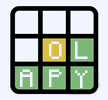
Wordly Mod brings the popular word-guessing game Wordly to Minecraft! Build your guesses with alphabet blocks and get feedback using colored brushes.

Features

How to Play

  1. Take letter blocks from the creative menu
  2. Place 5 blocks in a row (your guess)
  3. Have a secret word in mind
  4. Use brushes to get feedback:
    • 🟢 Green brush → Correct letter, correct position
    • 🟡 Yellow brush → Letter exists, wrong position
    • 🔴 Red brush → Letter not in the word

Installation

  1. Install Minecraft Forge 1.20.1
  2. Download the .jar file
  3. Place it in your mods folder
  4. Launch Minecraft and enjoy!

Requirements

Quick facts

Install steps are the general flow for this file type — How to install Minecraft Java mods & modpacks walks through it step by step.

Verified by MCModsHub

These come from our own check of the pack file, not from the source page.

Explore more