
custom portal forge
Java mod listed for Minecraft 26.x. File opened and checked on 2 Oct 2026; downloads from the MC Java Mods app on Android.
⬇ Download on Modrinth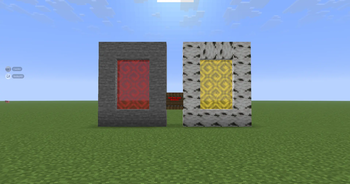
Custom Portal Forge
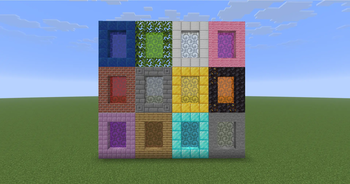
Custom Portal Forge is a Minecraft mod that lets you create and manage custom portal-based dimensions. Build a portal frame, activate it with the Dimension Igniter, and create unique portal-linked dimensions with colors that can be changed using dyes.
Main Features
- Create custom dimensions through portal frames.
- Activate portals using the Dimension Igniter.
- Change portal colors by throwing dyes into the portal.
- Portals keep their current frame material while changing only the portal color.
- Includes glowing animated portal visuals.
- Includes admin commands for managing custom dimensions.
- Works in singleplayer and multiplayer when installed correctly.
How to Use
- Build a valid portal frame.
- Use the Dimension Igniter on the frame to activate the portal.
- Enter the portal to travel to the linked custom dimension.
- Throw dye into the portal to change the portal color.
- Use admin commands to manage, rename, delete, or give access to custom dimensions.
What Happens When You Enter a Portal
When a custom portal is entered, it sends the player to that portal’s linked custom dimension.
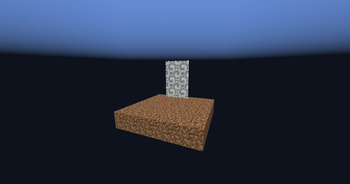
Newly created dimensions start with a simple blank template:
- A 5x5 dirt starter island
- Surrounded by the void
- Designed as a blank starting point for building your own dimension
Commands
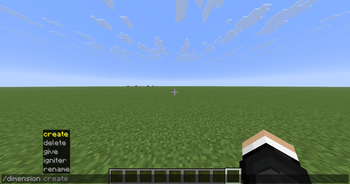
Create
Creates a new custom dimension.
Command:
/dimension create <name>
Use this to create a new blank custom dimension with the default 5x5 dirt starter island surrounded by the void.
Delete
Deletes an existing custom dimension.
Command:
/dimension delete <name>
Use this carefully. Deleting a dimension removes that custom dimension from the mod.
Give Igniter
Gives a Dimension Igniter for a specific dimension.
Command:
/dimension give igniter <player> <dimension>
Use this to give yourself or another player a Dimension Igniter linked to a specific custom dimension.
Rename
Renames an existing custom dimension.
Command:
/dimension rename <old_name> <new_name>
After using this command, the portal may take a few moments to update.
Crafting
The Dimension Igniter can be crafted using this recipe:
Torch | Empty | Empty
Diamond Block | Soul Soil | Empty
Flint and Steel | Amethyst Block | Torch
Installation
This mod is required on both the client and server.
For singleplayer, install it in your local mods folder.
For multiplayer, install it on the server and make sure every player also has the mod installed.
Notes
This mod is designed for custom portal travel, dimension experimentation, and building unique worlds from a blank void-island starting point.
- Edition: Minecraft Java
- File type: .jar
- Minecraft version listed: 26.1.2
- How to install: Install the matching mod loader (Forge, Fabric or NeoForge) for your Minecraft version. → Download the .jar. → Put it in the .minecraft/mods folder and launch that loader profile.
- Where to get it: Opens on Modrinth — not every file is mirrored on our own servers.
Install steps are the general flow for this file type — How to install Minecraft Java mods & modpacks walks through it step by step.
- Ships as custom portal forge 26.1.2.jar — drop this file into the mods folder
- Download size: 103 KB
- Download link checked 19 Oct 2026 — working
These come from our own check of the pack file, not from the source page.